Passport Photo Mistakes: Common Errors and How to Avoid Them
Last Update: February 24, 2026
Passport photo mistakes are one of the most common reasons applications get delayed or rejected. Many people assume a quick photo will do, only to find out later that small details like shadows or incorrect sizing, can lead to problems. Understanding passport photo requirements and avoiding common errors will help you get approved faster without unnecessary hassle.
For full official rules, see our complete guide to passport photo requirements.
Top Passport Photo Mistakes to Avoid
-
Wrong photo size or incorrect dimensions
-
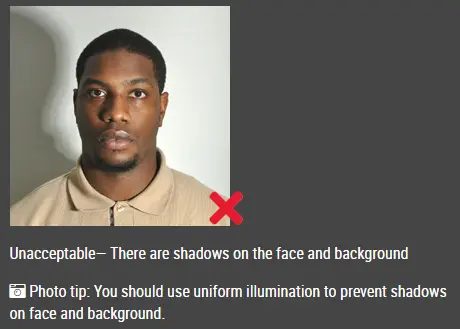
Shadows or uneven lighting
-
Non-compliant background
-
Incorrect facial expression
-
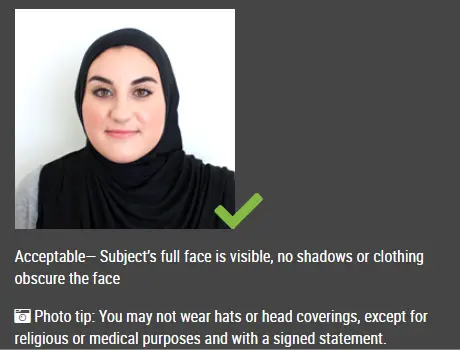
Glasses or obstructive accessories
-
Blurry or low-quality images
These are the most frequent reasons passport photos get rejected, but they are also easy to fix once you know what to look for.
Incorrect Photo Size and Dimensions
Getting the size wrong is one of the fastest ways to have your application rejected. For example, many countries require a standard size like 35mm x 45mm, with strict rules on how much space your face should occupy.
Quick fix: Check your country’s official passport photo guidelines before taking the photo. If you’re unsure, use a reliable passport photo tool or service that automatically crops to the correct size.
Poor Lighting and Shadows
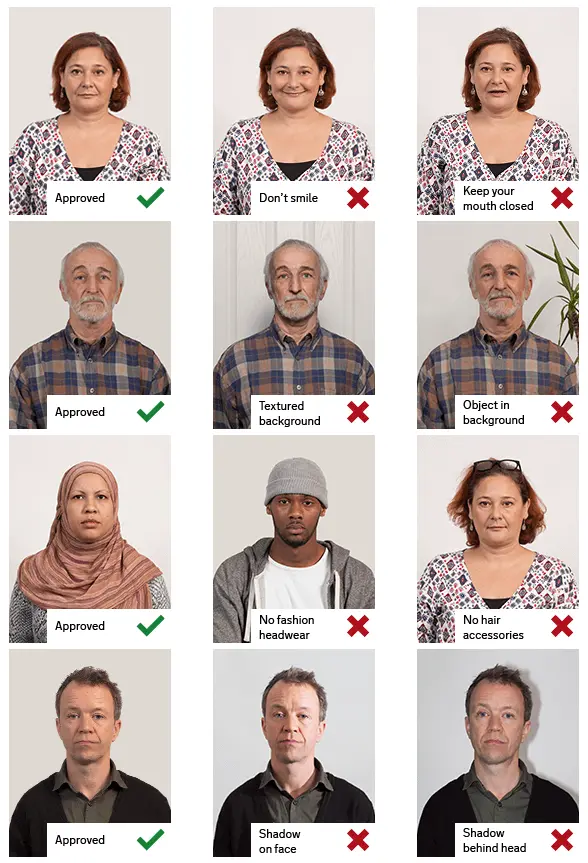
Lighting issues are more common than people expect. Even a slight shadow behind your ears or under your chin can cause rejection because it affects facial recognition.
Best practice: Stand facing a light source (like a window) and make sure light is evenly distributed across your face. Avoid overhead lighting that creates harsh shadows.
Incorrect Background
A background that looks “almost fine” can still fail. Off-white walls, textures, or visible objects often don’t meet passport photo rules.
What to do instead: Use a plain white or light-colored wall with no decorations, lines, or shadows. The cleaner the background, the better. IDPhotoDIY.com can automatically remove the background for you.
Wrong Facial Expression
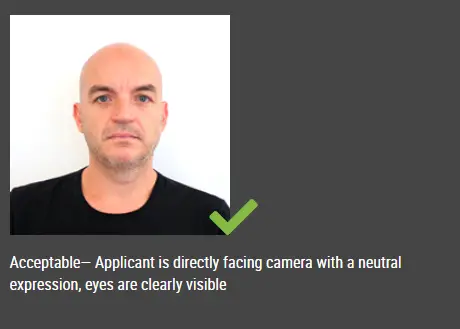
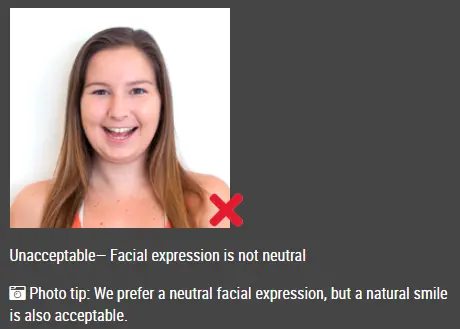
A big smile might look good, but it usually doesn’t meet passport photo requirements. Authorities typically require a neutral expression for accurate identification.
Quick tip: Keep your mouth closed, relax your face, and look straight into the camera. Think natural not posed.
Wearing Glasses or Accessories
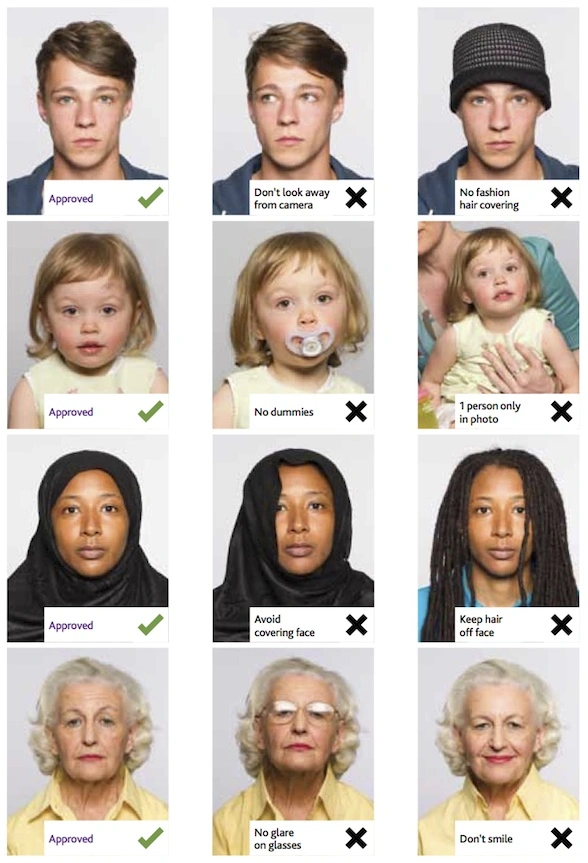
Glasses often cause glare or reflections, even if you don’t notice them right away. Hats, headbands, or large earrings can also interfere with visibility.
Best practice: Remove glasses and accessories unless they are required for medical or religious reasons. Your full face should be clearly visible.
Blurry or Low-Quality Images
A slightly blurry photo might look acceptable on your phone but fail official checks. Low resolution or compression can also reduce image quality.
Quick fix: Use a good camera, keep the lens clean, and make sure the photo is sharp and well-focused. Avoid screenshots or heavily compressed images.
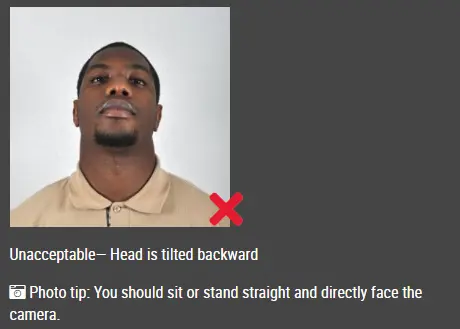
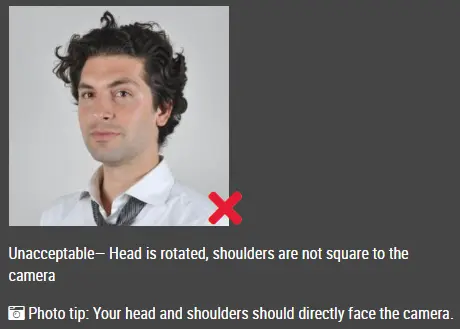
Incorrect Head Position and Framing
If your head is tilted or off-center, the photo may not meet passport photo guidelines. This is a subtle issue that many people overlook.
What to do instead: Keep your head straight, shoulders level, and face centered in the frame. Make sure there is proper space above your head.
Digital Alterations and Filters
Using beauty filters or editing apps might improve appearance, but it can lead to rejection because the photo no longer reflects your real look.
Best practice: Avoid filters, skin smoothing, or heavy edits. Only adjust basic settings like brightness if necessary.
Outdated Photo
Using an older photo even if it looks like you can still cause issues if your appearance has changed. Most passport photo guidelines require a recent image.
Quick tip: Use a photo taken within the last six months, especially if you’ve changed your hairstyle, facial hair, or overall look.
Passport Photo Requirements You Must Follow
To avoid passport photo mistakes, stick to these essentials:
-
Correct size and proportions
-
Even lighting with no shadows
-
Plain white or light background
-
Neutral facial expression
-
Clear, high-quality image
Frequently Asked Questions
Can I take a passport photo with my phone?
Yes, as long as the photo meets all passport photo requirements, including size, lighting, and quality.
Can I smile in a passport photo?
A slight natural expression is sometimes acceptable, but a broad smile is usually not allowed.
Why do passport photos get rejected?
The most common reasons include incorrect size, shadows, poor lighting, and non-compliant backgrounds.
Click here to make passport / visa photos
Other passport pictures guides
- How to Properly Crop and Resize DV Lottery Photos
- Best Lighting for DV Lottery Photos: A Simple, Home-Friendly Guide
- How to Split Photos Like a Pro with IDPhotoDIY’s Free Image Splitter
- What disqualifies you from the DV lottery?
- What increases your chances of winning the DV lottery?
- What is the best time to apply for the DV lottery?