Home > Passport Photo Requirements > United States Citizenship Photo 2x2 inch (51x51 mm, 5.1x5.1 cm)

United States Citizenship Photo Maker
2x2 inch (51x51 mm, 5.1x5.1 cm) Size and Requirements


How idPhotoDIY works

Country United States
Document type Citizenship
Passport picture size Width: 2 inch, Height: 2 inch
Resolution (DPI) 600
Image definition parameters

Head must be between 1 -1 3/8 inches (25 - 35 mm) from the bottom of the chin to the top of the head

Background color White
Printable photo Yes
Digital photo for online submission Yes
Digital photo size Width: 1000 pixels , Height: 1000 pixels
Photo Paper type matte
Detailed requirements
Last Update: July 27, 2026
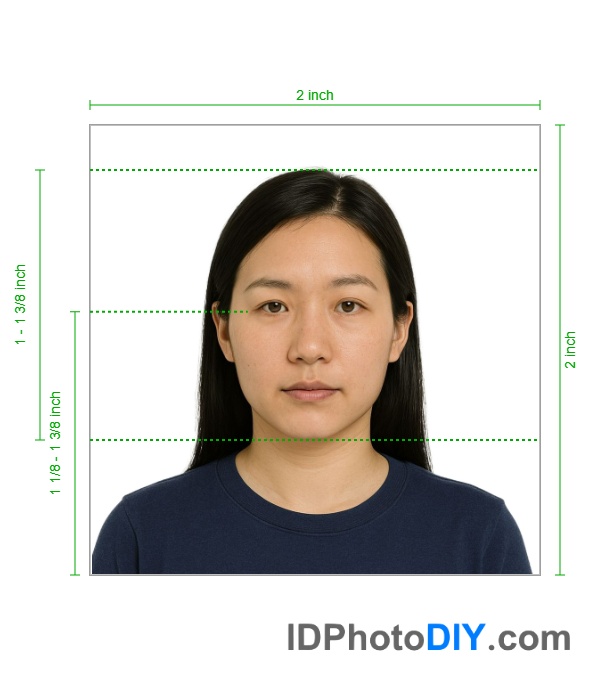
United States Citizenship photo

U.S. Citizenship Photo Size and Requirements

When USCIS asks for passport-style photos, they must meet strict specifications.

Photo Size

  • 2 inches by 2 inches (51 mm x 51 mm)
  • Square format

Head Size and Position

  • Head height: between 1 inch and 1⅜ inches (25 mm to 35 mm)
  • Face centered in the frame
  • Eyes positioned roughly in the middle

Background

  • Plain white or off-white
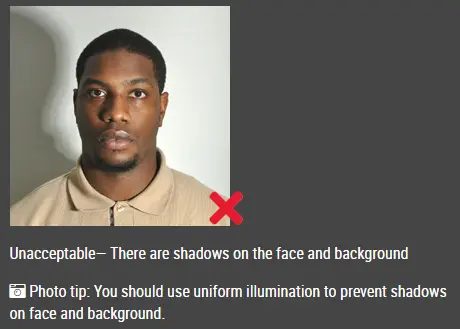
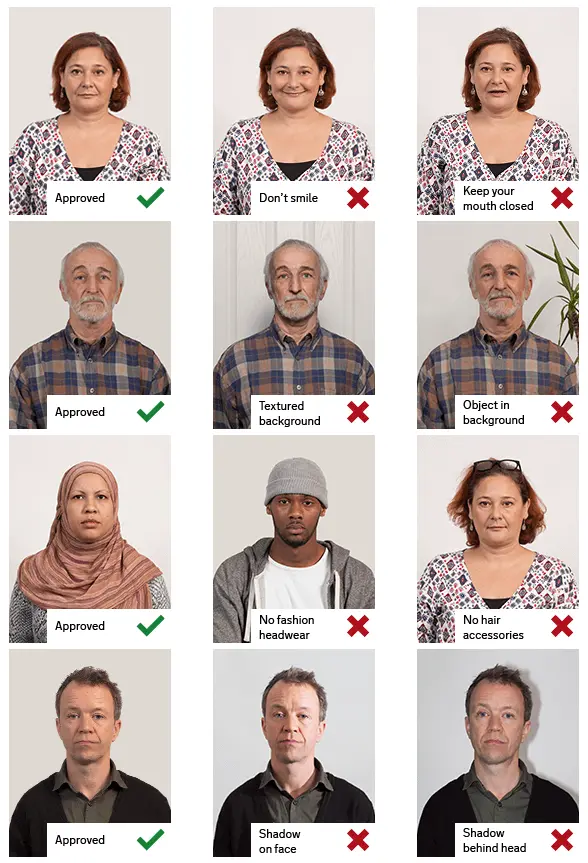
  • No shadows, patterns, or objects
  • No visible lines or textures

Stand a few feet away from the background to avoid shadows.

Image Quality

Your photo should be:

  • In color
  • Sharp and in focus
  • Properly lit (not too dark or too bright)
  • True to your natural skin tone
  • Recent and clearly recognizable

Avoid blurry, pixelated, or damaged photos.

Pose and Expression

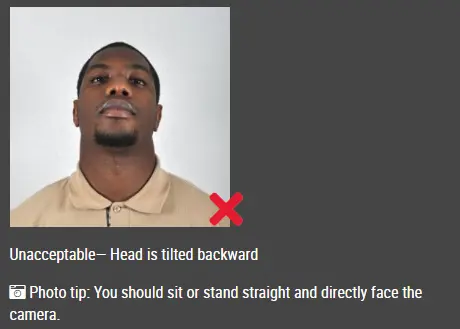
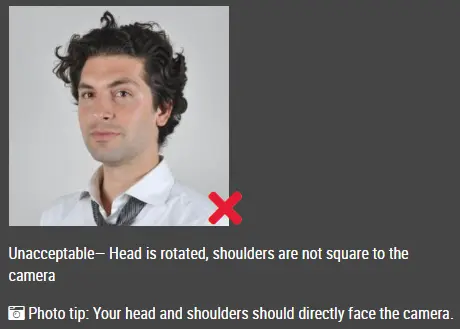
  • Face the camera directly
  • Keep your head straight
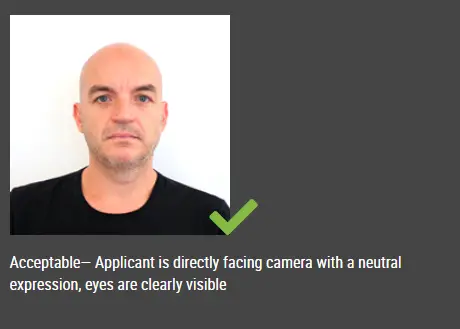
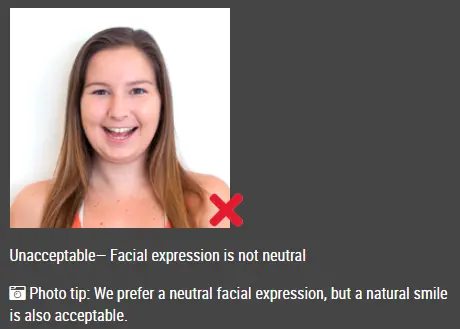
  • Neutral expression (no smiling with teeth)
  • Eyes open and visible
  • Mouth closed

Glasses

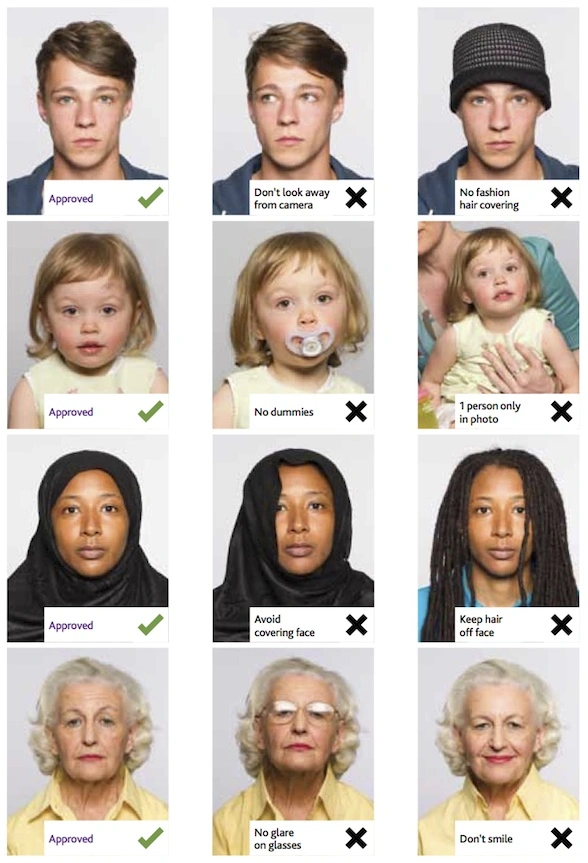
Remove all glasses, including prescription lenses, unless medically necessary.

Head Coverings

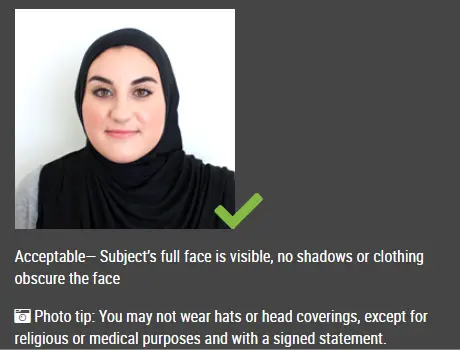
Head coverings are only allowed for religious or medical reasons.

If worn:

  • Your full face must be visible
  • No shadows should be cast
  • Nothing should cover facial features

Clothing

Wear everyday clothing.

Avoid:

  • Uniforms or costume-like clothing
  • Camouflage
  • Headphones or accessories covering the face

Jewelry is fine as long as it doesn’t hide facial features.

Printed Citizenship Photo Requirements

If you need to submit printed photos, follow these guidelines:

  • Print on thin, glossy photo paper
  • Do not mount or retouch the photo
  • Keep the exact 2×2 size

Avoid:

  • Regular printer paper
  • Folding or stapling photos
  • Taping or gluing photos
  • Printing with “fit to page”
  • Submitting damaged or creased photos

Digital Citizenship Photos

Submitting your application online doesn’t always mean you need to upload a photo.

Only upload a photo if:

  • The system specifically asks for it
  • Your checklist includes it
  • USCIS sends a request

Always follow the exact file requirements shown in your USCIS account.

Avoid Editing or Altering Photos

Your photo must reflect your real appearance.

Do not use:

  • Filters or beauty apps
  • Skin smoothing or color adjustments
  • Face reshaping or editing

Create a U.S. Citizenship Photo

Use the passport photo tool  if your application requires passport-style photos.

Start with a clear, original image taken against a proper background.

The passport photo tool helps you crop and format the photo correctly.

Common Reasons Photos Get Rejected

Photos are often rejected for:

  • Incorrect size
  • Wrong head position
  • Poor lighting or shadows
  • Blurry or low-quality images
  • Non-white background
  • Wearing glasses
  • Incorrect printing size
  • Damaged prints

Review your photo carefully before submitting.

Frequently Asked Questions

Do I need passport photos for N-400?

Most applicants inside the U.S. don’t need to submit photos unless USCIS asks for them.

Applicants outside the U.S. usually need to submit two photos.

How many photos are required?

Typically:

  • N-400 (outside U.S.): 2 photos
  • N-600 (outside U.S.): 2 photos
  • N-600K: 2 photos of the child

Is the size the same as a passport photo?

Yes. The standard size is 2×2 inches with the same head positioning rules.

Can I take the photo with my phone?

Yes, as long as the image is clear, properly lit, and not edited.

Can I smile?

A neutral expression is recommended.

Can I wear glasses?

No, unless medically required.

Do I need to upload a photo for online filing?

Only if USCIS specifically asks for it.

Should photos be glossy or matte?

Follow USCIS instructions. Most forms require glossy photo paper.

Can I reuse an old photo?

Only if it still reflects your current appearance and meets all requirements.


Official Information Sources

Requirements can change. Review the latest official information before filing:

Source https://www.uscis.gov/sites/default...

Do not worry about the photo size requirements. IDPhotoDIY online tool will help you make correct United States Citizenship size photos.

How to make United States Citizenship photo online


Step 1: Use a digital camera or a smartphone

Find someone to take the photo for you and selfie photo is not acceptable for passport photo application. If you have a tripod, use it. A tripod will make it easier to keep the camera steady and level. The distance of the person to the camera should be around 1 meter.

Step 2: Find a venue with good lighting

When taking photo, you should face the light, such as a nice bright window or the door. This can provide even lighting to avoid shadows on the face and background. The face must be evenly lit. There should be no shadows and glares on the face.

Note: No need to worry about the background as our online passport photo generator will automatically remove or change the background for you.

unacceptable passport photo

Step 3: Wear properly for your passport photo

Do not wear uniforms. Wear regular street clothes in your photo.

Do not wear eyeglasses. If you wear glasses, sunglasses, or tinted glasses, take them off for your passport photo.

Your face must still be fully visible.  Don’t let your hair drape over your face and obscure your eyes. If you have very long bangs that cover your eyebrows, you should pin them back with bobby pins. It’s best if your ears show, as well, but that won’t cause your photo to be rejected.

No hats are allowed in passport photos unless it is religious headgear such as a headscarf or yarmulke that you wear every day.

acceptable passport photo

Step 4: Pose for a passport

Look straight towards the camera with face straight on. Head should not be tilted or rotated.

Both ears showing or both edges of the face visible if hair covers the ears.

Shoulders should be visible, and there should be enough space around the head for cropping the photo.

Position the camera in the same height as the head.

unacceptable passport photo

unacceptable passport photo

Step 5: Have a neutral facial expression

The government prefers that you have a neutral facial expression in your passport photos.

Smiling or having your mouth open is usually not acceptable, especially under the new international passport rules.

acceptable passport photo

Unacceptable passport photo


Good and bad examples of passport photos

Example of passport photos

Printed passport photos

Online Passport Photo Generator

Is this document useful?

This document is rated 4.9 / 5 - 9 Votes