Wearing Jewelry in Passport Photos: Updated Rules for 2026
Last Update: February 23, 2026
Can you wear jewelry in passport photos?
Yes, but only if it doesn’t interfere with how your face is seen. Anything that blocks features, creates shadows, or reflects light can lead to rejection.
Many people assume jewelry isn’t allowed at all. That’s not entirely true. The rules are less about banning accessories and more about making sure your identity is clear and easy to verify.
For full official rules, see our complete guide to passport photo requirements.
Is Jewelry Allowed in Passport Photos?
In most countries, jewelry is allowed but with conditions. The goal is simple: your face must be fully visible and easy to recognize.
That means your jewelry:
-
Shouldn’t cover any part of your face
-
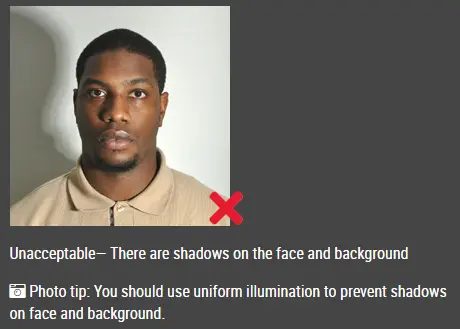
Shouldn’t create shadows on your skin
-
Shouldn’t reflect light or cause glare
-
Shouldn’t distract from your natural appearance
If it does any of these, even slightly, your photo might be rejected.
Passport Photo Earrings Rules (2026)
Earrings are usually fine, but size and shine matter more than people expect.
What works well:
-
Small studs
-
Simple hoops
-
Matte or non-reflective designs
What tends to cause problems:
-
Large dangling earrings that move or hang low
-
Oversized hoops that draw attention
-
Shiny metals that reflect camera flash
For example, big earrings can cast a faint shadow along your jawline. It might seem minor, but that alone can be enough for a rejection.
Can You Wear Necklaces in Passport Photos?
Necklaces are allowed, but they’re easy to overdo.
A thin chain or small pendant usually won’t cause issues. On the other hand, chunky or layered necklaces can pull attention away from your face, something passport guidelines try to avoid.
If you’re unsure, keep it simple or skip it altogether.
Are Piercings Allowed in Passport Photos?
Facial piercings are generally acceptable, as long as they don’t interfere with visibility.
Usually fine:
-
Small nose studs
-
Subtle, minimal piercings
Can be risky:
-
Multiple piercings at once
-
Larger or more noticeable pieces
-
Anything reflective or covering part of your face
A good rule: if the piercing draws attention before your face does, it’s better to remove it.
Common Mistakes That Lead to Rejection
A lot of rejected photos come down to small details people overlook:
-
Wearing jewelry that’s too large or eye-catching
-
Choosing shiny materials that reflect light
-
Letting earrings or accessories cast shadows
-
Covering parts of the jawline or cheeks
-
Wearing multiple pieces that clutter the image
These issues are easy to miss in the moment but noticeable in the final photo.
Practical Tips for a Safe Passport Photo
-
Stick to simple, minimal jewelry
-
Choose non-reflective materials
-
Check lighting to make sure there are no shadows
-
Keep hair away from your face and accessories
-
If you’re unsure, remove the jewelry - it’s the safest option
You can wear jewelry in passport photos in 2026, but it should be subtle enough that it doesn’t compete with your face. Small, simple pieces are usually fine. Anything bold, shiny, or distracting increases the chance of rejection.
When in doubt, less is always better.
FAQ
Can you wear jewelry in passport photos?
Yes, as long as it doesn’t block your face or create shadows or glare.
Are earrings allowed in passport photos?
Yes, but smaller and non-reflective styles are safer.
Can you wear a necklace in a passport photo?
You can, but simple designs work best.
Are piercings allowed in passport photos?
Yes, just make sure they don’t interfere with facial visibility.
Click here to make passport / visa photos