United States Employment Authorization Photo Maker
2x2 inch (51x51 mm, 5.1x5.1 cm) Size and Requirements


| Country | United States |
| Document type | Employment Authorization |
| Passport picture size | Width: 2 inch, Height: 2 inch |
| Resolution (DPI) | 600 |
| Image definition parameters | Head must be between 1 -1 3/8 inches (25 - 35 mm) from the bottom of the chin to the top of the head |
| Background color | White |
| Printable photo | Yes |
| Digital photo for online submission | Yes |
| Digital photo size | Width: 1000 pixels , Height: 1000 pixels |
| Photo Paper type | matte |
|
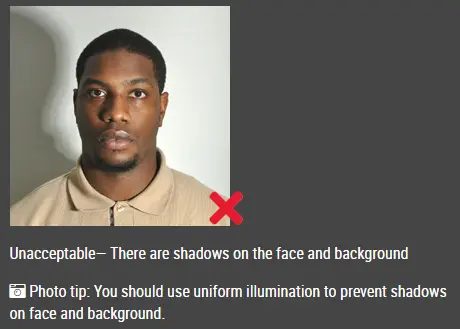
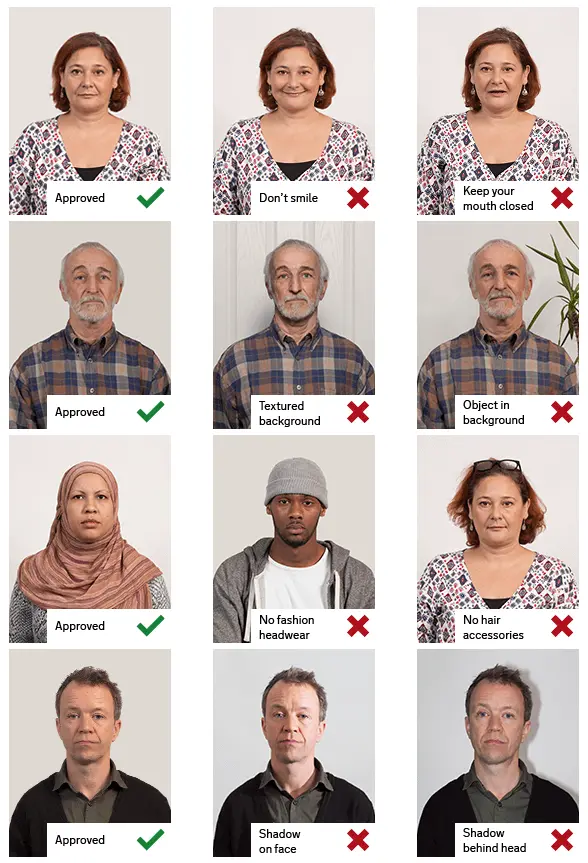
Detailed requirements Last Update: July 24, 2026 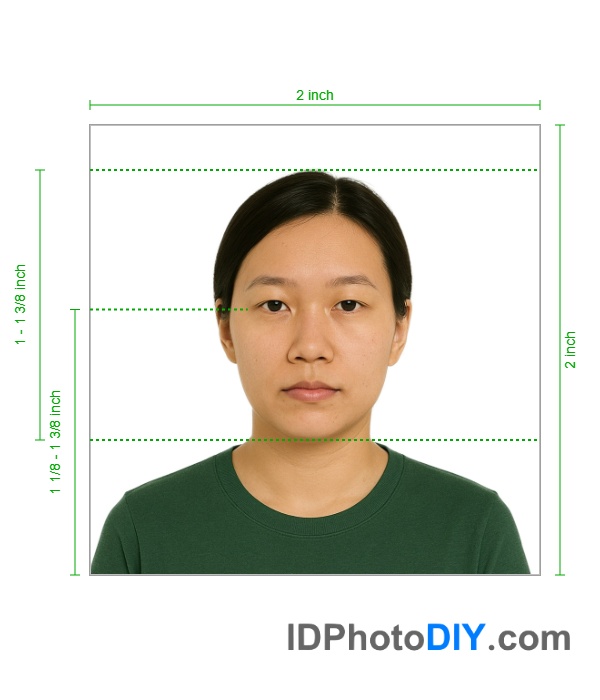 Quick EAD Photo Requirements When passport-style photos are requested for Form I-765, the instructions list the following requirements: Photo quantity: Two identical photographs The current Form I-765 instructions state that applicants must submit two identical, recently taken colour passport-style photographs when photographs are required. They also specify a white to off-white background and provide the required head and eye measurements. Background RequirementsUse a plain white or off-white background. For the most natural result, take the original photograph in front of a clean, evenly lit white or off-white wall. The background should not contain:
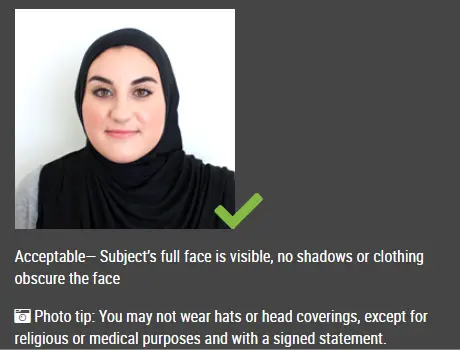
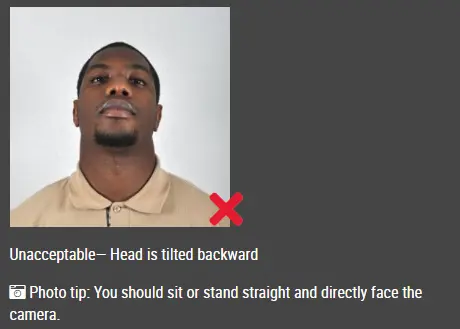
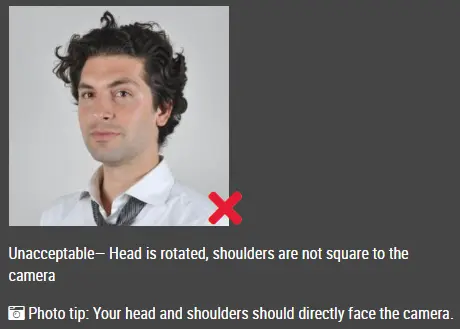
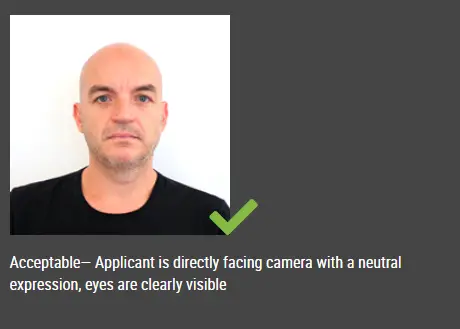
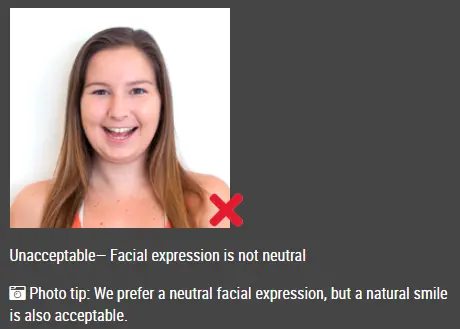
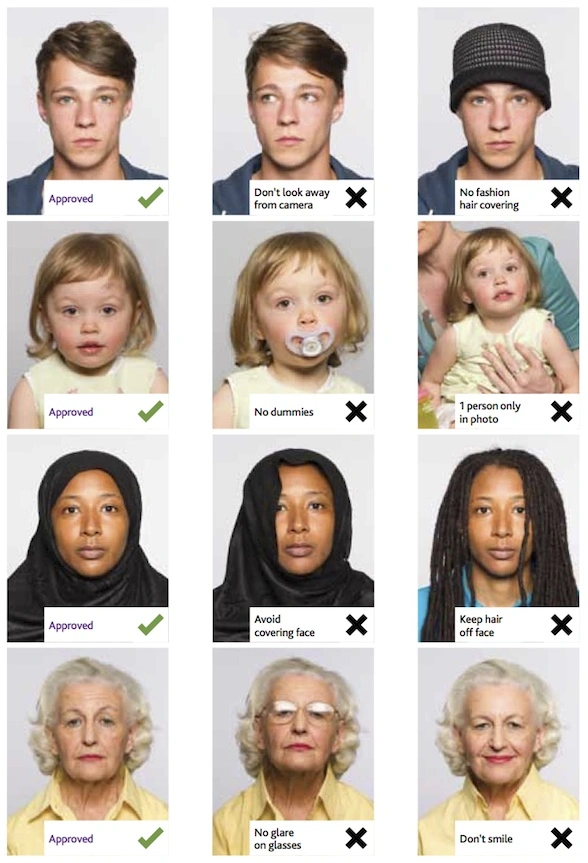
USCIS instructions require the photograph to be unretouched. Avoid edits that change the applicant’s face, skin, hair, clothing, head shape or natural appearance. Facial Position and ExpressionFace the camera directly with your full face visible. Keep your head straight and centred. Do not tilt or rotate your head. Look directly into the camera and use a natural, neutral expression. Both eyes should be open and clearly visible. The photograph should show your facial features without shadows, glare, blur or obstruction. Do not use:
The final photograph should look like the applicant and provide a clear, accurate representation of their current appearance. Lighting RequirementsUse soft, even lighting across the face and background. Avoid lighting that creates:
Natural daylight can work well when it is evenly distributed. Avoid standing in direct sunlight because it may cause squinting and harsh facial shadows. Clothing and AppearanceWear normal everyday clothing. Choose clothing that contrasts with the white or off-white background. Very light or white clothing may blend into the background and make the shoulders difficult to see. Avoid uniforms, costumes or clothing that covers important facial features. Religious clothing normally worn every day may be acceptable, provided the full face remains visible. Your face should be visible from the bottom of the chin to the top of the forehead. Clothing, hair or accessories should not cover the eyes or important parts of the face. Can I Wear Glasses?To reduce the risk of glare or obstruction, remove glasses when taking the photograph whenever possible. Glasses can create reflections, shadows or frames that cover the eyes. Sunglasses or tinted glasses should not be worn unless they are required for a documented medical reason and accepted under the applicable USCIS requirements. Printed EAD Photo RequirementsWhen physical photographs are requested, USCIS instructions state that they should be printed on thin photographic paper with a glossy finish. The photographs should be unmounted and unretouched. Do not print the photograph on:
Make sure the printed image measures exactly 2 × 2 inches after cutting. Cut carefully along the outer edges. Do not cut into the applicant’s hair, head or shoulders. Common EAD Photo MistakesAvoid these common problems: Incorrect dimensionsThe final photograph is not exactly 2 × 2 inches or has been stretched into a square. Head is too large or too smallThe distance from the top of the hair to the bottom of the chin falls outside the required range. Incorrect backgroundThe background is dark, coloured, patterned, cluttered or uneven. Background shadowsA visible shadow appears behind the head or shoulders. Blurry imageThe face, eyes or hair are not sharp and clearly defined. Digital filtersThe photograph uses skin smoothing, face reshaping, artificial lighting or other beauty effects. Altered facial appearanceEditing has changed the face, hairline, ears, skin tone or natural facial details. Poor croppingThe top of the hair, chin or shoulders have been cut off. Uneven lightingOne side of the face is significantly darker or lighter than the other. Incorrect print finishThe photograph is printed on ordinary paper or with a finish that does not match the current instructions. Outdated photographThe image no longer accurately represents the applicant’s current appearance. Frequently Asked QuestionsWhat is the required EAD photo size?The traditional USCIS passport-style photo size listed in the Form I-765 instructions is 2 × 2 inches, or approximately 51 × 51 millimetres. How large should my head be in the photograph?The distance from the top of the hair to the bottom of the chin should be between 1 inch and 1⅜ inches, or approximately 25 to 35 millimetres. What background should I use?Use a plain white or off-white background with even lighting and no visible shadows, objects, patterns or other people. Does the photograph have to be in colour?Yes. The Form I-765 instructions request identical colour passport-style photographs when photographs are required. How recent should the photograph be?The Form I-765 instructions say that the photographs must be taken recently. Use a current photograph that accurately represents your appearance when filing. Do I need two EAD photographs?Current Form I-765 instructions list two identical passport-style photographs when photos are required. Check the latest filing instructions because USCIS changed its photograph policy in December 2025. Can I smile in an EAD photo?Use a natural expression that keeps your full facial features clearly visible. Avoid an exaggerated smile or expression that changes the appearance of your eyes or face. Can I wear a hat?Avoid hats and other head coverings unless the covering is normally worn for a religious purpose. The covering must not hide or cast shadows on the face. Can I digitally improve the photograph?Basic preparation such as sizing and cropping should not alter your appearance. Do not use filters, facial retouching, skin smoothing, face reshaping or AI-generated facial details. Can I reuse an old passport photo?Use a recent photograph that accurately represents your current appearance. Also note that USCIS updated its photograph reuse policy in December 2025. Will USCIS take my photograph?Under the policy announced on December 12, 2025, USCIS stated that secure identity documents would use photographs taken by USCIS or another authorized entity rather than self-submitted photographs. Follow any biometrics appointment notice that USCIS sends you. Prepare Your EAD PhotoCreate a properly sized 2 × 2-inch photograph for your Form I-765 application when your current filing instructions request one. Upload a clear, recent photograph to our passport photo maker and it will generate a 100% compliant photo for your application. |
|
| Source | https://www.uscis.gov/working-unite... |