Detailed requirements
Last Update: May 28, 2026
Photo Recency
- The photo must have been taken within the last two years.
Photo Size
- The printed photo must be 4.5 cm high and 3.5 cm wide, excluding any border.
- The head length, from the top of the head to the bottom of the chin, must be between 3.2 cm and 3.6 cm.
Photo Composition
- The photo must be a close-up of the head and the top of the shoulders.
- The face should occupy 70% to 80% of the whole photo.
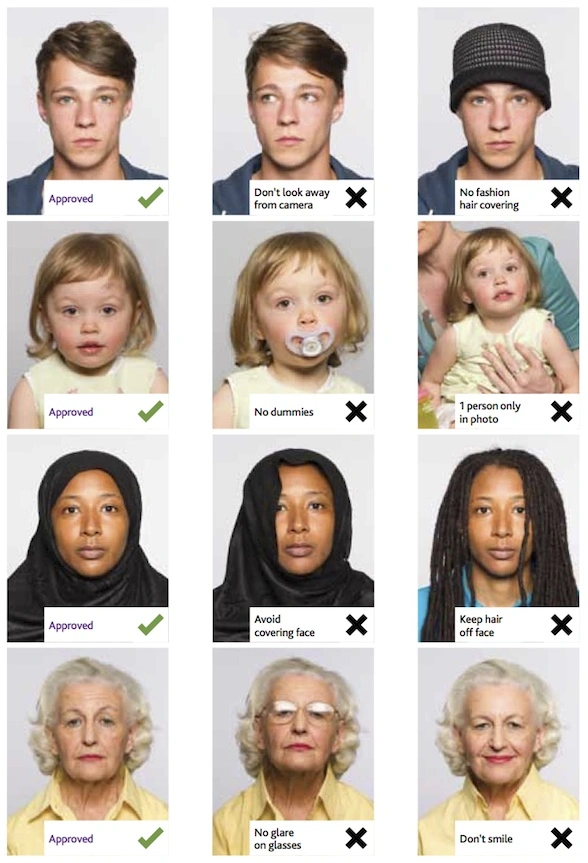
- Only the applicant may appear in the photo.
- Chairs, toys, or other people must not appear in the photo.
Face and Expression
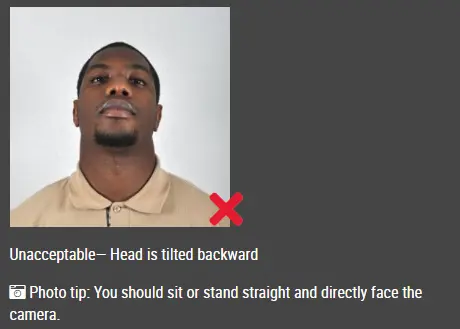
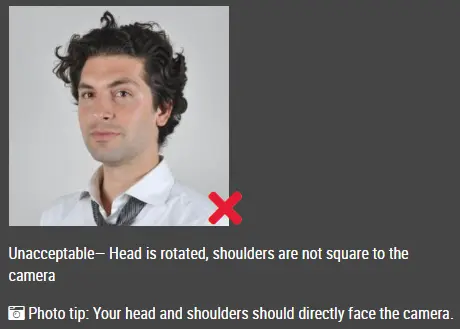
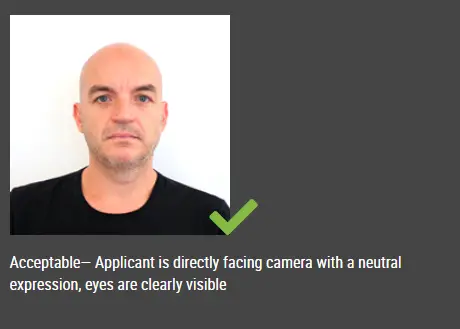
- The applicant must face the camera directly.
- The eyes must be open and clearly visible.
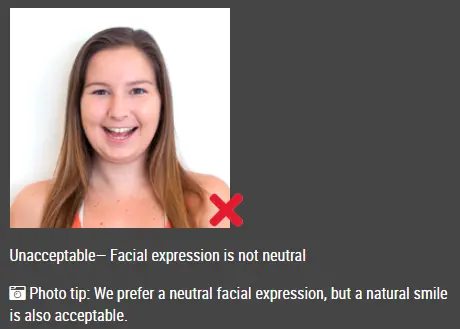
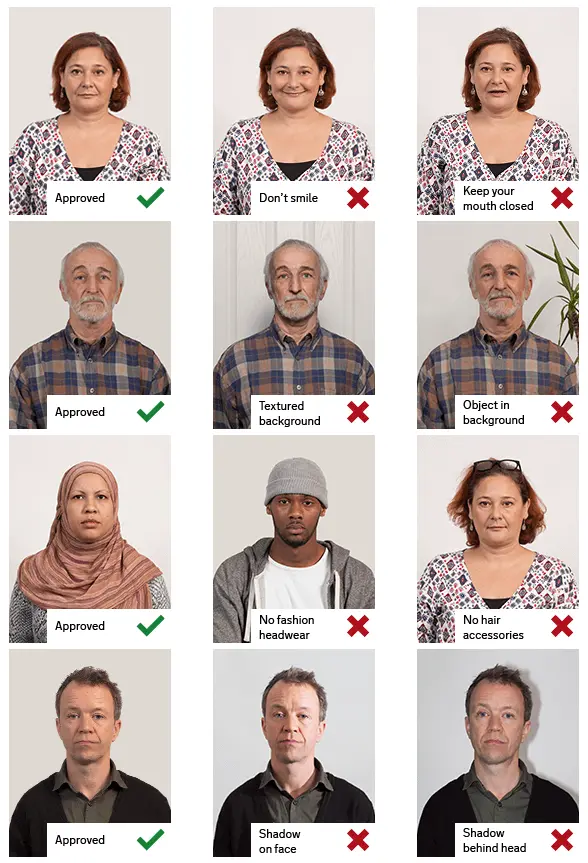
- The mouth must be closed.
- The expression must be natural and not exaggerated. A slight smile is allowed.
- The head must not be tilted or turned sideways.
Facial Visibility
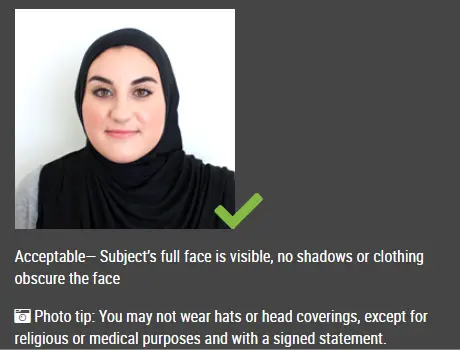
- The eyes, nose, mouth, face, eyebrows, both ears, and both sides of the face must be clearly visible.
- Special features such as moles, birthmarks, and scars must also be clearly visible.
- Hair must not cover the eyes, eyebrows, facial features, or face outline.
- Long hair, bangs, and sideburns are allowed, but they must not intentionally cover the ears or facial features.
Background and Lighting
- The background must be white.
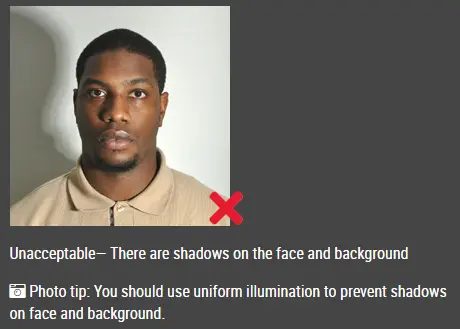
- The lighting must be even.
- There must be no shadows, glare, flash reflection, or red-eye.
Image Quality
- The photo must be clear, sharp, and in focus.
- The photo must be high quality, with no ink marks, stains, folds, or creases.
- The photo must show natural skin tone, proper brightness, and proper contrast.
- The photo must have neutral colors.
Printing Requirements
- The photo must be printed in high resolution on high-quality glossy photo paper.
- If the photo was taken with a digital camera, it must have high color saturation and be printed on photo paper if submitted as a printed photo.
Editing Restrictions
- The photo must not be modified, retouched, enhanced, mirrored, or digitally composited.
- Synthetic photos and mirror-image photos are not allowed.
Glasses
- Tinted glasses, colored contact lenses, and cosmetic enlarging lenses are not allowed.
- If glasses are worn, the eyes must be clearly visible.
- There must be no flash reflection on the glasses.
- The frames must not cover any part of the eyes.
- Thick frames should be avoided.
- Visually impaired applicants may wear tinted glasses.
Religious Head Coverings
- Religious head coverings are allowed.
- The facial features from the bottom of the chin to the top of the forehead must be clearly visible.
- Both sides of the face must also be clearly visible.
Hair, Wigs, Beards, and Accessories
- There is no restriction against tying hair or dyeing hair.
- Wigs are allowed for applicants undergoing chemotherapy or applicants with naturally sparse hair.
- Beards are allowed.
- Earrings and nose rings are allowed.
However, none of these may deliberately cover the eyes, nose, mouth, face, eyebrows, ears, or facial outline.
Microtia Exception
- Applicants with microtia may cover the ear outline with hair.
However, both sides of the face must still be clearly visible.
Digital Photo File Requirements
- If submitting a digital photo, it must be in JPG format.
- The file size must not exceed 5 MB.
- The image height must be at least 531 pixels.
- The image width must be at least 413 pixels.
Back of Printed Photo
- The back of the printed photo must include the applicant’s name, national ID number, and date the photo was taken.
Clothing Recommendation
- Dark-colored clothing is recommended.
- Light-colored clothing should be avoided because it may affect the appearance of the photo and the look of the new ID card.
|