Singapore Visa Photo Maker
35x45 mm (3.5x4.5 cm) Size and Requirements


| Country | Singapore |
| Document type | Visa |
| Passport picture size | Width: 35 mm, Height: 45 mm |
| Resolution (DPI) | 600 |
| Image definition parameters | Head must be between 70 to 80 % of the photograph from the bottom of the chin to the top of the head |
| Background color | White |
| Printable photo | Yes |
| Digital photo for online submission | Yes |
| Digital photo size | Width: 400 pixels , Height: 514 pixels |
| Photo Paper type | matte |
|
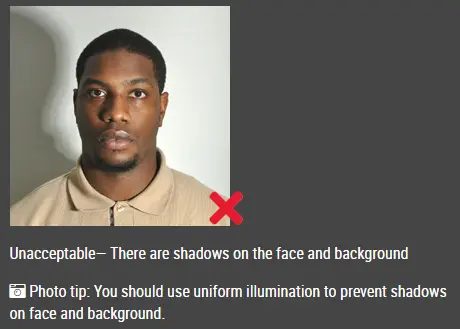
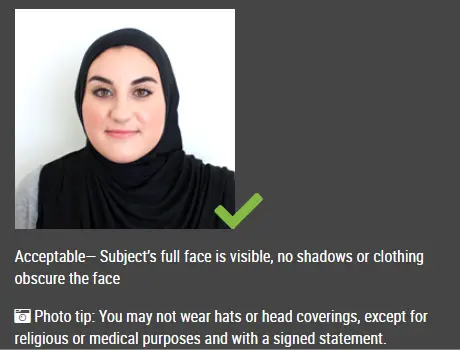
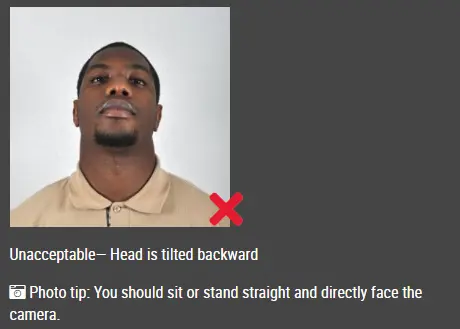
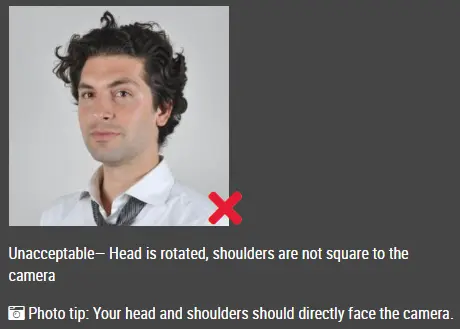
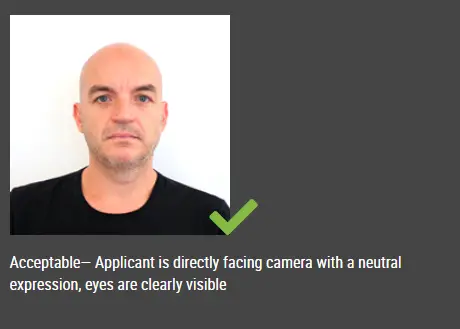
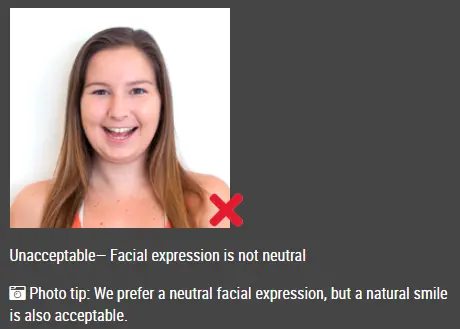
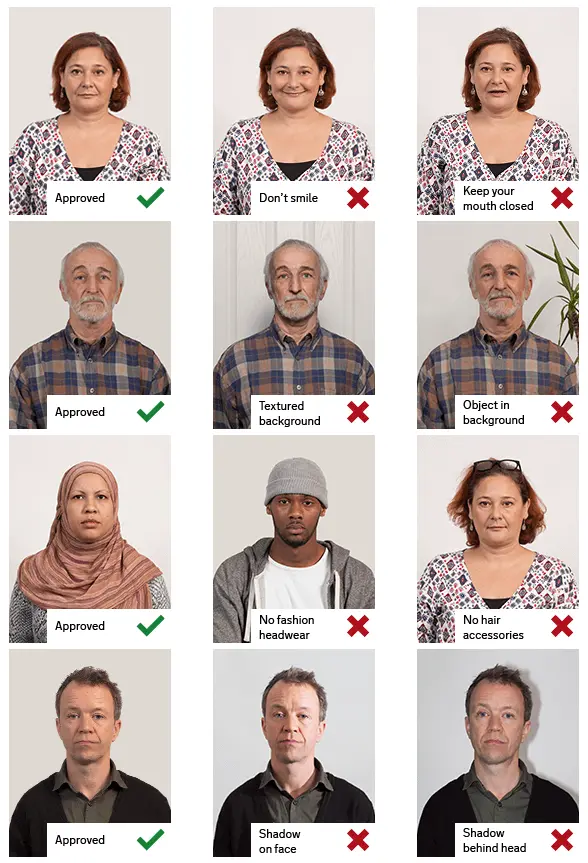
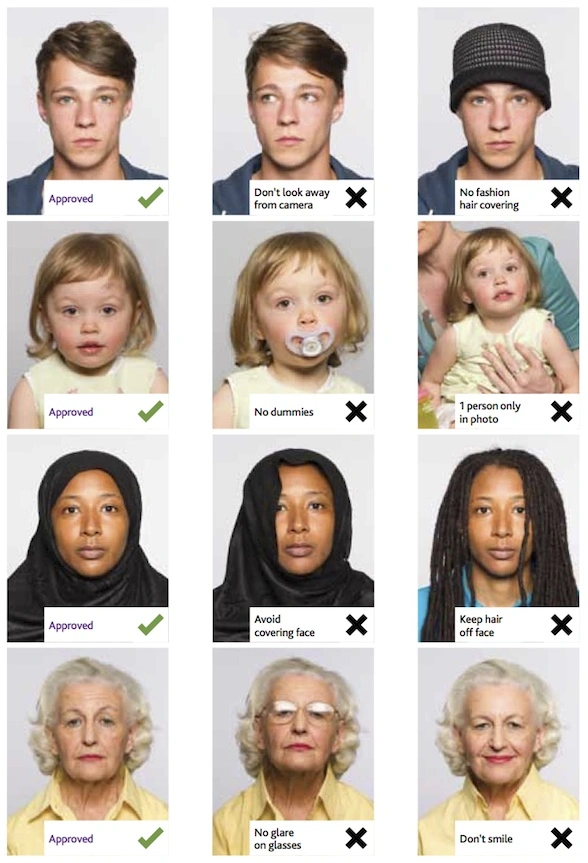
Detailed requirements Last Update: July 25, 2026 SINGAPORE VISA PHOTO SIZE AND REQUIREMENTS Online photo dimensions: 400 × 514 pixels Printed photo dimensions: 35 mm wide × 45 mm high Photo age: Taken within the last three months Photo type: Recent colour photograph Background: Plain white without shadows File formats for ICA e-Services: JPG, JPEG, HEIC, HEIF or PNG Maximum online file size: 8 MB Printed photo finish: Matte or semi-matte SINGAPORE VISA PHOTO RULES Recent colour image The photograph must be recent and accurately show your current appearance. For a Singapore visa application, it should have been taken within the previous three months. Use a colour image that is clear, sharp and properly focused. Face and head position Face the camera directly with your head straight and centred. Your full face and the top of your shoulders must be visible. Do not turn, tilt or lower your head. Keep both eyes open and clearly visible. Hair must not cover your eyes or eyebrows. Facial expression Use a natural, neutral facial expression. Keep your mouth closed and avoid exaggerated smiles, frowning or raised eyebrows. Background Use a plain white background without patterns, furniture or other visible objects. The background must not contain shadows. Make sure your clothing and head covering do not blend into it. Lighting Use soft, even lighting across your face. Avoid direct flash, bright spots, red-eye and shadows under the eyes, nose or chin. There should also be no strong shadow behind your head. Glasses Your eyes must remain completely visible. Spectacle frames must not cover any part of the eyes, and the lenses must not show reflections or glare. Sunglasses and tinted lenses should not be worn. Removing glasses is usually the easiest way to avoid glare or obstruction. Head coverings Do not wear a hat, cap or other head covering unless it is normally worn for religious or racial customs. A permitted head covering must not hide your forehead, eyes, nose, mouth, chin or the edges of your face. Clothing Wear normal everyday clothing. Avoid white clothing that disappears into the background. Uniforms, camouflage clothing and outfits that obscure the neck or lower face should also be avoided. SINGAPORE VISA PHOTOS FOR BABIES AND CHILDREN The child must be the only person visible in the final photograph. For a baby, place the child on a plain white sheet and take the photograph from directly above. Make sure the sheet has no folds or shadows around the head. A parent’s hands, toys, chair backs, cushions and other objects must not appear in the image. The baby’s face should be visible and directed toward the camera as much as possible. Do not use a photograph in which a pacifier covers the mouth.
How to Get a Singapore Visa Photo Online in 400 × 514 Pixels Follow these steps to prepare your visa photo with the IDPhotoDIY passport photo maker. Step 1: Take a photo Ask another person to take a clear photo of you with a smartphone or digital camera. Face the camera directly and leave enough space around your head and shoulders for cropping. Avoid taking a handheld selfie because the short camera distance may distort your facial proportions. Step 2: Upload the original image Choose the photo from your phone, tablet or computer. Use a sharp, well-lit image with your full face visible. Do not upload a scanned passport photo, screenshot or image altered with beauty filters. Step 3: Process the photo The passport photo maker will fix the background, crop and resize the image to the selected Singapore visa photo dimensions. Step 4: Review and download Download the digital photo for online submission and a printable passport size photo layout.
IDPHOTODIY PASSPORT PHOTO MAKER FEATURES Automatic cropping The tool crops the uploaded image to the correct Singapore visa photo proportions. Photo resizing It prepares the image as a 400 × 514 pixel digital photo or a 35 × 45 mm printable passport size photo. Background preparation A distracting original background can be replaced with a plain background suitable for the selected document. Head positioning The photo is positioned so that the face is centred with enough space around the head and shoulders. Digital photo output Download a digital image suitable for an online application when the submission service accepts this format. Printable photo layout Create a printable layout containing correctly sized passport photos for applications that require physical copies. WHY USE IDPHOTODIY? Create your photo at home Take the original picture with your smartphone or digital camera instead of travelling to a photo studio. No photo-editing experience required You do not need to calculate dimensions or manually create a passport photo template. Use it on different devices Upload and prepare your passport photo online from a phone, tablet or computer. Prepare digital and printed photos Create a digital visa photo for online submission or a passport size photo that can be printed locally. Support for multiple documents The passport photo maker can prepare photos for visas, passports, identity cards, driving licences and other official documents. WHERE CAN I GET A SINGAPORE VISA PHOTO? Online passport photo maker Create the photo at home with IDPhotoDIY. Upload a smartphone image, prepare the correct size and download the completed file. Professional photo studio A local photographer can take and print passport photos. Tell the photographer that you need a recent Singapore visa photo measuring 35 × 45 mm. Photo-printing shop When you already have a correctly prepared digital file, a photo-printing service can produce physical copies on matte or semi-matte photographic paper. Home printer You may print the photo at home when you have a good-quality colour printer and suitable photo paper. Confirm the printed dimensions with a ruler before submitting it. Photo booth You can also take your Singapore visa photo at a self-service photo booth.
FREQUENTLY ASKED QUESTIONS What is the Singapore visa photo size for online submission? ICA recommends an image measuring 400 pixels wide by 514 pixels high for photographs uploaded through its e-Services. What is the printed Singapore visa photo size? The standard printed visa photograph measures 35 mm wide by 45 mm high without a border. How recent must the photograph be? The photo must have been taken within the last three months and should reflect your current appearance. Can I make a Singapore visa photo online? Yes. Upload a clear smartphone or camera image to the IDPhotoDIY passport photo tool to crop and resize it. Can I use a smartphone? Yes. A smartphone can produce a suitable original image when the camera is held level, the lighting is even and the picture is sharp. Can I submit a selfie? Selfies are not recommended. A close camera position may distort your face, and holding the phone can cause an incorrect angle. Ask another person to take the picture or use a tripod. What file formats does ICA accept? ICA currently lists JPG, JPEG, HEIC, HEIF and PNG for online photo submissions through its e-Services. What is the maximum file size? The maximum file size stated by ICA for an online photo submission is 8 MB. |
|
| Source | https://www.singapore-visa.com.sg/ |