Singapore Passport Photo Maker
35x45 mm (3.5x4.5 cm) Size and Requirements


| Country | Singapore | ||||||||||||||||||||||||
| Document type | Passport | ||||||||||||||||||||||||
| Passport picture size | Width: 35 mm, Height: 45 mm | ||||||||||||||||||||||||
| Resolution (DPI) | 600 | ||||||||||||||||||||||||
| Image definition parameters | Head must be between 70 to 80 % of the photograph from the bottom of the chin to the top of the head |
||||||||||||||||||||||||
| Background color | White | ||||||||||||||||||||||||
| Printable photo | Yes | ||||||||||||||||||||||||
| Digital photo for online submission | Yes | ||||||||||||||||||||||||
| Digital photo size | Width: 400 pixels , Height: 514 pixels | ||||||||||||||||||||||||
| Photo Paper type | matte | ||||||||||||||||||||||||
|
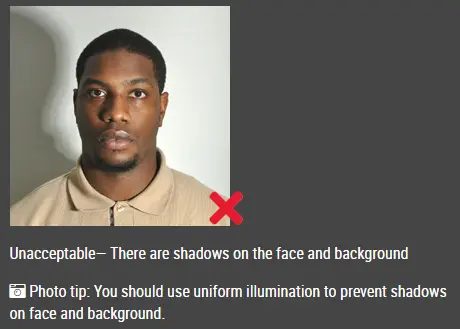
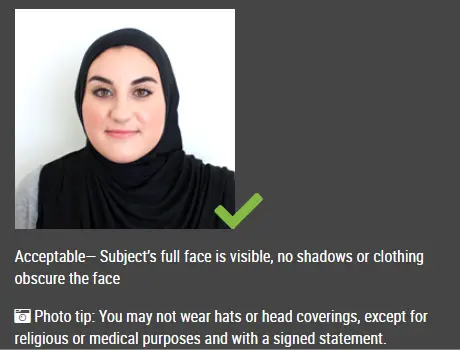
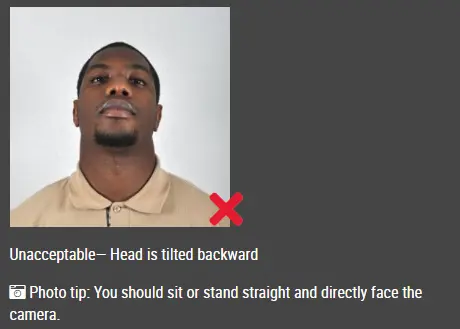
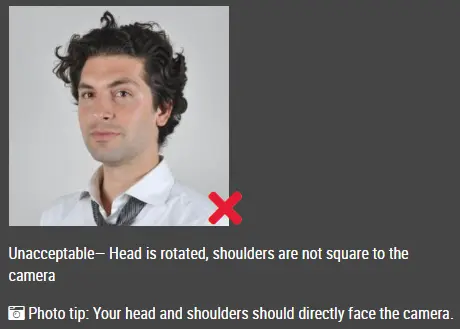
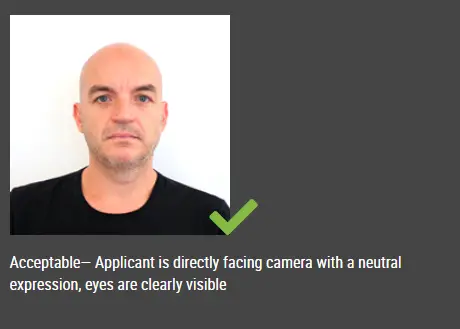
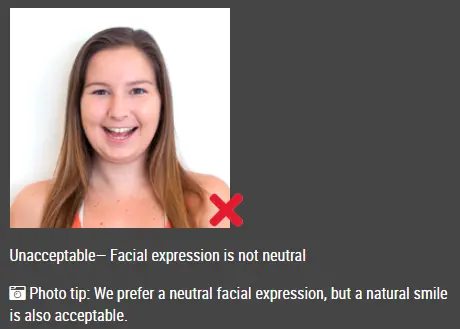
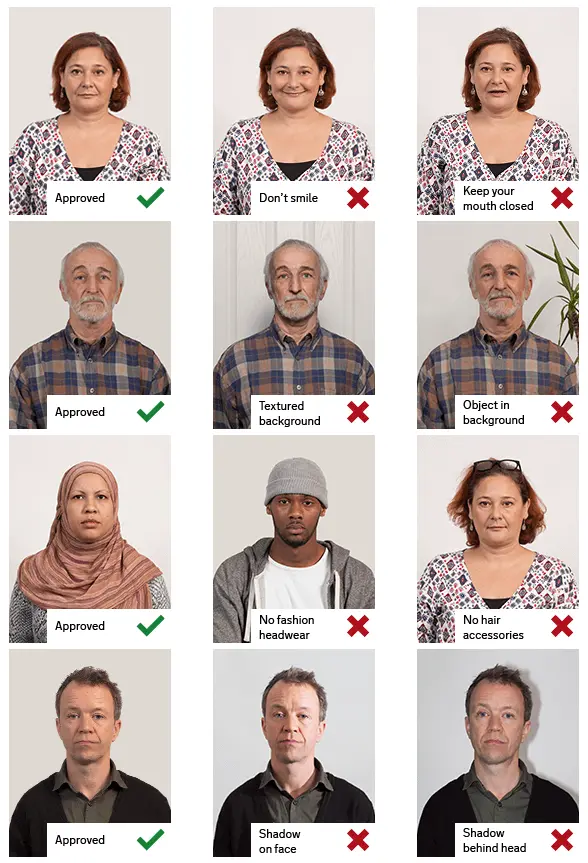
Detailed requirements Last Update: July 25, 2026 Create a compliant Singapore passport photo for your online or hardcopy application. For online submission, the Immigration & Checkpoints Authority of Singapore recommends a digital colour photograph measuring 400 × 514 pixels. The photograph must be recent, clear and taken against a plain white background. It should show your full face looking directly at the camera, without shadows, filters or facial enhancement. Singapore Passport Photo Requirements
Digital Photo Requirements for Online ApplicationsWhen applying for or renewing a Singapore passport online, prepare a digital colour photograph with the following specifications:
You may resize or crop the photograph to the required dimensions. However, do not modify facial features, reshape the face, smooth the skin excessively or use filters that change your appearance. Printed Singapore Passport Photo RequirementsA printed Singapore passport photograph should measure:
The photograph should be sharp and professionally printed. Do not submit a photo that is pixelated, damaged, creased, stained or printed on reflective paper. How to Get a compliant Singapore Passport Photo Online Follow these steps to create your compliant Singapore passport photo with the IDPhotoDIY passport photo maker. Step 1: Take a photo Ask another person to take a clear photo of you using a smartphone or digital camera. Step 2: Upload the original image Choose the photo from your phone, tablet or computer. Step 3: Process the photo The passport photo maker will adjust the background, crop the image and resize it to the passport photo requirements for your selected country and document. Step 4: Review and download Review the finished image, then download the digital passport photo for online submission and a printable passport size photo layout.
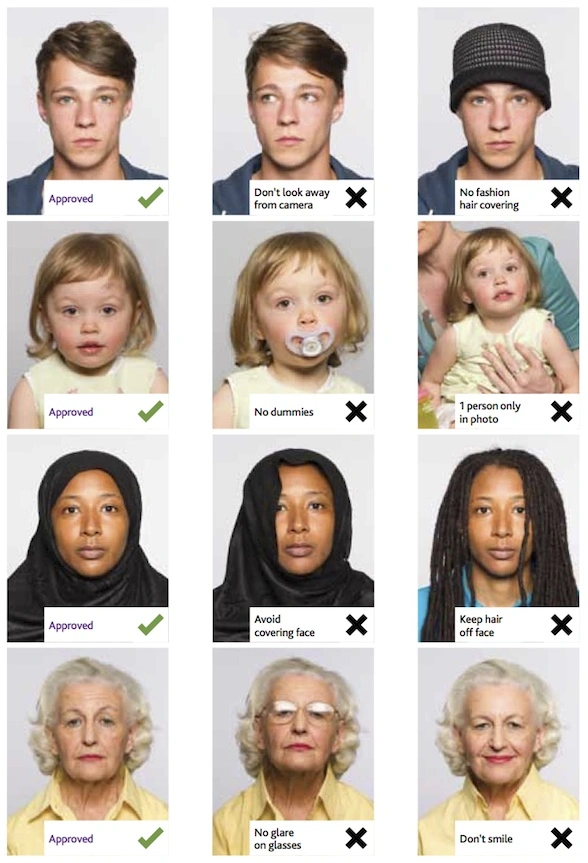
Singapore Passport Photos for Babies and ChildrenWhen taking a passport photo for a baby or young child, the child must be photographed on their own. Make sure no parent, hands, toys, or other objects appear in the final image. For babies who are not able to sit upright yet:
The photo should reflect the child’s current appearance and must be taken within the last three months. It’s normal for babies to have slight expressions or not look perfectly neutral. As long as the face is clearly visible and the eyes are open (where possible), the photo should be acceptable. Frequently Asked QuestionsWhat is the Singapore passport photo size?A printed Singapore passport photo should measure 35 × 45 mm. For online applications, ICA recommends a digital photograph measuring 400 × 514 pixels. What are the required pixel dimensions?The recommended dimensions for an online Singapore passport photo are 400 pixels wide × 514 pixels high. What file formats does ICA accept?Accepted file formats include JPG, JPEG, HEIC, HEIF and PNG. What is the maximum file size?The maximum file size for an online photo submission is 8 MB. How recent must my passport photo be?Your photograph must have been taken within the last three months and must represent your current appearance. Can I take my passport photo using a mobile phone?Yes. You may use a mobile phone to take your photograph. Ask another person to take it, use even lighting and ensure the final image meets the required dimensions. Can I submit a selfie?ICA does not recommend selfies because they often have unsuitable angles, framing or mirrored orientation. Ask another person to take the photograph whenever possible. Can I use Photoshop?You may crop or resize the photograph. Do not reshape your face, modify facial features, remove permanent identifying marks or apply beauty enhancements. Can I wear glasses?Clear glasses may be acceptable when there is no glare and the eyes are fully visible. Removing glasses is the safest option. Can I wear contact lenses?Clear contact lenses are normally acceptable. Avoid coloured, patterned or enlarging contact lenses that change the natural appearance of your eyes. Can I wear a hijab or religious head covering?Yes, provided the covering is worn for religious or racial customs and does not hide any facial features. The full face must remain visible. Does my hair need to be behind my ears?Your ears do not necessarily need to be visible. However, your hair must not cover your eyes or obscure the outline of your face. Can I wear makeup?Natural makeup is acceptable when it does not change your appearance. Avoid heavy contouring, glitter, beauty filters and digitally applied makeup. Why was my passport photo rejected?Common reasons include a non-white background, shadows, poor lighting, a blurred image, incorrect framing, glare on glasses, a mirrored selfie or digital facial enhancement. |
|||||||||||||||||||||||||
| Source | https://www.ica.gov.sg/common/passp... | ||||||||||||||||||||||||