Schengen Visa Photo Maker
35x45 mm (3.5x4.5 cm) Size and Requirements


| Country | Schengen |
| Document type | Visa |
| Passport picture size | Width: 35 mm, Height: 45 mm |
| Resolution (DPI) | 600 |
| Image definition parameters | Head must be between 70 to 80 % of the photograph from the bottom of the chin to the top of the head |
| Background color | White |
| Printable photo | Yes |
| Digital photo for online submission | Yes |
| Digital photo size | Width: 826 pixels , Height: 1062 pixels |
| Photo Paper type | matte |
|
Detailed requirements Last Update: July 26, 2026 A Schengen visa photograph should normally meet the following conditions:
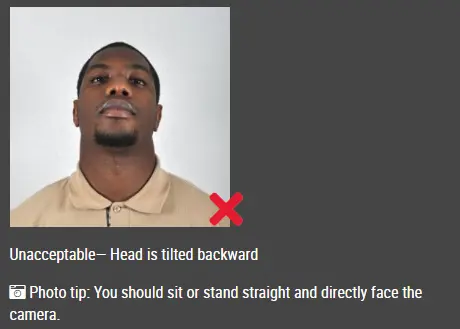
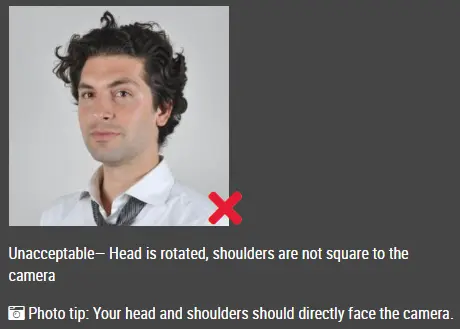
What Is the Required Schengen Visa Photo Size?The standard size commonly requested for a Schengen visa photograph is: 35 mm wide × 45 mm high The image should be a close-up showing your head and the upper part of your shoulders. Your face should generally fill around 70–80% of the photograph. Your complete head must be visible and positioned in the center. There should be sufficient space around it to ensure that your hair, chin or any part of your face is not cropped. Face Position and Head AlignmentLook directly into the camera and keep your head upright. The photograph should clearly show:
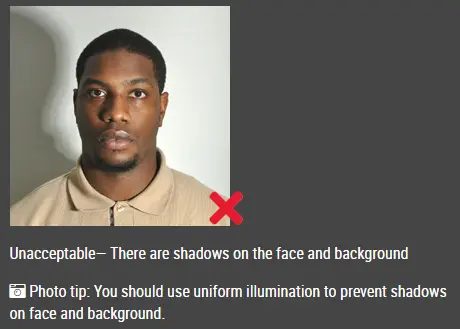
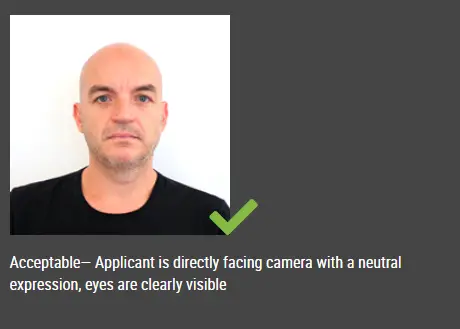
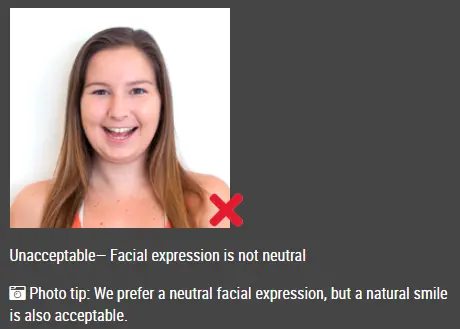
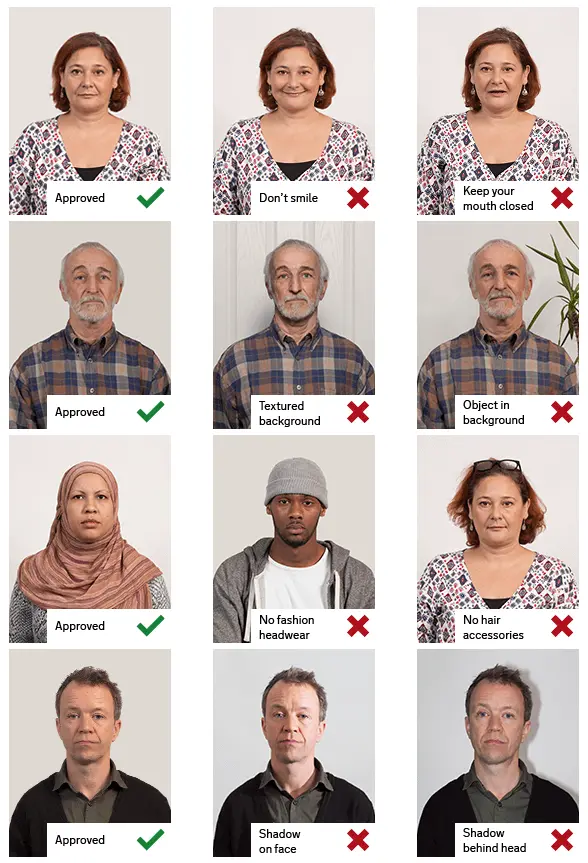
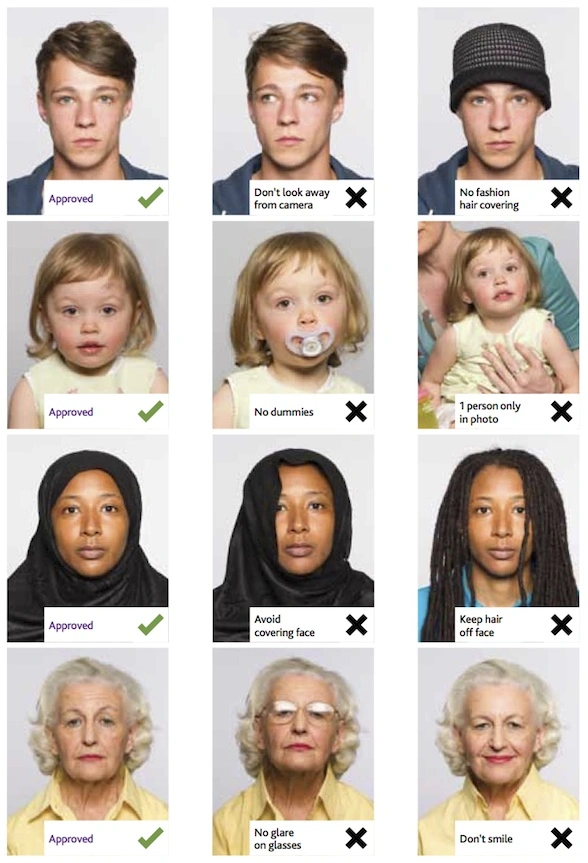
Do not lean or tilt your head in any direction. Your body should face forward rather than being turned to the side or positioned over one shoulder. Your hair may cover your ears, but it must not obscure your eyes or other important facial features. No part of your face should be intentionally hidden. Facial ExpressionMaintain a relaxed, neutral expression. Your mouth should remain closed, and both eyes must be open and clearly visible. Avoid broad smiles, visible teeth, raised eyebrows or exaggerated expressions. Keep your facial muscles relaxed and look directly at the camera. Background RequirementsUse a plain, light-colored background without patterns, objects or noticeable textures. The background should:
White, light gray or another pale background may be accepted, depending on the requirements of the embassy, consulate or visa application center handling your application. Avoid replacing the background digitally when doing so creates artificial outlines or unnatural edges around your hair, face or shoulders. Lighting and Image QualityTake the photograph in bright, evenly distributed light. The final image should be:
Avoid standing directly beneath a ceiling light, as this may create shadows under your eyes, nose and chin. Natural daylight can produce good results. Stand facing a window so that the light falls evenly across both sides of your face. Do not use beauty filters, portrait effects or editing tools that alter your facial structure, skin tone or natural appearance. Are Glasses Allowed?Glasses may be acceptable when your eyes remain fully visible. The photograph must not contain:
Removing your glasses is generally the safest option and can reduce the likelihood of the photograph being rejected. Exceptions may apply for medical reasons or under country-specific rules. Review the instructions issued by the relevant embassy or consulate before submitting your application. Head CoveringsHats, caps and headwear worn for fashion purposes should be removed. Religious head coverings may be allowed when:
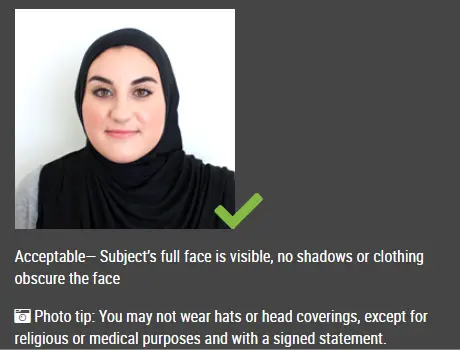
Your facial features should remain visible from the bottom of your chin to the top of your forehead. Clothing RecommendationsWear ordinary clothing that contrasts clearly with the background. Try to avoid:
Formal clothing is not required. Simple clothing without large prints or distracting patterns is usually the best choice. Schengen Visa Photos for Babies and ChildrenA child must appear alone in the photograph. The image should not include:
The child’s face should be visible and directed toward the camera. Whenever possible, the eyes should be open and the mouth closed. Some authorities may allow limited flexibility for newborns and very young babies. Check the child-photograph requirements published by the relevant embassy, consulate or visa application center. How Our Schengen Visa Photo Maker Works1. Upload Your PhotographSelect a clear image taken in good lighting with a plain background. 2. Process the ImageOur Schengen visa photo maker automatically centers your face, adjusts the background and resizes the photograph to the required Schengen visa format. 3. DownloadSave the completed photograph for printing or electronic submission. Frequently Asked QuestionsWhat is the standard Schengen visa photo size?The commonly requested size is 35 mm × 45 mm. However, you should always confirm the exact dimensions required by the embassy, consulate or visa application center handling your case. How recent should my Schengen visa photo be?The photograph should normally have been taken within the last six months and must accurately reflect your current appearance. Does the background need to be completely white?Official guidance generally requires a plain, light-colored background. Some authorities may specifically request white or light gray, so follow the local instructions for your application. Am I allowed to smile?You should use a neutral expression with your mouth closed. Avoid broad smiles, visible teeth and exaggerated facial expressions. Must my ears be visible?Your ears do not usually need to be fully exposed. The main requirement is that both sides of your face and all essential facial features remain clearly visible, unless the relevant authority provides different instructions. Can I wear glasses?Glasses may be permitted when the lenses are clear, there is no glare and the frames do not cover your eyes. Taking the photograph without glasses may reduce the risk of rejection. Can I wear a religious head covering?Religious head coverings are generally acceptable when the full face remains visible from the chin to the top of the forehead and no shadows are cast over the facial features. Can I take the photograph using a smartphone?Yes. A modern smartphone can produce a suitable photograph when the camera is positioned at eye level, the lighting is even and the original image is clear and sharply focused. Can I submit a selfie?Selfies are not recommended because holding the camera too close can distort your facial proportions. Use a tripod, phone stand or ask another person to take the photograph from an appropriate distance. Can the background be edited?Minor corrections may be acceptable as long as the final image appears natural. Avoid editing that creates visible outlines, removes parts of the hair or produces unnatural colors around the face. Source: European Commission, ICAO Photograph Guidelines |
|
| Source | https://www.euro-dollar-currency.co... |