New Zealand Passport (online applications) Photo Maker
33x44 mm (3.3x4.4 cm) Size and Requirements


| Country | New Zealand | ||||||||||||||||||||||
| Document type | Passport (online applications) | ||||||||||||||||||||||
| Passport picture size | Width: 33 mm, Height: 44 mm | ||||||||||||||||||||||
| Resolution (DPI) | 600 | ||||||||||||||||||||||
| Image definition parameters | Head must be between 70 to 80 % of the photograph from the bottom of the chin to the top of the head |
||||||||||||||||||||||
| Background color | White | ||||||||||||||||||||||
| Printable photo | Yes | ||||||||||||||||||||||
| Digital photo for online submission | Yes | ||||||||||||||||||||||
| Digital photo size | Width: 1800 pixels , Height: 2400 pixels | ||||||||||||||||||||||
| Photo Paper type | matte | ||||||||||||||||||||||
|
Detailed requirements Last Update: July 26, 2026 For an online New Zealand passport application, your digital photo must meet the following technical requirements:
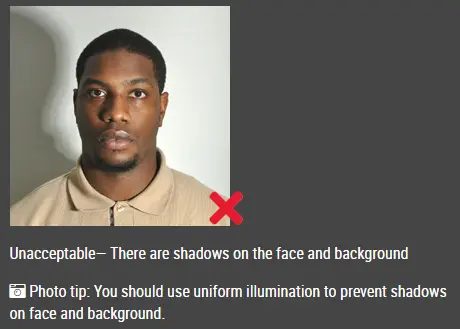
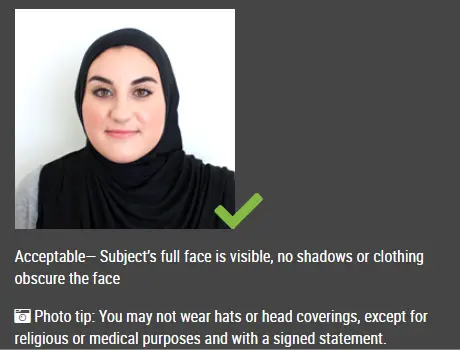
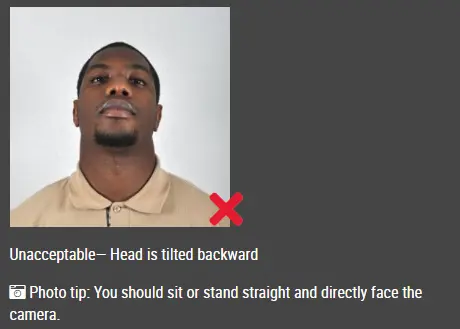
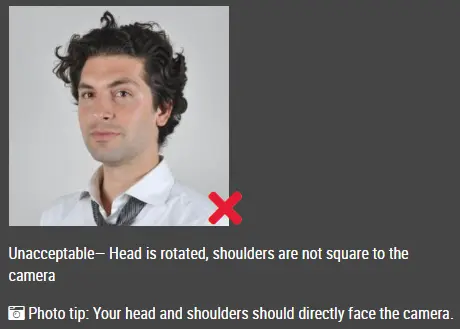
The width must be shorter than the height. For example, a photo measuring 1800 × 2400 pixels has the correct 3:4 portrait ratio. How IDPhotoDIY Helps Create Your NZ Passport PhotoIDPhotoDIY helps turn a photo taken with your phone or camera into a properly cropped, resized and formatted passport photo. No design skills or specialist photo-editing software are required. IDPhotoDIY generates a correctly formatted passport-photo file from a real photo of you. 1. Take a clear photoStart by taking a recent, clear colour photo using a phone or digital camera. For the best result, ask another person to take the photo for you. Do not use a selfie, filtered image, or scan of a printed photograph. Make sure your face is well lit, in focus, and clearly visible against a plain, light-coloured background, as required for New Zealand passport photos. 2. Upload your original photoChoose the photo you have just taken and upload it to IDPhotoDIY. Use a high-quality image where your face is clearly visible, evenly lit, and not blurred. Avoid selfies, filters, beauty effects, or scanned printed photos, as these may not meet New Zealand Passport Office requirements. 3. Process the photoIDPhotoDIY, the passport photo maker, will adjust the background, crop the image and resize it to the passport photo requirements for your selected country and document. 4. Download your photoIDPhotoDIY processes your image and generates a compliant New Zealand passport photo in the correct format for both online submission and printing. The service helps with technical preparation, including:
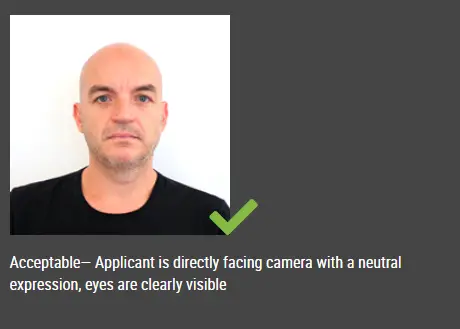
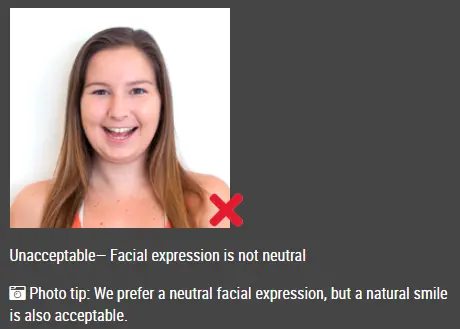
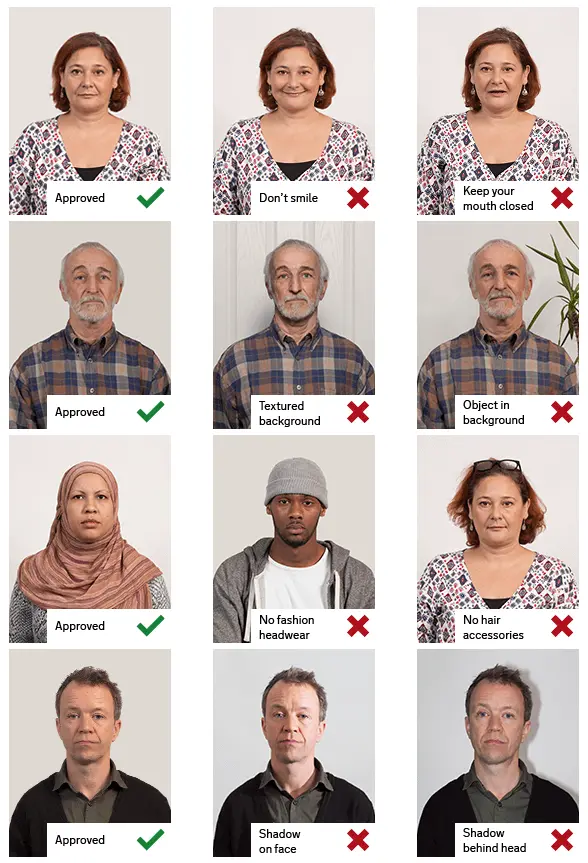
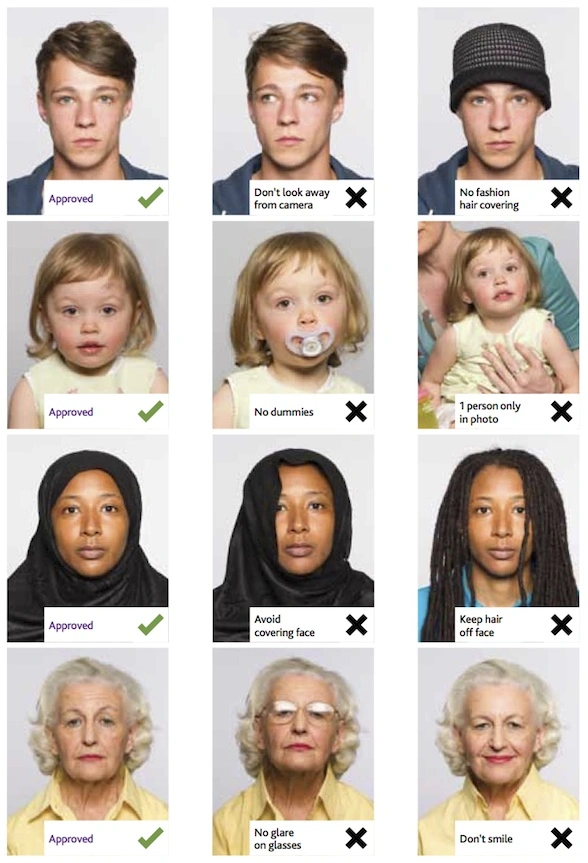
After processing, download your completed image to your phone, computer, or tablet. Common reasons New Zealand passport photos get rejectedA photo can be rejected for a few simple reasons: It’s a selfieAsk someone else to take the photo for you, ideally from about 1.5 metres away. Wrong orientationThe image must be portrait, not landscape, with a 3:4 ratio. Incorrect dimensionsThe file should be between 900–4500 pixels wide and 1200–6000 pixels high. If width and height are swapped, it won’t be accepted. File size issuesMake sure the JPG or JPEG is between 250KB and 5MB. Face looks distortedThis usually happens when the camera is too close. Cropped too tightlyThere should be some space above your head and around it, and your shoulders and upper chest should be visible. Smiling or wrong expressionKeep a neutral expression with your mouth closed and eyes open. Bad backgroundUse a plain, light background with no patterns, objects, or shadows. Glare on glassesAdjust lighting or remove glasses if reflections are covering your eyes. Photo has been editedAvoid filters, beauty apps, or any AI tools that change your appearance. Scanned photosDon’t scan printed photos — they aren’t accepted for online applications. New Zealand Passport Photos for Babies and ChildrenThe same technical file requirements apply to a baby or child’s digital passport photo. For a baby:
The baby should be the only person visible in the photograph. IDPhotoDIY can help crop and format the original baby photo after it has been taken. Frequently Asked QuestionsWhat size is a New Zealand passport photo for an online application?The digital image must be between 900 and 4500 pixels wide and between 1200 and 6000 pixels high. It must use a 3:4 portrait aspect ratio. Is the New Zealand passport photo ratio 3:4 or 4:3?It is a 3:4 portrait ratio: three units wide and four units high. For example, 900 × 1200, 1200 × 1600 and 1800 × 2400 pixels all have a 3:4 portrait ratio. Does the online photo need to be 33 × 44 mm?Millimetre measurements are mainly relevant to printed photos. An online passport application uses a digital JPG or JPEG measured in pixels and file size. Follow the required 3:4 ratio, pixel range and 250KB–5MB file-size range. Can I use a 900 × 1200 pixel photo?Yes. A 900 × 1200 pixel image is within the permitted dimensions and has the correct 3:4 portrait ratio, provided it meets all other photo requirements. Can I take my passport photo with a phone?Yes. You may use a phone or digital camera, but another person must take the photo. Selfies are rejected. Can I smile in my New Zealand passport photo?No. You must use a neutral expression with your mouth closed and your eyes open. Can I wear prescription glasses?Yes, provided they are not tinted or thick-framed, your eyes remain clearly visible, and there is no glare or reflection on the lenses. Can I scan a printed passport photo?No. Scans of printed photographs are not accepted for New Zealand online passport applications. How recent must the photo be?The photograph must have been taken within the last six months. |
|||||||||||||||||||||||
| Source | https://www.passports.govt.nz/Elect... | ||||||||||||||||||||||