New Zealand APEC Business Travel Card Photo Maker
35x45 mm (3.5x4.5 cm) Size and Requirements


| Country | New Zealand |
| Document type | APEC Business Travel Card |
| Passport picture size | Width: 35 mm, Height: 45 mm |
| Resolution (DPI) | 600 |
| Image definition parameters | Head must be between 70 to 80 % of the photograph from the bottom of the chin to the top of the head |
| Background color | White |
| Printable photo | Yes |
| Digital photo for online submission | Yes |
| Digital photo size | Width: 1800 pixels , Height: 2400 pixels |
| Photo Paper type | matte |
|
Detailed requirements Last Update: July 26, 2026 New Zealand APEC Card Photo Requirements at a GlanceYour photograph should meet the following requirements:
Always check the latest Immigration New Zealand instructions before submitting your application, as requirements may change. What Is the Correct New Zealand APEC Card Photo Size?The required photograph size for a New Zealand APEC Business Travel Card application is: 35 mm wide × 45 mm high This is the same physical size commonly used for New Zealand passport-style photographs. The image should have a vertical portrait orientation. Do not stretch or distort the photograph to make it fit the required dimensions. The face and head should remain in their natural proportions. How Recent Must the Photograph Be?Your photograph must have been taken within the previous six months. The photograph should accurately show your current appearance. You should take a new photograph if your appearance has changed significantly due to factors such as:
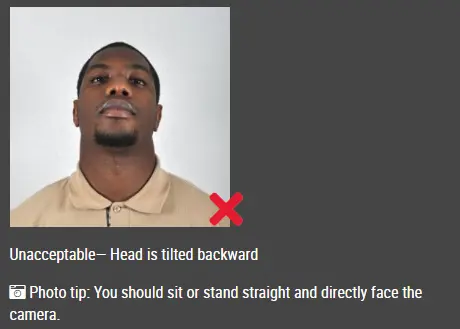
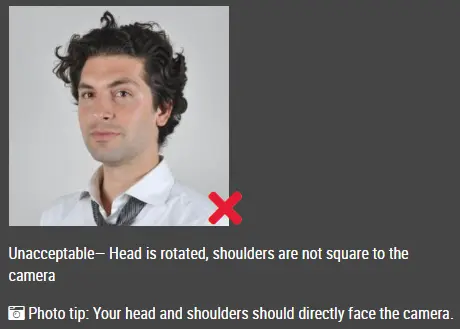
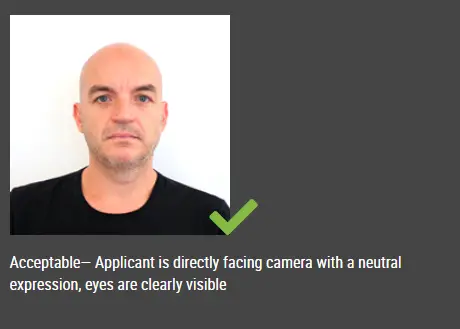
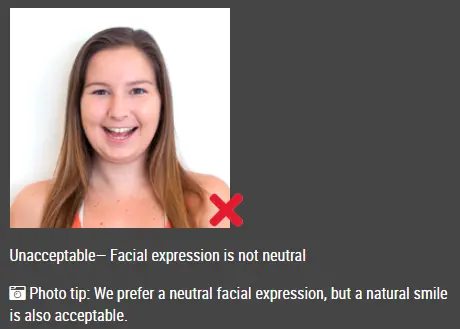
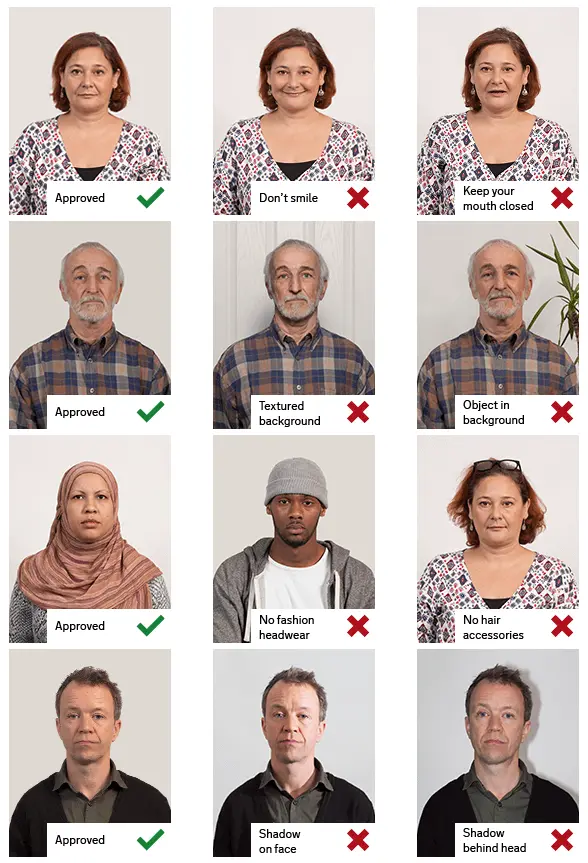
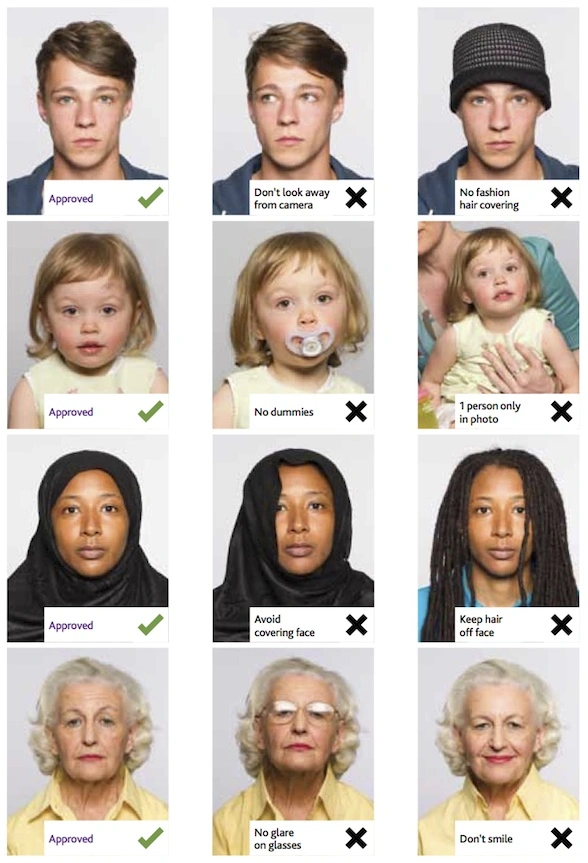
Minor changes, such as growing or removing light facial hair, may not require a new photograph as long as you remain clearly identifiable. Face Position and ExpressionStand or sit directly in front of the camera and look straight toward the lens. Your photograph should show:
Do not look upward, downward or to either side. Avoid exaggerated expressions, raised eyebrows, frowning or smiling with an open mouth. Background RequirementsUse a plain, neutral background that creates a clear contrast with your face and hair. The background should:
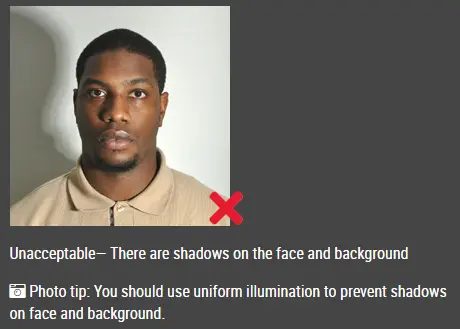
A plain light-coloured wall may be suitable, provided it is clean, evenly lit and free from shadows. Do not stand directly against the wall. Leave some space between yourself and the background to reduce shadows. Do Not Replace or Edit the BackgroundUse a real, suitable background when taking the photograph. Do not use artificial intelligence, photo-editing software or mobile applications to:
Basic cropping and resizing may be acceptable when they do not alter your appearance or the original background. Your photograph should remain a true and accurate representation of your appearance. Lighting and Image QualityUse soft, even lighting across your entire face. Avoid:
Natural daylight can work well, but do not stand in direct sunlight. Facing a window with indirect daylight may provide more even lighting. The image must be clear enough for your facial features to be easily identified. Can I Wear Glasses?Clear prescription glasses may be acceptable when:
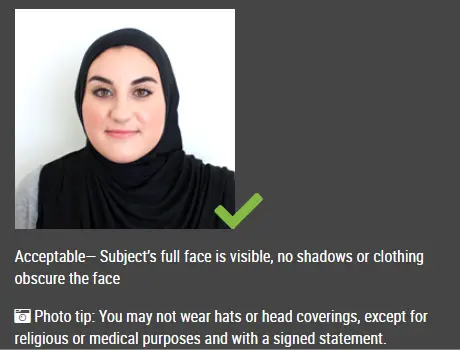
Remove your glasses if reflections, shadows or thick frames make your eyes difficult to see. Do not wear sunglasses or tinted glasses unless they are medically required. Supporting evidence may be requested when glasses are required for medical reasons. Head Coverings and Religious ClothingHead coverings worn for religious or medical reasons may be acceptable. Your full facial features must remain visible from the bottom of your chin to the top of your forehead. The head covering must not cast shadows across your face or obscure your eyes, nose, mouth or facial outline. Fashion hats, caps, headbands and other decorative headwear should be removed. Clothing RecommendationsWear normal everyday clothing that contrasts with the background. Avoid:
Your shoulders should be visible, but the image should remain focused primarily on your head and face. How to Use IDPhotoDIY to Make a New Zealand APEC Business Travel Card PhotoStep 1: Take a photoStand in front of a plain, light-coloured background and ask someone to take a clear, front-facing photo of you. Make sure your face is fully visible, your eyes are open, and your expression is neutral with your mouth closed. Use good lighting and avoid shadows on your face or background. Step 2: Upload your photo to IDPhotoDIYGo to the IDPhotoDIY New Zealand APEC Business Travel Card photo tool and upload your image. Choose a clear, high-quality photo that shows your full head and shoulders. Step 3: Adjust and crop the photoUse the tool to automatically adjust the background and crop your image to the correct 35 × 45 mm size. It will also automatically position your face in the center so that your head is properly framed and meets the required proportions. Step 4: Download and use your photoOnce the photo is correctly formatted, download the final image - both single digital photo for online submission and printable template. Common Reasons APEC Card Photos Are RejectedYour photograph may be rejected if:
Check the photograph carefully before submitting it to reduce the risk of delays. Frequently Asked QuestionsWhat size is a New Zealand APEC Business Travel Card photo?The required photograph size is 35 mm wide × 45 mm high. It should be a vertical, colour photograph. How old can my APEC Card photograph be?The photograph must have been taken within the previous six months and must show your current appearance. Does the background have to be white?Use a plain, neutral background that clearly contrasts with your face and hair. Avoid patterns, objects, shadows and other people. Check the current official instructions before assuming that a specific background colour is mandatory. Can I smile in the photograph?Use a neutral expression with your mouth closed. A broad or open-mouth smile may cause the photograph to be rejected. Can I wear prescription glasses?Clear prescription glasses may be acceptable when your eyes are fully visible and there is no glare. Remove the glasses if the frames or reflections obscure your eyes. Can I wear sunglasses?No. Sunglasses and tinted glasses should not be worn unless they are medically necessary and permitted under the current official requirements. Can I use a selfie?A photograph taken by another person is recommended. Handheld selfies can cause facial distortion, incorrect angles and framing problems. Can I use a mobile phone?Yes, a modern mobile phone may produce a suitable photograph when the image is clear, correctly lit and taken with the camera directly in front of the face. Use the main camera when possible and ask another person to take the photograph. Can I remove the background digitally?No. Do not use software or artificial intelligence to remove, blur or replace the original background. Take the photograph against a suitable real background. Can I use a beauty filter?No. Filters, skin smoothing, facial reshaping and other beauty enhancements can make the photograph unacceptable. |
|
| Source | https://www.immigration.govt.nz/doc... |