Home > Passport Photo Requirements > Nigeria Passport Photo 35x45 mm (3.5x4.5 cm)

Nigeria Passport Photo Maker
35x45 mm (3.5x4.5 cm) Size and Requirements


How idPhotoDIY works

Country Nigeria
Document type Passport
Passport picture size Width: 35 mm, Height: 45 mm
Resolution (DPI) 600
Image definition parameters

Head must be between 70 to 80 % of the photograph from the bottom of the chin to the top of the head

Background color White
Printable photo Yes
Digital photo for online submission Yes
Digital photo size Width: 600 pixels , Height: 800 pixels
Photo Paper type matte
Detailed requirements
Last Update: July 20, 2026
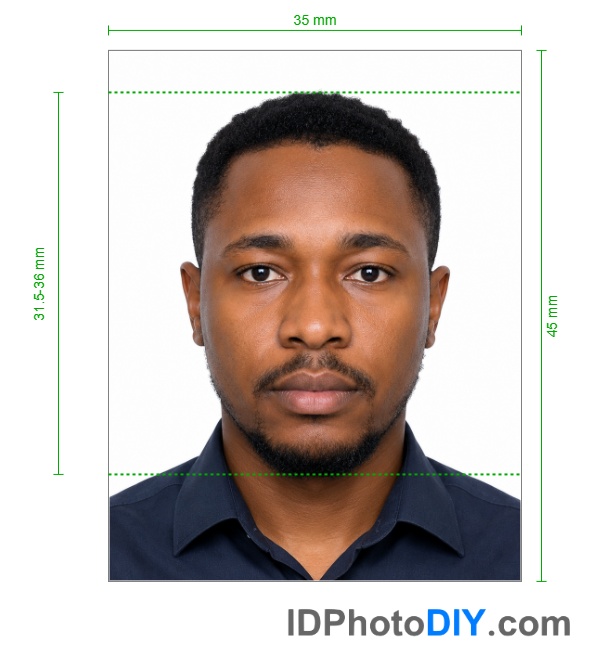
Nigeria Passport photo

Digital Nigeria Passport Photo Requirements

For a photograph uploaded to the Nigeria Immigration Service passport portal, prepare an image with the following specifications:

  • Image dimensions: 600 × 800 pixels
  • Maximum file size: less than 2 MB
  • Background: plain white
  • Lighting: even and natural, without an overexposed or very dark face
  • Face position: centred and facing directly toward the camera
  • Hair: must not cover the face or ears
  • Accessories: no headphones, masks, or other items that hide the face
  • Image quality: sharp, clear and free from blur

Upload the original, high-quality image whenever possible. Sending a photograph through messaging applications may compress the file and reduce its quality.

Printed Nigeria Passport Photo Size

A commonly requested printed Nigeria passport-photo size is 35 × 45 mm. Printed requirements may depend on the application type and the Nigerian passport office, embassy or consulate handling the application.

Clothing, Glasses and Head Coverings

Wear normal everyday clothing that contrasts with the white background. Avoid white tops that may disappear into the background and avoid uniforms or clothing that resembles an official uniform.

Remove sunglasses, tinted lenses and glasses that create reflections or cover the eyes. Removing ordinary eyeglasses is the safest option when taking the photograph.

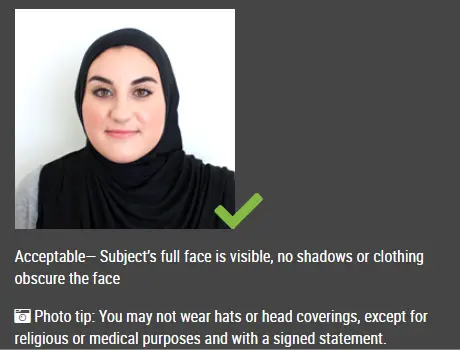
Religious or medically necessary head coverings may be acceptable when the entire face remains visible. The covering must not cast shadows across the eyes, cheeks or chin.

Nigeria Passport Photos for Babies and Children

The Nigeria Immigration Service allows some relaxation of ICAO positioning rules for children under five. However, the child should still look toward the camera and the face should be centred.

For the best result:

  • Use a plain white sheet or background.
  • Make sure no parent, hand, toy or support object appears in the photograph.
  • Keep the child’s face fully visible.
  • Avoid shadows around the head.
  • Submit a sharp photograph with the child’s eyes visible whenever possible.

Take several photographs and choose the clearest image before uploading it to the photo maker.

Common Reasons a Nigeria Passport Photo May Be Rejected

A passport photograph may fail the online compliance check or be rejected during processing when:

  • The image has the wrong pixel dimensions.
  • The file is larger than the permitted upload size.
  • The photograph is blurred or pixelated.
  • The face is too dark or overexposed.
  • Hair covers the face or ears.
  • The head is tilted or turned.
  • The photograph contains a mask, headphones or another facial obstruction.
  • The image has been heavily retouched or filtered.
  • Too much of the body is visible or the face is cropped too closely.

How the Nigeria Passport Photo Maker Works

  1. Upload a clear photograph taken with a smartphone or digital camera.
  2. The tool detects the face and prepares the correct crop.
  3. The background is changed to white.
  4. The image is resized for the selected Nigeria passport-photo format.
  5. Download the digital image or prepare a printable photo sheet.

Frequently Asked Questions

What is the digital Nigeria passport photo size?

The Nigeria Immigration Service photo-compliance page currently specifies an image resolution of 600 × 800 pixels and a file size below 2 MB.

Is a Nigeria passport photo 35 × 45 mm?

35 × 45 mm is commonly used for printed Nigerian passport photographs. Confirm the required print dimensions and number of copies with your processing centre, embassy or consulate.

What background is required?

Use a plain, evenly lit white background without patterns, objects or visible shadows.

Can I wear glasses?

Removing glasses is recommended. Sunglasses and tinted lenses should not be worn. Glasses must never obscure the eyes or create reflections.

Can I smile in a Nigerian passport photo?

Use a neutral expression with your mouth closed. This is safer for biometric and ICAO-compliant photographs than a broad smile.

Can I use a selfie?

Ask another person to take the photograph or use a tripod with the camera positioned at eye level. Handheld selfies commonly create perspective distortion and uneven facial proportions.

Can the background be removed online?

Yes. The background can be replaced with white, but the original photograph must still have clear facial details, good lighting and no hair or objects covering the face.

Why will my photo not upload to the NIS portal?

Check that the image is 600 × 800 pixels, below 2 MB and saved in a commonly supported image format. Also check that the filename does not contain unusual symbols and try uploading from a desktop browser when mobile upload fails.

Source: https://passport.immigration.gov.ng/image-compliance

Source

Do not worry about the photo size requirements. IDPhotoDIY online tool will help you make correct Nigeria Passport size photos.

How to make Nigeria Passport photo online


Step 1: Use a digital camera or a smartphone

Find someone to take the photo for you and selfie photo is not acceptable for passport photo application. If you have a tripod, use it. A tripod will make it easier to keep the camera steady and level. The distance of the person to the camera should be around 1 meter.

Step 2: Find a venue with good lighting

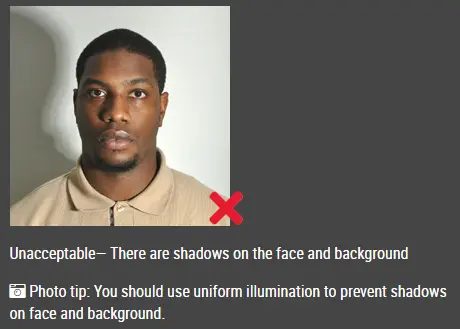
When taking photo, you should face the light, such as a nice bright window or the door. This can provide even lighting to avoid shadows on the face and background. The face must be evenly lit. There should be no shadows and glares on the face.

Note: No need to worry about the background as our online passport photo generator will automatically remove or change the background for you.

unacceptable passport photo

Step 3: Wear properly for your passport photo

Do not wear uniforms. Wear regular street clothes in your photo.

Do not wear eyeglasses. If you wear glasses, sunglasses, or tinted glasses, take them off for your passport photo.

Your face must still be fully visible.  Don’t let your hair drape over your face and obscure your eyes. If you have very long bangs that cover your eyebrows, you should pin them back with bobby pins. It’s best if your ears show, as well, but that won’t cause your photo to be rejected.

No hats are allowed in passport photos unless it is religious headgear such as a headscarf or yarmulke that you wear every day.

acceptable passport photo

Step 4: Pose for a passport

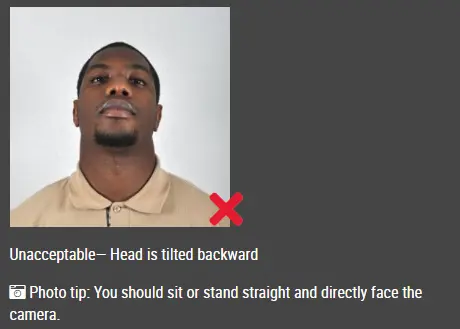
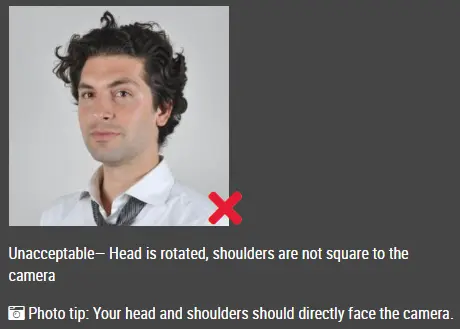
Look straight towards the camera with face straight on. Head should not be tilted or rotated.

Both ears showing or both edges of the face visible if hair covers the ears.

Shoulders should be visible, and there should be enough space around the head for cropping the photo.

Position the camera in the same height as the head.

unacceptable passport photo

unacceptable passport photo

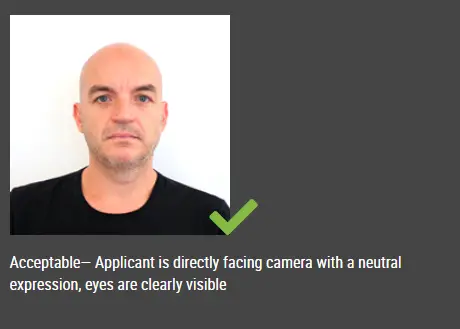
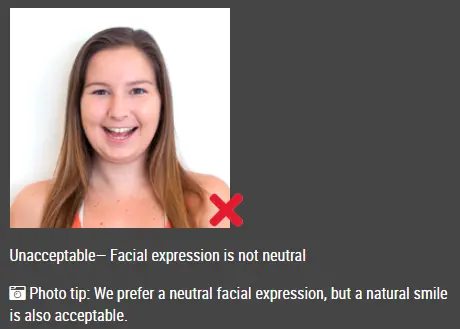
Step 5: Have a neutral facial expression

The government prefers that you have a neutral facial expression in your passport photos.

Smiling or having your mouth open is usually not acceptable, especially under the new international passport rules.

acceptable passport photo

Unacceptable passport photo


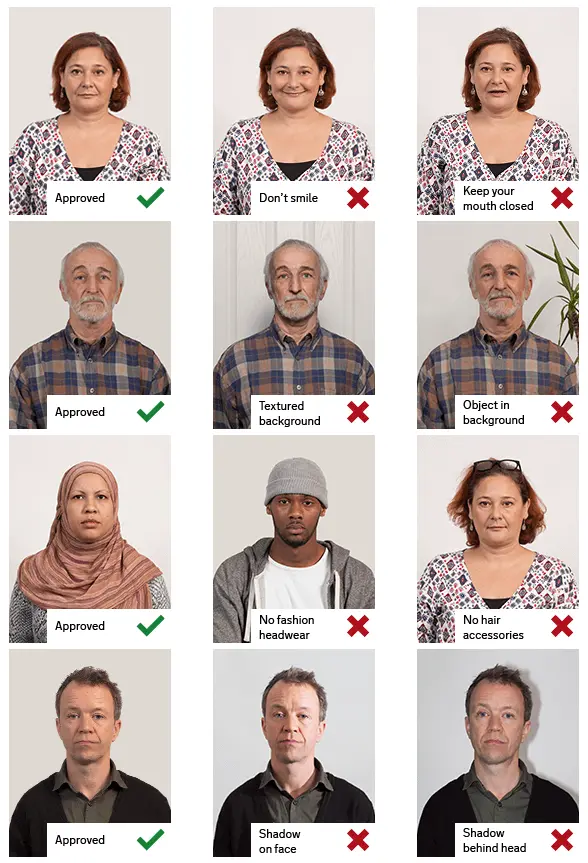
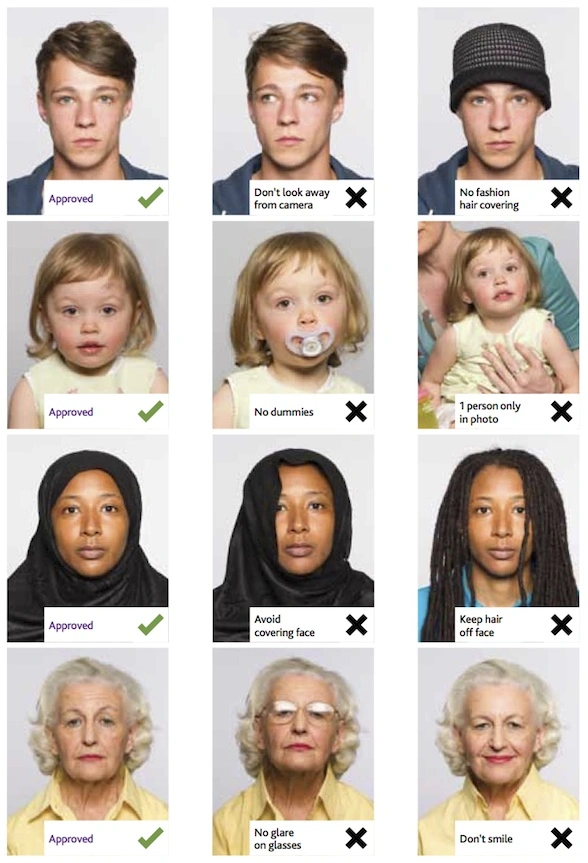
Good and bad examples of passport photos

Example of passport photos

Printed passport photos

Online Passport Photo Generator

Is this document useful?

This document is rated 4.6 / 5 - 13 Votes