Ireland Visa Photo Maker
35x45 mm (3.5x4.5 cm) Size and Requirements


| Country | Ireland |
| Document type | Visa |
| Passport picture size | Width: 35 mm, Height: 45 mm |
| Resolution (DPI) | 600 |
| Image definition parameters | Head must be between 70 to 80 % of the photograph from the bottom of the chin to the top of the head |
| Background color | White |
| Printable photo | Yes |
| Digital photo for online submission | Yes |
| Digital photo size | Width: 715 pixels , Height: 951 pixels |
| Photo Paper type | matte |
|
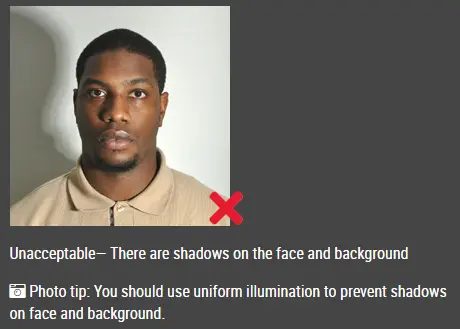
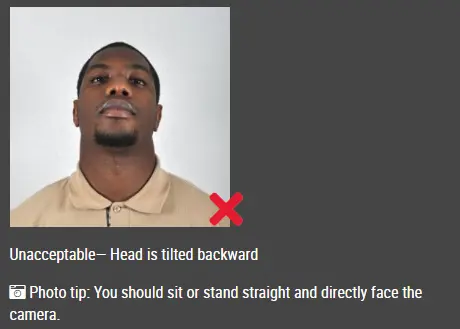
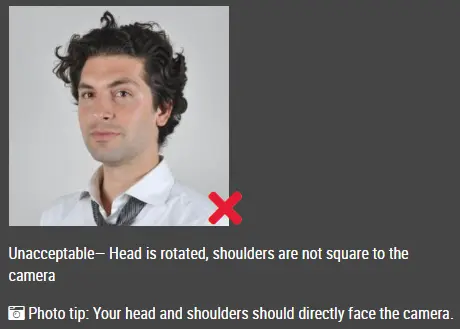
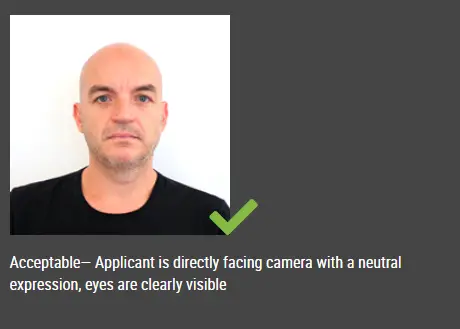
Detailed requirements Last Update: July 25, 2026 Ireland Visa Photo Size and RequirementsYour Irish visa photographs must meet the following requirements: Number of photos: Two identical photographs Ireland Visa Photo Face SizeYour face should take up about 70% to 80% of the photo. The image should be a clear close-up showing your face and the top of your shoulders. Make sure your head is:
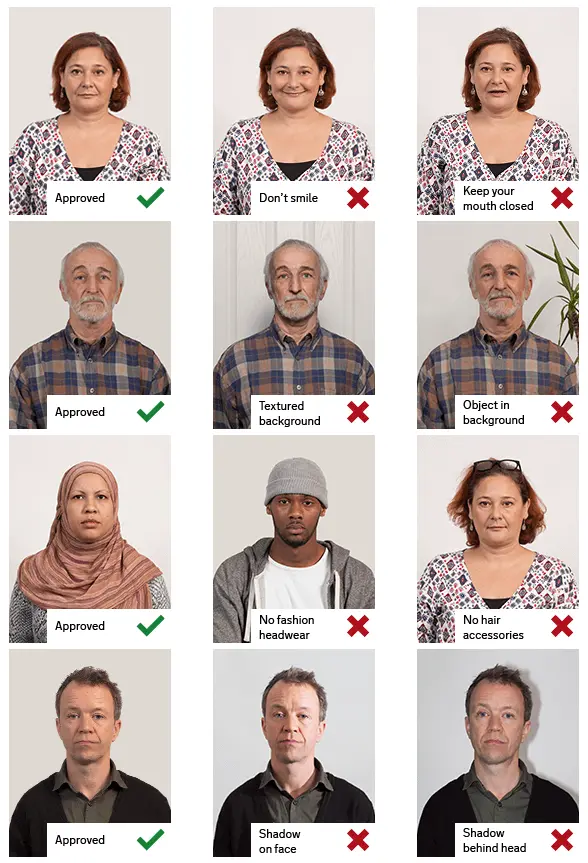
Avoid cutting off any part of your head, including the top of your hair, chin, or sides of your face. Ireland Visa Photo BackgroundThe background must be plain white or light grey. A suitable background should:
Take the original photograph against an appropriate background whenever possible. GlassesDo not wear sunglasses or glasses with tinted or coloured lenses. You may wear ordinary prescription glasses provided that:
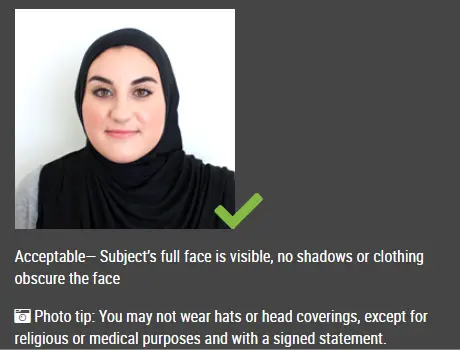
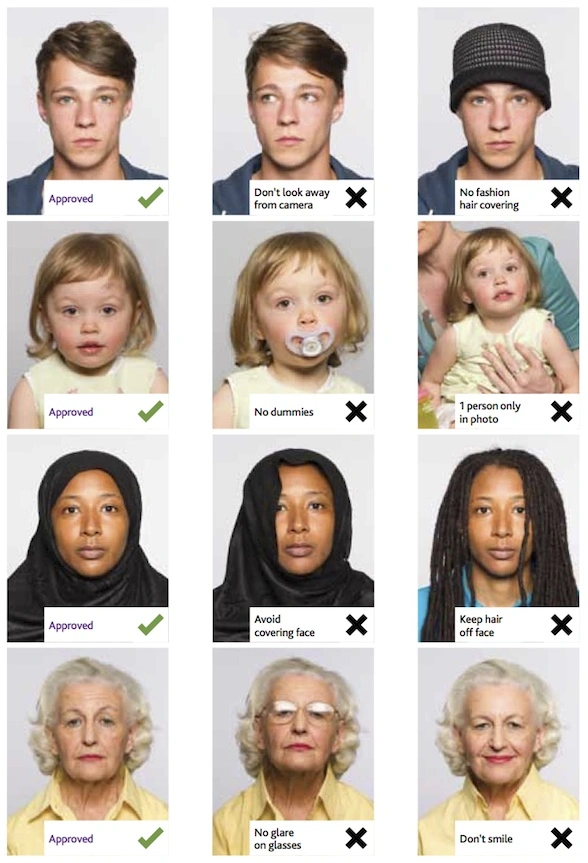
Removing your glasses may make it easier to avoid glare and reflections. Head CoveringsDo not wear hats, caps, headbands or other fashion head coverings. A head covering may be worn for religious reasons. However:
Ireland Visa Photos for Babies and ChildrenChildren and babies must also provide photographs that clearly show their face. Only the child should appear in the photograph. Make sure:
For a young baby, place the baby on a plain light-coloured surface and take the photograph from directly above. Printing Your Ireland Visa PhotosYour photographs must be printed on photographic paper. The reverse of each photograph must be:
Print two identical copies of the same image. Do not submit photographs printed on ordinary office paper. What to Write on the Back of Each PhotoWrite the following information on the back of both photographs using BLOCK CAPITALS:
You do not need to write a transaction number when applying for a re-entry visa. Write carefully so that you do not damage or mark the front of the photographs. Place the photographs in the same envelope as your application form. Do not staple, glue or attach the photographs to the application form. Common Reasons Ireland Visa Photos Get RejectedEven small mistakes can delay your visa application. Common reasons applications get held up include:
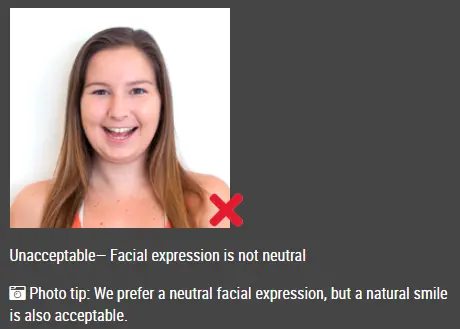
Check everything carefully before submitting to avoid delays. Frequently Asked QuestionsWhat size is an Ireland visa photo?Each photograph must be between 35 and 38 mm wide and between 45 and 50 mm high. A commonly prepared size within this permitted range is 35 × 45 mm. How many photographs do I need?You must submit two identical passport-sized photographs. Do the photographs need to be printed?Yes. The official visa-photo instructions require photographs printed on photographic paper. How recent must my photographs be?The photographs must have been taken within the last six months. Both photographs must show exactly the same image. What colour should the background be?The background must be plain white or light grey. Can I smile in an Ireland visa photo?No. You must use a neutral expression. Keep your eyes open and your mouth closed. Can I wear glasses in an Ireland visa photo?Ordinary glasses are permitted when your eyes are clearly visible and there is no glare or reflection. Sunglasses and tinted or coloured glasses are not accepted. Can I wear a religious head covering?Yes. A religious head covering is permitted as long as your face remains clearly and fully visible. Can I take my visa photo with a phone?Yes. You can take the original photograph with a modern smartphone or digital camera, provided that the final printed images meet all official requirements. Can I submit a digital photo instead?The standard Irish visa-photo guidance requires two printed photographs. Follow any additional instructions issued by the embassy, consulate or visa application office handling your application. What should I write on the back?Write the applicant’s name and visa application or transaction number in BLOCK CAPITALS on the back of both photographs. Should I attach the photos to my form?No. Put the photographs in the same envelope as your application form, but do not staple, glue or otherwise attach them. Prepare Your Ireland Visa Photo with IDPhotoDIY.comUse the IDPhotoDIY passport photo maker to quickly create a compliant Ireland visa photo in just three simple steps: Step 1: Upload your photoTake a clear, recent photo and upload it from your phone, tablet, or computer. Make sure your face is visible, well-lit, and taken against a plain background. Step 2: Automatic processing with our passport photo makerOur passport photo maker will automatically crop your image to the correct Ireland visa size, adjust the face position, and format it to meet official requirements. Step 3: Download and printDownload your ready-to-use photo sheet and one single digital photo. Print two identical copies on high-quality photographic paper. Your photos are now ready for your Ireland visa application. Official source: https://www.irishimmigration.ie/photograph-rules-for-visa-applications/ |
|
| Source | https://www.inis.gov.ie/en/INIS/Re-... |