Ireland Employment Permit Photo Maker
35x45 mm (3.5x4.5 cm) Size and Requirements


| Country | Ireland |
| Document type | Employment Permit |
| Passport picture size | Width: 35 mm, Height: 45 mm |
| Resolution (DPI) | 600 |
| Image definition parameters | Head must be between 70 to 80 % of the photograph from the bottom of the chin to the top of the head |
| Background color | White |
| Printable photo | Yes |
| Digital photo for online submission | Yes |
| Digital photo size | Width: 448 pixels , Height: 590 pixels |
| Photo Paper type | matte |
|
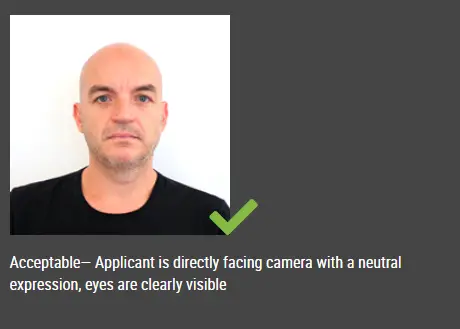
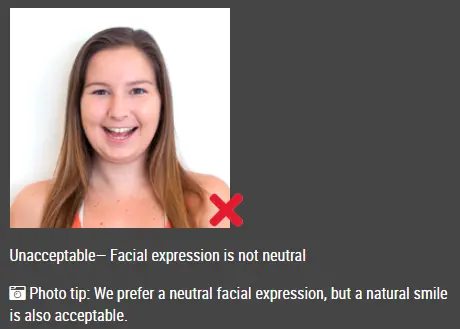
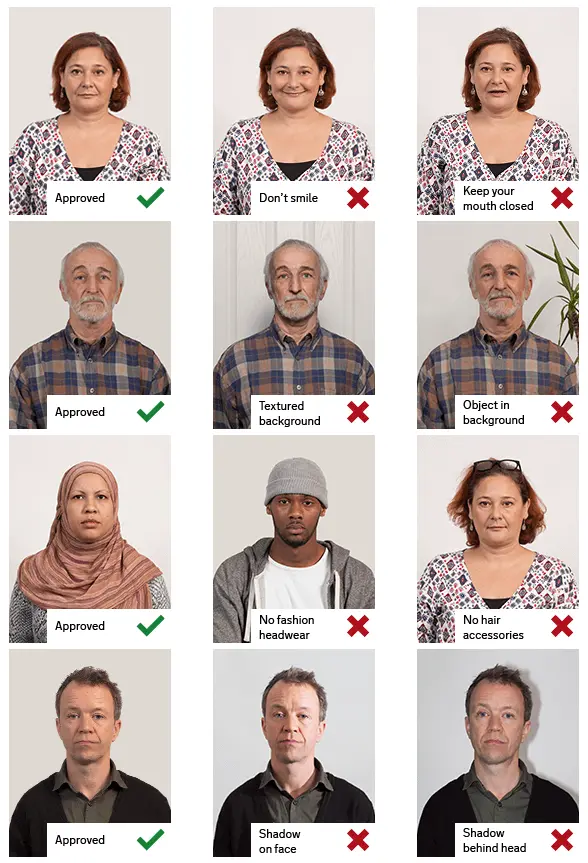
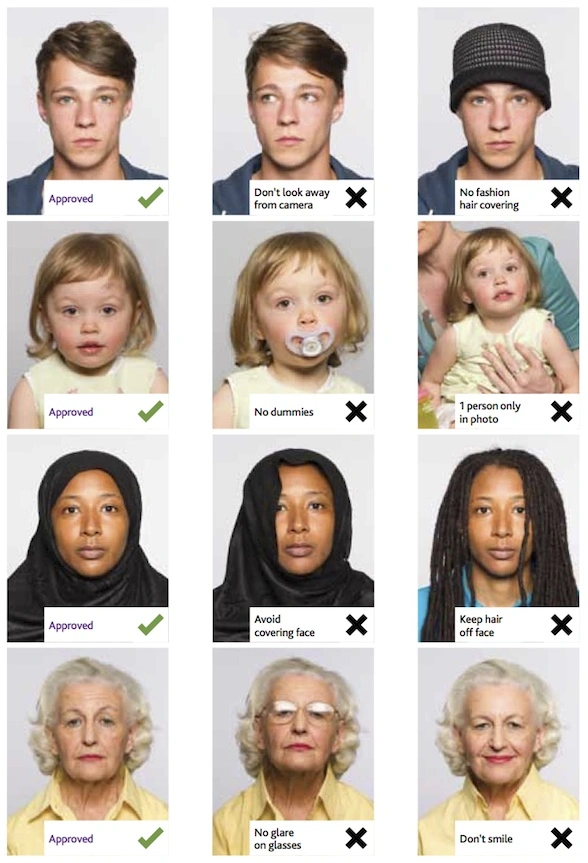
Detailed requirements Last Update: July 25, 2026 IRELAND EMPLOYMENT PERMIT PHOTO REQUIREMENTSFile format: JPEG Minimum image size: 413 × 531 pixels Maximum image size: 448 × 590 pixels Physical size range: 35 × 45 mm to 38 × 50 mm Image resolution: 240–300 DPI Maximum file size: Less than 5 MB Submission type: Digital upload Scanned printed photo: Not accepted Upload an original digital image rather than a scan of a printed passport photo. The file must be saved as a JPEG and meet the required dimensions, resolution and file-size limit. HOW TO USE IDPHOTODIY TO CREATE AN IRELAND EMPLOYMENT PERMIT PHOTO ONLINEStep 1: Take a clear passport photo online Use a smartphone or digital camera to take your passport size photo. For best results, ask another person to take the picture so your face is centered, level, and looking directly at the camera. Make sure there is enough space around your head and shoulders so the image can be properly cropped for an Ireland Employment Permit passport photo. Step 2: Upload your photo to the passport photo maker Select the original image from your phone, tablet, or computer. Avoid screenshots, compressed images, or scanned printed photos, as these may not meet the requirements. Step 3: Create your passport size photo online Use the IDPhotoDIY passport photo maker to automatically crop, resize, and adjust your image to the correct Ireland Employment Permit photo dimensions, DPI, and JPEG format. Step 4: Download and upload your final photo Save the processed passport photo to your device. Then upload it when completing the employee section of your Ireland Employment Permit application. WHY IS MY PHOTO NOT UPLOADING?Your photo may be rejected for one of these reasons: Incorrect dimensions The image must be between 413 × 531 and 448 × 590 pixels. Incorrect resolution The resolution must be between 240 and 300 DPI. Incorrect format The file must be saved as JPEG. File is too large The image must be less than 5 MB. The photo was scanned Use an original digital image rather than a scanned printed photo. Browser or upload problem Save the file directly to your computer desktop and try uploading it again. You can also clear your browser cache or use a desktop or laptop computer. FREQUENTLY ASKED QUESTIONSCan I create my passport photo online? Yes. Upload a clear image and use the IDPhotoDIY passport photo maker to crop and resize it for an Ireland Employment Permit application. Can I use a smartphone photo? Yes. A smartphone photo can be used when it is clear, properly lit and meets all technical requirements. Can I use a selfie? A selfie may create an incorrect angle or distort facial proportions. Ask another person to take the photo or place your phone on a stable tripod. Can I use a 35 × 45 mm passport size photo? Yes, provided the digital file is at least 413 × 531 pixels, uses a resolution between 240 and 300 DPI, is saved as JPEG and is less than 5 MB. Does the photo need to be printed? No. The Employment Permit photo is uploaded digitally. Can I scan an existing printed passport photo? No. Use an original digital JPEG image rather than a scan. Can I use the same photo for an employment visa? Do not assume the requirements are identical. Check the separate photo instructions for the visa application. |
|
| Source | https://epos.djei.ie/EPOSOnlineport... |