United Kingdom Visa Photo Maker
35x45 mm (3.5x4.5 cm) Size and Requirements


| Country | United Kingdom |
| Document type | Visa |
| Passport picture size | Width: 35 mm, Height: 45 mm |
| Resolution (DPI) | 600 |
| Required file size | At least 50KB and no more than 6MB |
| Image definition parameters | Head must be between 70 to 80 % of the photograph from the bottom of the chin to the top of the head |
| Background color | White |
| Printable photo | Yes |
| Digital photo for online submission | Yes |
| Digital photo size | Width: 826 pixels , Height: 1062 pixels |
| Photo Paper type | matte |
|
Detailed requirements Last Update: July 24, 2026 UK Visa Photo Requirements: Size, Pixels and Photo RulesUK Visa Photo Requirements at a GlanceHere’s a quick overview of what your UK visa photo should meet:
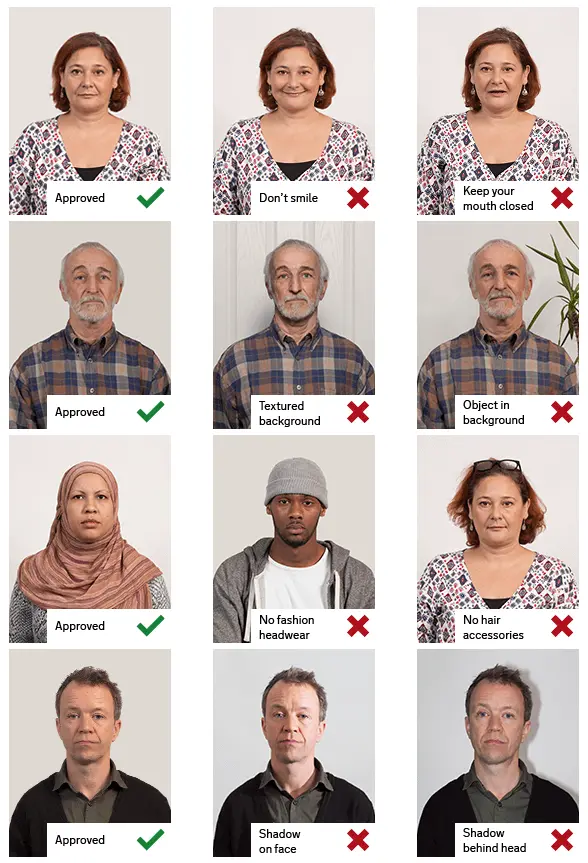
It’s worth noting that a 35 × 45 mm photo isn’t always required. That size usually applies only if your visa centre or application instructions specifically ask for a printed passport-style photo. Digital UK Visa Photo SizeIf you’re applying online, your photo should be at least: 600 pixels wide × 750 pixels tall Make sure the image is vertical, not landscape. You don’t have to stick to one exact size, as long as the proportions are correct and the image meets the quality and file-size requirements. Larger images are generally fine if they’re clear and properly formatted. Save your photo as a JPG or JPEG file, and keep the file size between 50KB and 6MB. DPI isn’t something you need to worry about for online applications. What matters most is the pixel size, clarity and file size. Is a UK Visa Photo 35 × 45 mm?Sometimes, yes—but not always. A 35 mm by 45 mm photo may be required if you’re asked to submit printed photographs. However, most UK visa applications today use digital photos instead. Before printing anything, check the instructions that come with your application or appointment. Requirements can vary, so it’s best not to assume. UK Visa Photo BackgroundYour photo should be taken against a plain, light-coloured background. Avoid backgrounds with:
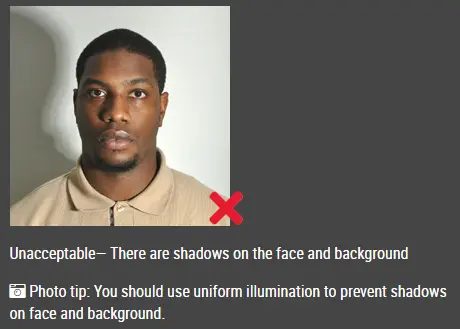
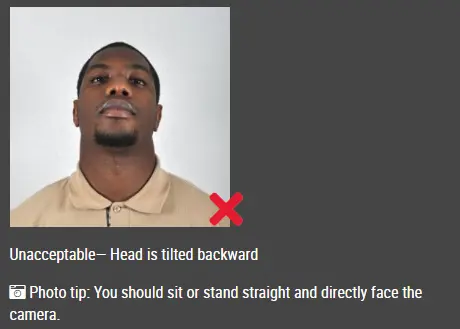
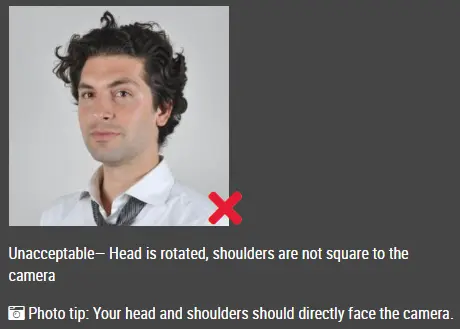
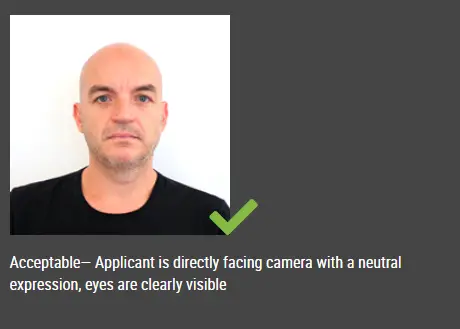
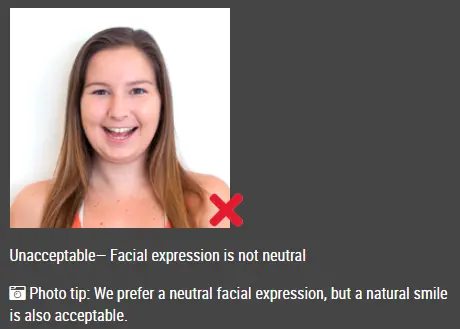
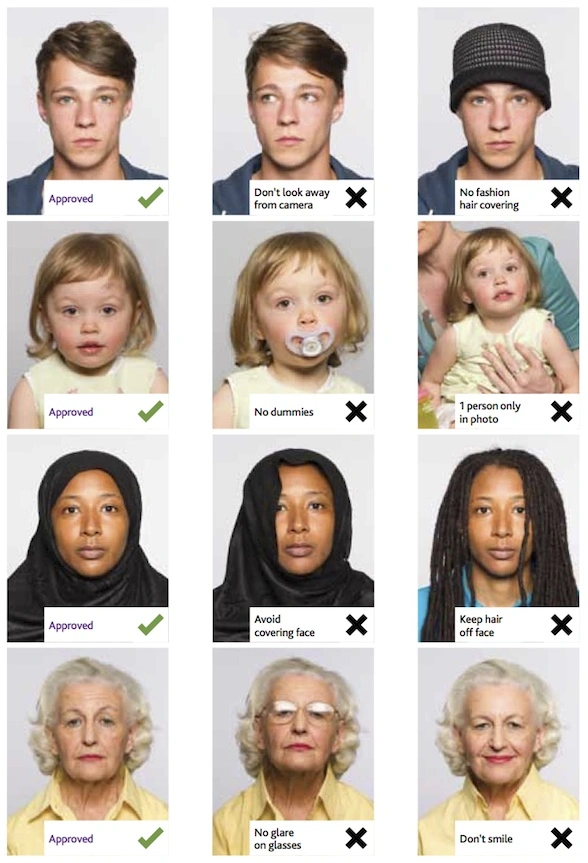
Lighting should be even so your face is clearly visible. Try to avoid shadows on your face or behind you. Also, skip filters, beauty modes or background blur effects. According to official guidance, the image shouldn’t be digitally altered. It’s always safer to take the photo correctly from the start rather than editing it later. Facial Expression and Head PositionFace the camera directly and keep your head straight. Your photo should show:
Avoid tilting your head or turning to the side. Don’t smile widely or make exaggerated expressions. Make sure your hair doesn’t cover your eyes. Can You Wear Glasses?It’s usually better to take your glasses off. Glasses can cause issues like:
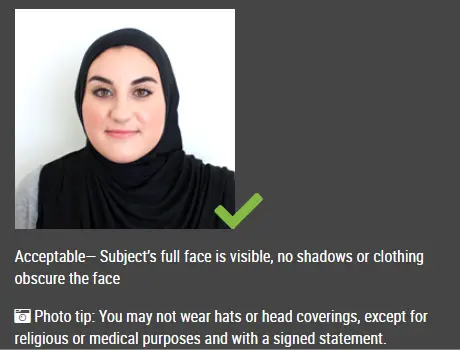
If you do need to wear them, make sure your eyes are fully visible and there’s no glare. Sunglasses or tinted lenses are not allowed. Head CoveringsHats, caps and fashion headwear aren’t allowed. However, head coverings for religious or medical reasons are acceptable, as long as your face is fully visible. Your face should be clear from the bottom of your chin to the top of your forehead. ClothingChoose clothing that stands out against a light background. Avoid wearing white or very light colours if they blend into the background. Uniforms are generally not recommended unless they’re worn for religious reasons. UK Visa Photos for Babies and ChildrenChildren must be photographed on their own. The photo should not include:
Use a plain, light background and make sure the child’s face is clearly visible. There may be some flexibility for babies, but the photo still needs to be clear enough for identification. Can You Take a Selfie?It’s better not to. Selfies often distort your face because the camera is too close. They can also make it harder to keep the right angle and positioning. If possible, ask someone else to take the photo from a proper distance. Prepare Your UK Visa Photo with IDPhotoDIY.com
Frequently Asked QuestionsWhat size should a digital UK visa photo be?At least 600 pixels wide and 750 pixels tall, in a vertical format. What file size should a UK visa photo be?Between 50KB and 6MB. What file format is accepted?JPG or JPEG. Does a UK visa photo have to be 35 × 45 mm?Not always. That size is only needed if printed photos are specifically requested. Can I use my phone to take the photo?Yes, as long as the image is clear, well-lit and taken against a plain background. Can I smile?No—keep a neutral expression with your mouth closed. Can I wear glasses?It’s better to remove them. If you keep them on, your eyes must be clearly visible without glare. Can I edit the background?No. The photo should not be digitally altered. It’s best to take it against a proper background from the start. Do I need a 600 DPI photo?No. DPI isn’t important for online submissions—focus on pixel size and file requirements. Can I submit a selfie?It’s not recommended. A photo taken by someone else usually works better. Can I use an old photograph?Use a recent photo that reflects how you currently look. What happens if my photo is rejected?You’ll need to submit a new one, which can delay your application. It’s best to get it right the first time. Source: https://www.gov.uk/guidance/how-to-take-a-photo-for-a-visa-application-or-permission |
|
| Source | |