Home > Passport Photo Requirements > United Kingdom Driving Licence Photo 35x45 mm (3.5x4.5 cm)

United Kingdom Driving Licence Photo Maker
35x45 mm (3.5x4.5 cm) Size and Requirements


How idPhotoDIY works

Country United Kingdom
Document type Driving Licence
Passport picture size Width: 35 mm, Height: 45 mm
Resolution (DPI) 600
Image definition parameters

Head must be between 70 to 80 % of the photograph from the bottom of the chin to the top of the head

Background color White
Printable photo Yes
Digital photo for online submission Yes
Digital photo size Width: 826 pixels , Height: 1062 pixels
Photo Paper type matte
Detailed requirements
Last Update: July 22, 2026

Printed UK driving licence photo requirements

  • The photo must be 45 mm high by 35 mm wide.
  • The head must measure 29-34 mm from the chin to the crown.
  • Use plain white photographic paper with no border.
  • Use a plain cream or light grey background with no pattern or objects.
  • The image must be clear, in focus, in colour and free from red eye.
  • The print must have no creases, tears or software alteration.
  • Do not submit a print cut from a larger photograph.

Digital photo requirements for an online application

For a new digital passport-style image, follow the UK government's

digital photo standards:

At least 600 pixels wide and 750 pixels high

Between 50 KB and 10 MB

Clear, sharp and in colour

No filters, beauty effects or software alteration

No other people or objects in the image

A plain, light-coloured background

No red eye, facial shadows or background shadows


How to take a suitable UK driving licence photo

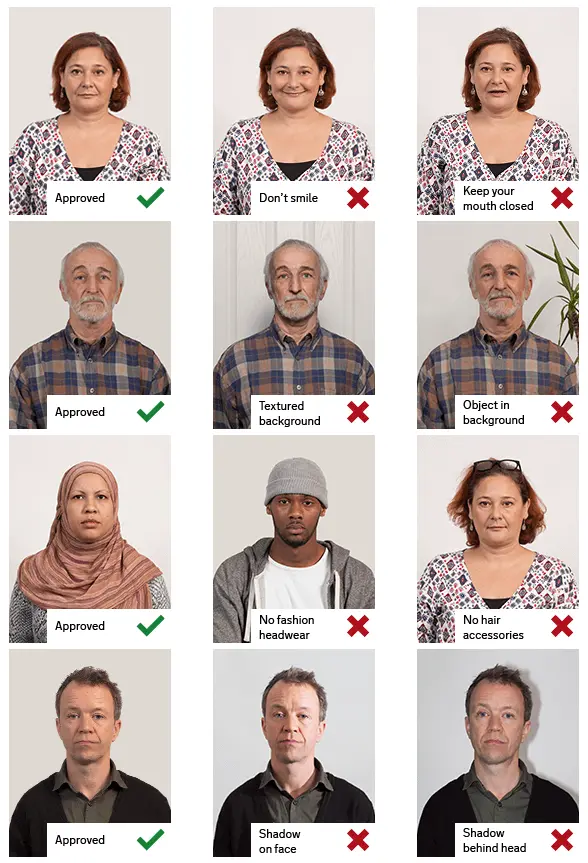
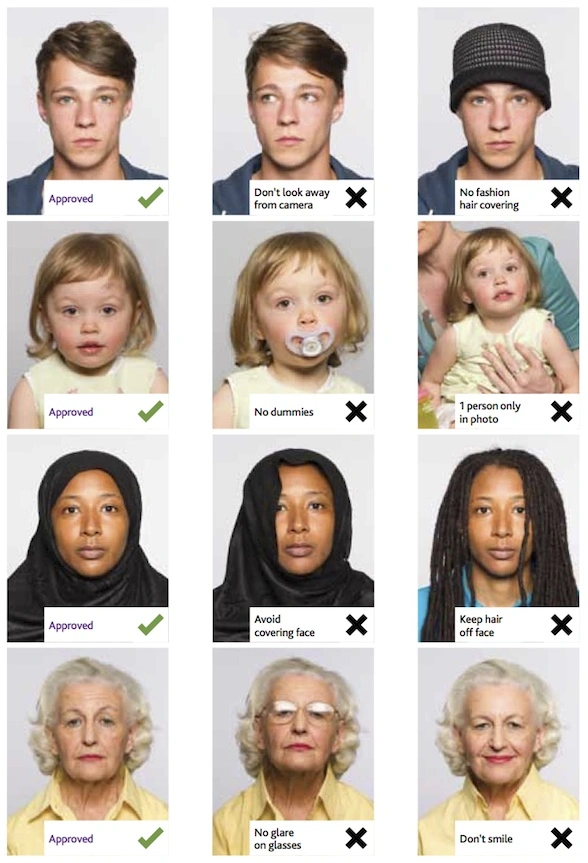
Face the camera directly


Keep your head straight and look directly into the camera. Your full
face must be visible, with your eyes open and not covered by hair.

Use a neutral expression

Keep a plain expression and close your mouth. Do not smile broadly,
frown or raise your eyebrows.

Use even lighting

Stand in soft, even light. Avoid strong light from one side, flash glare
and shadows on your face or behind your head.

Keep your face visible

Head coverings are permitted only for religious or medical reasons and
must not cover your facial features.

Remove glasses where possible

Do not wear glasses unless you have to. When glasses are necessary,
make sure the lenses are not tinted and that the frames, glare,
reflections or shadows do not hide your eyes.

Frequently asked questions

What size is a UK driving licence photo?

A printed passport-style photo for a DVLA postal application should
measure 35 mm wide by 45 mm high. The image from the crown of the
head to the chin should normally measure between 29 mm and 34 mm.

Can I smile in a UK driving licence photo?

Use a plain, neutral expression with your mouth closed. Face forward
and look directly at the camera.

Can I use my passport photo for my driving licence?

DVLA may allow you to use the photo held with your UK passport when
you apply or renew online. The official service will show the options
available for your application.

Does my driving licence photo need to be signed?

Not always. A signature is generally unnecessary when DVLA verifies
your identity through a UK passport or share code, or when you renew
a licence with a new photo. Some other applications require an
eligible person to sign the form and photo.

Can I wear glasses in my driving licence photo?

Remove glasses unless you must wear them. If they are necessary, your
eyes must remain fully visible, and there must be no tint, glare,
reflection or shadow.


Official sources

GOV.UK: Change the photo on your driving licence

GOV.UK: Digital passport photo requirements

GOV.UK: Printed passport photo requirements

GOV.UK: Identity documents and photo signing

nidirect: Northern Ireland driving licence photos

Source

Do not worry about the photo size requirements. IDPhotoDIY online tool will help you make correct United Kingdom Driving Licence size photos.

How to make United Kingdom Driving Licence photo online


Step 1: Use a digital camera or a smartphone

Find someone to take the photo for you and selfie photo is not acceptable for passport photo application. If you have a tripod, use it. A tripod will make it easier to keep the camera steady and level. The distance of the person to the camera should be around 1 meter.

Step 2: Find a venue with good lighting

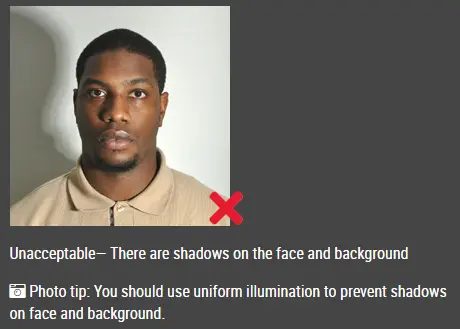
When taking photo, you should face the light, such as a nice bright window or the door. This can provide even lighting to avoid shadows on the face and background. The face must be evenly lit. There should be no shadows and glares on the face.

Note: No need to worry about the background as our online passport photo generator will automatically remove or change the background for you.

unacceptable passport photo

Step 3: Wear properly for your passport photo

Do not wear uniforms. Wear regular street clothes in your photo.

Do not wear eyeglasses. If you wear glasses, sunglasses, or tinted glasses, take them off for your passport photo.

Your face must still be fully visible.  Don’t let your hair drape over your face and obscure your eyes. If you have very long bangs that cover your eyebrows, you should pin them back with bobby pins. It’s best if your ears show, as well, but that won’t cause your photo to be rejected.

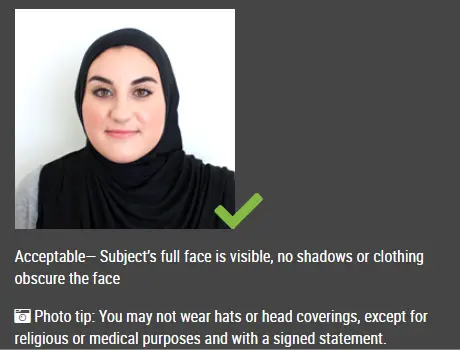
No hats are allowed in passport photos unless it is religious headgear such as a headscarf or yarmulke that you wear every day.

acceptable passport photo

Step 4: Pose for a passport

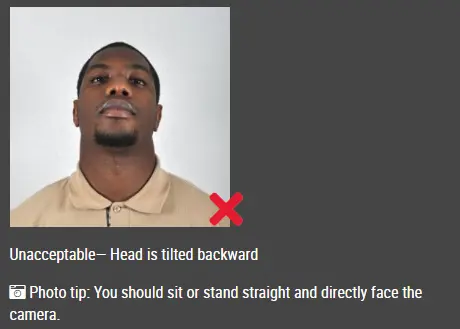
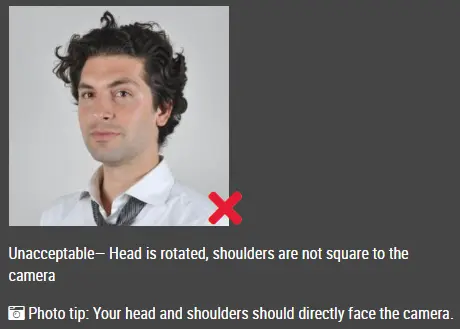
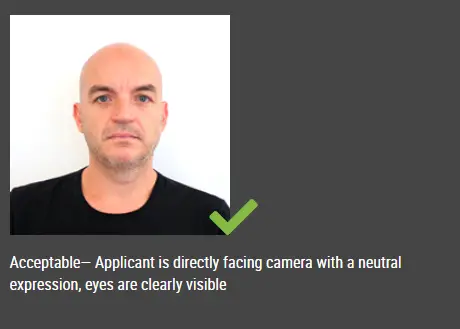
Look straight towards the camera with face straight on. Head should not be tilted or rotated.

Both ears showing or both edges of the face visible if hair covers the ears.

Shoulders should be visible, and there should be enough space around the head for cropping the photo.

Position the camera in the same height as the head.

unacceptable passport photo

unacceptable passport photo

Step 5: Have a neutral facial expression

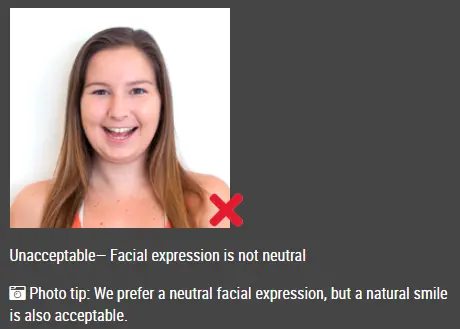
You can smile in your passport photos, but the government prefers that you have a neutral facial expression.

Smiling or having your mouth open is usually not acceptable, especially under the new international passport rules.

acceptable passport photo

Unacceptable passport photo


Good and bad examples of passport photos

Example of passport photos

Printed passport photos

Online Passport Photo Generator

Is this document useful?