DV Lottery Photo Common Errors
Last Update: October 10, 2025
Diverse Visas (DV) are lottery programs that provide green cards to immigrants from low-immigration countries. Applicants must submit a photo that meets certain requirements as part of the application process.The photo you submit with your DV lottery application is crucial. Images that do not meet one or more of the requirements will automatically be disqualified.
The most common DV lottery photo errors are:
1. The photo is not in the required size and format.
The size should be a square with a minimum of 600 pixels and a maximum of 1200 pixels on each side. Files should be in jpeg or jpg format. If the photo does not meet these requirements, it will not be accepted and the application will be disqualified. Be sure the photo meets the requirements before submitting the application by carefully reviewing the photo requirements.
2. The photo is not a recent, clear and accurate representation of the applicant.
The photo must be taken within the past six months.The DV lottery photo may raise suspicions about the authenticity of the application and the identity of the applicant if it is not a recent image of the applicant. As a result, the application could be denied or the applicant could be denied entry into the country. To avoid any potential issues, applicants should submit a recent and accurate photo in their DV lottery application.
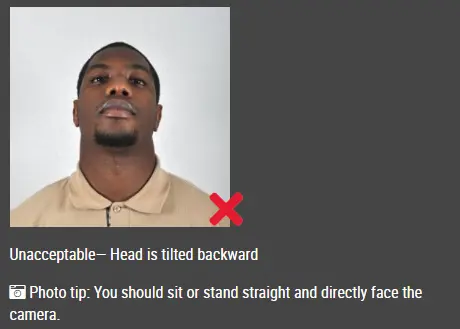
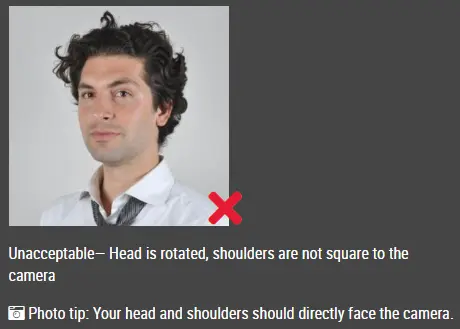
3. The applicant's face is not clearly visible in the photo.
A new photo that clearly shows the applicant's face should be submitted in this case. It is important that the applicant faces the camera directly with their face clearly visible in the photo, and it should be taken in a well-lit area with a neutral background.
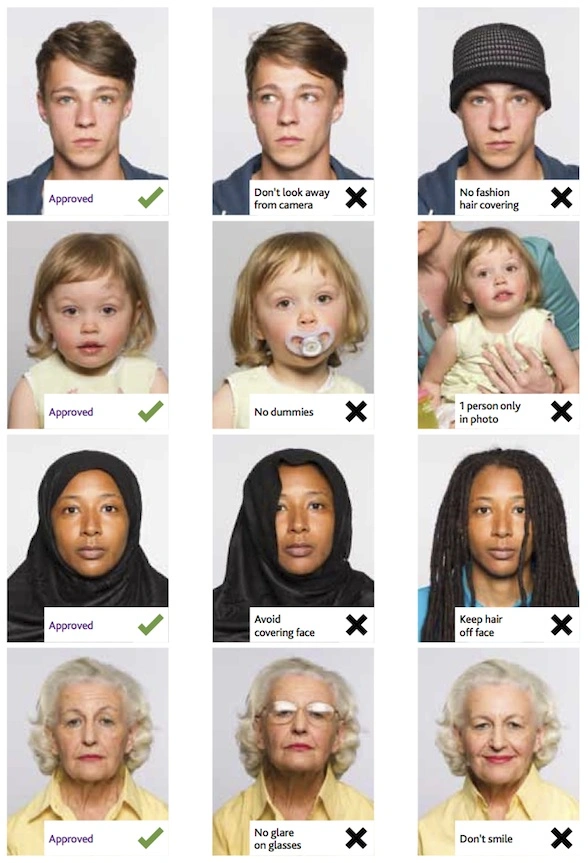
4. The applicant is not the only person in the photo.
It is likely that the applicant's application will be disqualified if there is more than one person in the DV lottery picture. Only the applicant should appear in the photo, and no other individuals should be present. Failure to adhere to this requirement can result in the applicant's application being denied under the DV lottery program.
5. The photo is not taken against a plain white or off-white background.
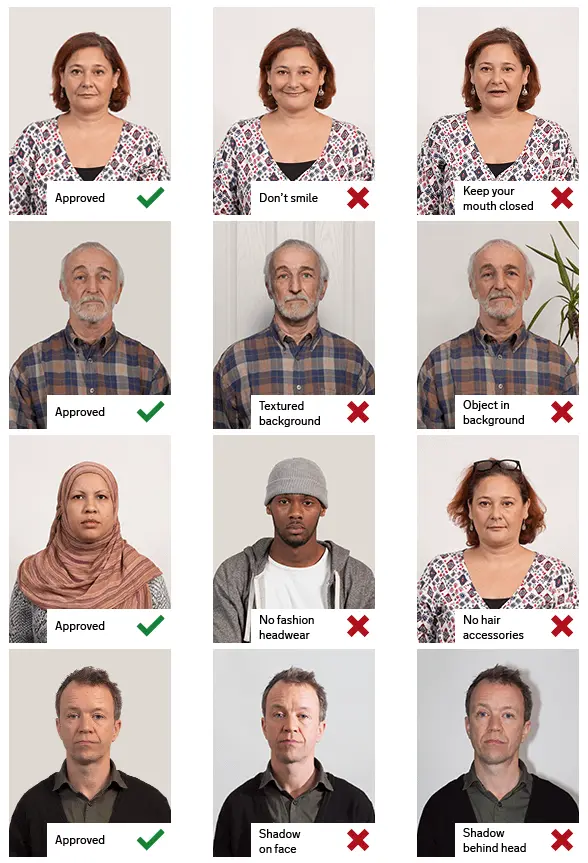
Having a plain white or off-white background is essential for the photo, according to the guidelines and requirements.
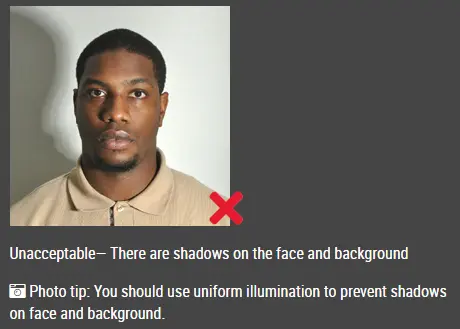
6. The photo is not taken in proper lighting conditions.
For a clear and accurate representation of the applicant's appearance, the photo should be taken in a well-lit area with even lighting. Under fluorescent lighting or direct sunlight, the applicant's features may appear distorted or harsh shadows may result. In addition, ensure that the background is plain and free of distractions.
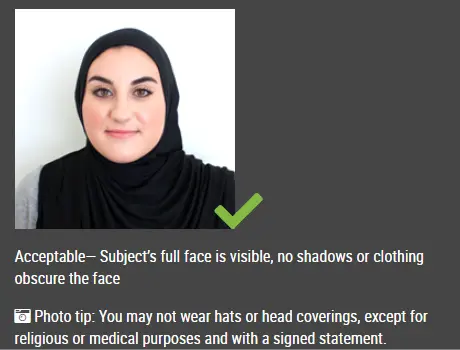
7. The applicant is wearing a hat, head covering or sunglasses in the photo.
This is not acceptable for the DV lottery photo. It is necessary for the applicant to remove hats, headcoverings, or sunglasses before taking a photo. It is important for the face to be clearly visible without any obstructions.
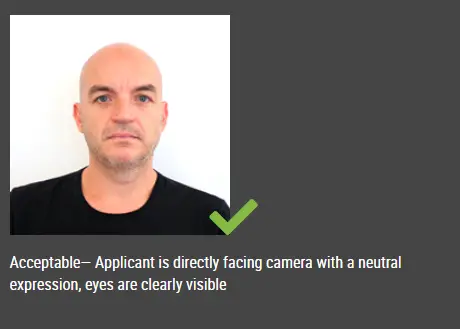
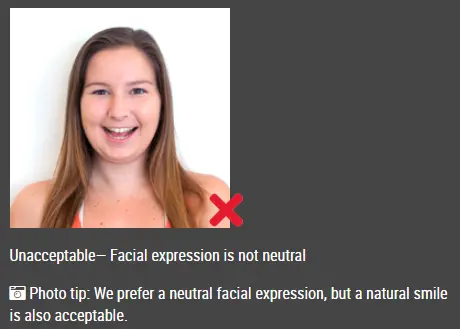
8. The photo is not taken in neutral facial expressions.
You are allowed to smile gently in your DV Lottery photo. A big smile, however, will disqualify you. When taking your Green Card photo, keep your facial expression neutral and avoid showing your teeth.
9. The photo is not free of glares or reflections.
Glare or reflection may appear in the photo, affecting its quality and making it difficult to see the person clearly. Photo quality is important to ensure that it meets the requirements of the DV lottery and can be used for application purposes.
10. The photo is not free of red eye.
Photos with red eye are not accepted. And you cannot remove it by using photo editing software. You have to resubmit a photo without red eye.
11. The photo is in low resolution
You must submit a digital photo between 600x600 pixels and 1200x1200 pixels when you register for the DV Lottery.
12. The face image is too large or too small
The applicant should retake the DV lottery photo if the face image is too large or too small. The applicant should ensure that the face fills the required area and meets the DV lottery specifications.
Head must be between 1 -1 3/8 inches (25 - 35 mm) from the bottom of the chin to the top of the head (photos cannot be taken too far away or too close up)
13. There are shadows on the face
Probably, the shadows on the face in the lottery photo were caused by the lighting in the room or outdoors. An artificial light source or the sun's shadow may cast contrasting shadows on the face, highlighting certain features. A photo may also have shadows cast from different directions by the light source, depending on the angle at which it was taken. Shadows on the face are not allowed. You need to retake a photo without shadow.
14. Facial characteristics are altered.
Changes to your hair, eyes, and skin color, as well as blurring your face tone are absolutely unacceptable. If you don't distort your original appearance in any way, such manipulations as changing the size or background of the photo are not a violation.
Other articles about DV Lottery photos
-
Best Lighting for DV Lottery Photos: A Simple, Home-Friendly Guide
-
How to Split Photos Like a Pro with IDPhotoDIY’s Free Image Splitter
- Baby DV lottery photo
Cliquez ici pour créer des photos d'identité / de visa