DV lottery photo
Last Update: December 28, 2025
When you apply for the Diversity Visa (DV) Program online,
You must upload a digital image. All photographs of you, your spouse, and your derivative children must be from the past six months. If you submit the same photograph as a previous year's entry, you will not be eligible for a DV.
Your digital image must :
-
be an image file in the JPEG format (.jpg)
- Have a resolution of 600 x 600 pixels
-
be In a square aspect ratio (height equals width)
-
be less than or equal to 240 kB (kilobytes).
If you are selected,
You must bring two identical photos to the interview if you are selected. Your photos must be:
- A photo-quality print
-
A size of 2 x 2 inches (51 x 51 mm)
What is the photo requirement for DV Lottery?
You can take new digital photos or scan recent photos using a digital scanner.
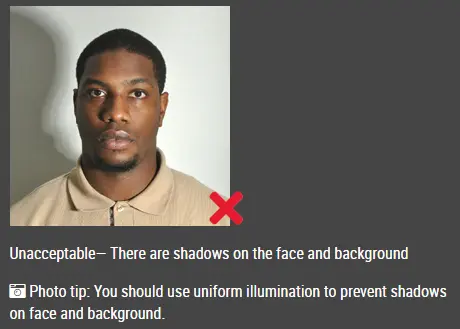
Ensure that all standards are met when taking a photograph. You will not be eligible for a DV if your photograph doesn't meet these specifications:
- Presented in color
- In focus
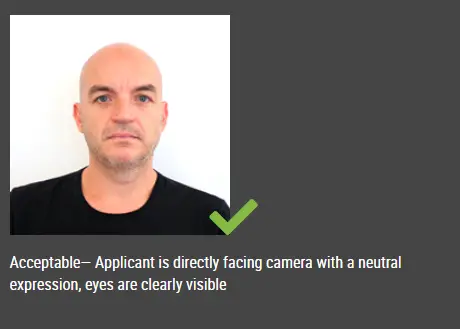
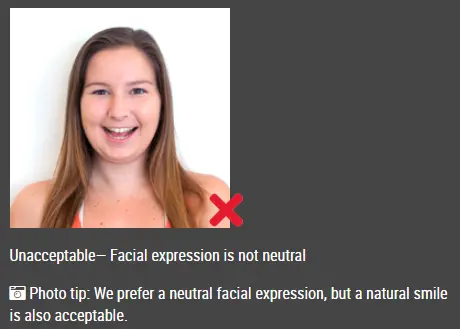
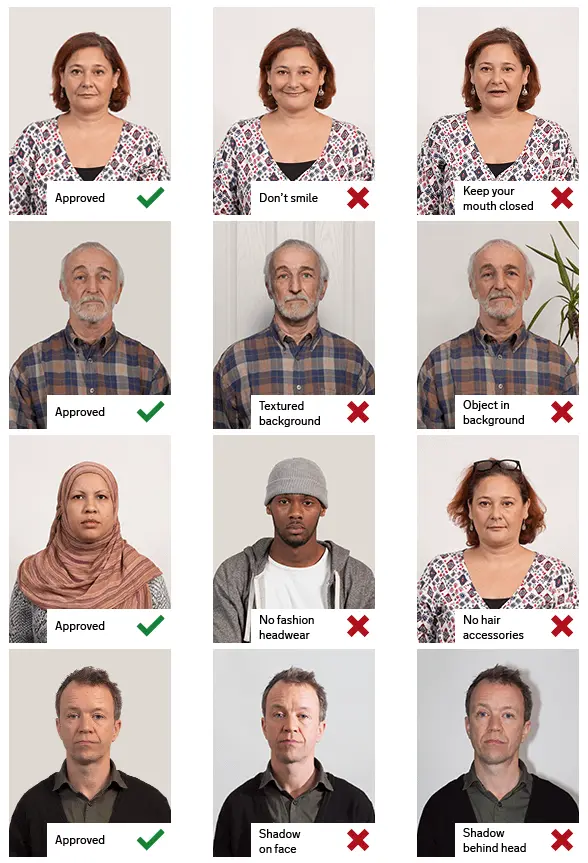
- Both eyes are open and the facial expression is neutral
- Sized between 1 and 1 3/8 inches (22 to 35 mm) or 50 to 69 percent of the image's height from bottom to top.
- The photo should reflect your current appearance and be taken within the last six months
- The background should be white or off-white
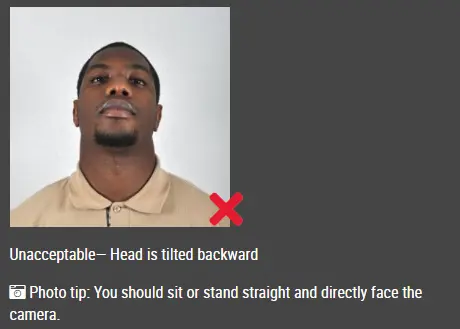
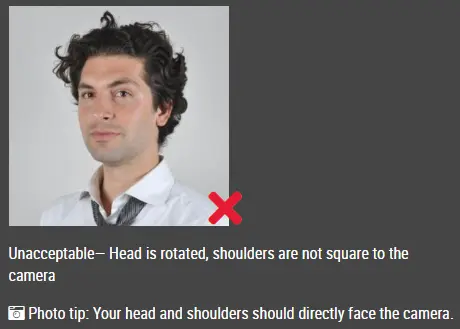
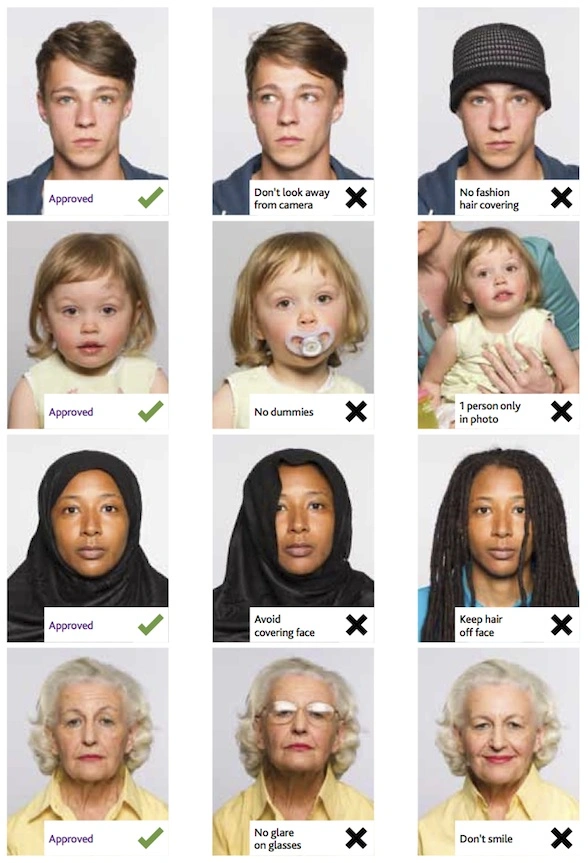
- Directly facing the camera in full-face view
- Have correct dress code for passport photo
- Taken in daily clothing that you normally wear
- In your photo, uniforms should not be worn, except for religious clothing worn daily.
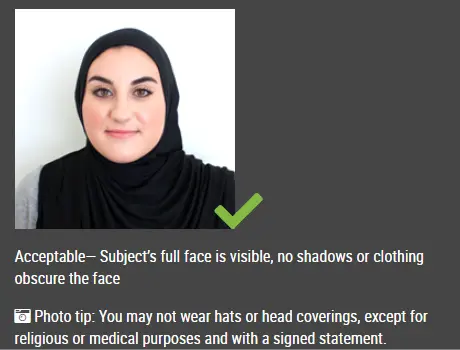
- Head coverings should not obscure the hairline or hair, unless worn for religious reasons on a daily basis.
- Ensure that your entire face is visible, and the head covering should not cast any shadows on it.
- Your photo must not include headphones, wireless hands-free devices, or similar items.
- Avoid wearing eyeglasses.
- Your photo may include a hearing aid or similar item if you normally wear one.
Photocopies or digital scans of driver's licenses or other official documents are not acceptable. In addition, low quality vending machine and full-length photographs are not acceptable.
When taking a photo of your baby or toddler, there should be no other people in the picture, and your child should be looking directly at the camera.
- Lay your baby on his or her back
- Make certain there are no shadows on your baby's face, especially if you take a picture from above with the baby lying down.
- Take a picture of your child in the car seat
Can I take DV lottery photo with my phone?
Yes, you can take a DV lottery photo with your smartphone.The photo must be in high resolution.
Can I edit photo for DV Lottery? Is it acceptable to edit my photo for DV Lottery?
The digital manipulation of photographs or altering of facial characteristics is not allowed.Your lottery application will be disqualified if you do so.
Can I photograph my DV Lottery at home?
Yes, you can take your own photo using your smart phone or any other digital devices with a camera. However, you need to keep in mind the requirements for Diversity Visa lottery photos before you take the photo.
How do I take a photo of diversity visa?
1.Don't take selfie, have others to take photo for you.
2.Use a tripod
3.Ensure you are facing the bright window or door
4.Dress in regular street clothes for your photo
5.Face the camera straight on and have a neutral facial expression
Can I scan an existing photo? How do I scan a picture for DV Lottery?
Aside from the digital image requirement, your existing photo must also be:
• 2 x 2 inches (51 x 51 mm)
• Scanned at 300 pixels per inch
Can I submit DS-160 without photo?
No, in order to complete and submit Form DS-160, you must upload a digital photograph taken within the last six months. On the day of your interview, you should also bring a copy of your photograph.
How can I upload digital photo in DS-160?
Please keep the file size of your photo to 240 kb or less, and make sure the image format is JPEG (i.e., jpg). Click "Browse" and select your photograph from your local computer, then click "Upload Photo".
How can I get digital photo for DV lottery?
The most convenient way is to take a photo at home using your smart photo camera and then upload it to our website www.idphotodiy.com to generate your DV lottery photo.
How can I crop my photo in DV Lottery?
1. upload your original photo to our webiste www.idphotodiy.com
2. drag the crop frame to cut your photo
How do I know if my DV lottery photo is good?
Before uploading your photo for the entry of DV lottery , you may check if your photo meets all the requirements at https://tsg.phototool.state.gov/photo
Which app is best for DV lottery photo?
Our webiste is the best for you to generate your DV lottery photo as it only take a few seconds to generate high quality photo!
پاسپورٹ / ویزا تصاویر بنانے کے لیے یہاں کلک کریں