United States DV lottery Photo Maker

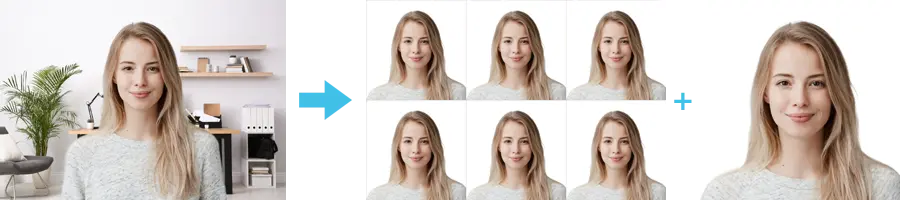
How idPhotoDIY works
Create your passport / visa photos online for printing and online submission

    (Anforderungen)
    (Anforderungen)
    (Anforderungen)
    (Anforderungen)
    (Anforderungen)
    (Anforderungen)
    (Anforderungen)
    (Anforderungen)


So funktioniert es

1. Foto aufnehmen

Nutzen Sie eine weiße Wand als Hintergrund und machen Sie mehrere Fotos mit einer Kamera oder einem Smartphone

2. Foto zuschneiden

Schneiden Sie Ihr Foto auf die richtige Ausweis- oder Passfotogröße zu. Über 50 Vorlagen verfügbar!

3. Herunterladen und drucken

Laden Sie Ihr Foto herunter und drucken Sie es in einem beliebigen Fotogeschäft oder online. Ein einzelnes digitales Foto ist ebenfalls erhältlich.

Baby DV lottery photo

Last Update: July 25, 2023

The Baby DV lottery photo is an important requirement for parents who wish to apply for the Diversity Visa Program. This program allows people from countries with low rates of immigration to the United States to apply for a chance to obtain permanent residency.

To apply for the program, parents must submit a recent photo of their child or children who are under the age of 21. The photo must meet certain requirements to be considered valid.

First, the photo must be in color and taken within the last six months. It must be a clear, full-face image of the child with a neutral expression and with both eyes open. The child's head must be centered within the frame and the background must be plain, with no patterns or objects.

The size of the photo must be 600x600 pixels and the file format must be JPEG. The file size must be equal to or less than 240 kB (kilobytes).

It is important to note that photos that do not meet these requirements will not be accepted and could result in the application being rejected.

Therefore, when submitting a Baby DV lottery photo, it is crucial to carefully follow the guidelines to ensure that the photo is valid and the application has the best chance of success.

Tips For Taking photos of babies

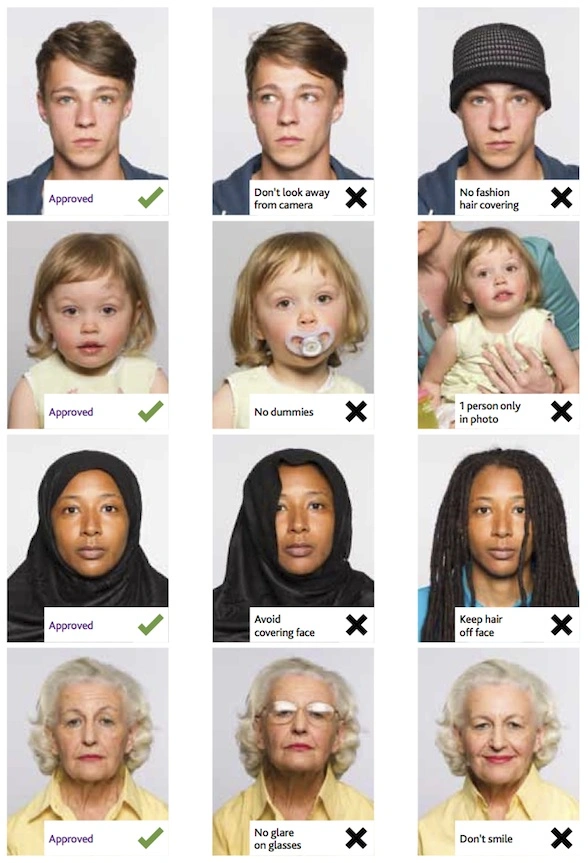
You should not include other people in a photo of your baby or toddler, and your baby should be looking at the camera with his or her eyes open. Below are some tips for taking photos of your baby:


  • Lay your baby on his or her back on a plain white or off-white sheet.By doing this, you will ensure your baby's head is supported and your photo will have a plain background.You should make sure your baby's face is not shadowed, especially if you are taking a picture from above.
  • You can take a picture of your child in the car seat by covering it with a white or off-white sheet.It will also ensure that your baby's head is supported.
  • Use idphotodiy.com to generate your DV lottery photo

Generating a DV Lottery photo that adheres to the strict guidelines can be a daunting task. However, with idphotodiy.com, the process becomes simple and efficient. This user-friendly website ensures compliance with the DV Lottery photo requirements, allowing you to focus on completing your application with confidence. By following the step-by-step guide provided, you can create a professional-quality DV Lottery photo effortlessly.


Klicken Sie hier, um Passfotos / Visafotos zu erstellen
Weitere Anleitungen zu Passfotos

Wie macht man in 5 Schritten ein Passfoto?


Schritt 1: Verwenden Sie eine Digitalkamera oder ein Smartphone, um ein Foto aufzunehmen

Bitten Sie jemanden, das Foto für Sie aufzunehmen – ein Selfie wird für den Passfotoantrag nicht akzeptiert. Falls Sie ein Stativ besitzen, verwenden Sie es. Ein Stativ erleichtert es, die Kamera ruhig und gerade zu halten. Der Abstand der Person zur Kamera sollte etwa 1 Meter betragen.


Schritt 2: Suchen Sie einen Ort mit guter Beleuchtung

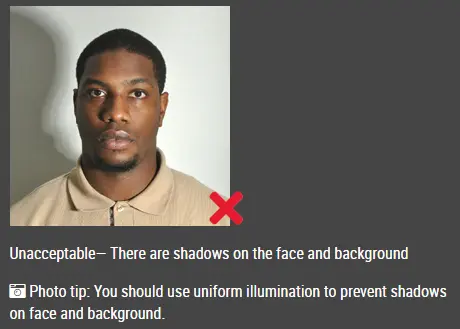
Beim Fotografieren sollten Sie dem Licht zugewandt sein, zum Beispiel einem hellen Fenster oder einer Tür. So entsteht eine gleichmäßige Beleuchtung, die Schatten auf Gesicht und Hintergrund vermeidet. Das Gesicht muss gleichmäßig ausgeleuchtet sein. Es dürfen keine Schatten oder Reflexionen im Gesicht zu sehen sein.

Hinweis: Sie müssen sich keine Gedanken über den Hintergrund machen, da unser Online-Passfotogenerator den Hintergrund automatisch für Sie entfernt oder ändert.

unzulässiges Passfoto


Schritt 3: Kleiden Sie sich richtig für Ihr Passfoto

Tragen Sie keine Uniform. Tragen Sie auf dem Foto normale Alltagskleidung.

Tragen Sie keine Brille. Wenn Sie eine Brille, Sonnenbrille oder getönte Brille tragen, nehmen Sie diese für Ihr Passfoto ab.

Ihr Gesicht muss vollständig sichtbar bleiben. Lassen Sie Ihre Haare nicht über das Gesicht fallen und die Augen verdecken. Wenn Sie sehr lange Pony-Haare haben, die die Augenbrauen bedecken, sollten Sie diese mit Haarklammern zurückstecken. Am besten sind auch die Ohren sichtbar, doch das führt nicht zur Ablehnung des Fotos.

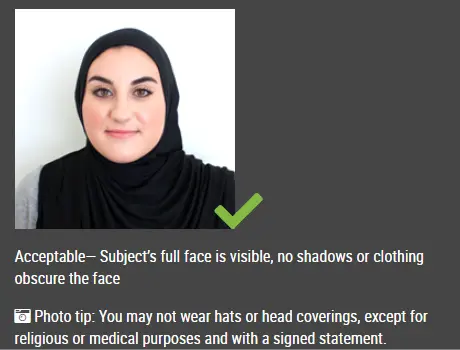
Kopfbedeckungen sind auf Passfotos nicht erlaubt, es sei denn, es handelt sich um religiöse Kopfbedeckungen wie ein Kopftuch oder eine Kippa, die Sie täglich tragen.

akzeptables Passfoto

Schritt 4: Posieren Sie für das Passfoto

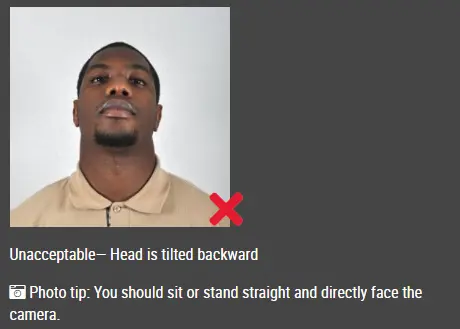
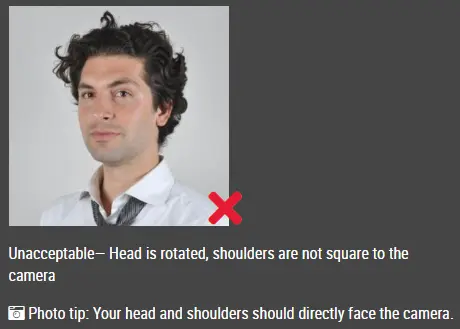
Schauen Sie mit geradem Gesicht direkt in die Kamera. Der Kopf sollte weder geneigt noch gedreht sein.

Beide Ohren müssen sichtbar sein, oder falls die Haare die Ohren bedecken, müssen beide Gesichtsränder sichtbar sein.

Die Schultern sollten sichtbar sein, und um den Kopf herum sollte genügend Platz zum Zuschneiden des Fotos vorhanden sein.

Positionieren Sie die Kamera auf derselben Höhe wie der Kopf.

unzulässiges Passfoto

unzulässiges Passfoto


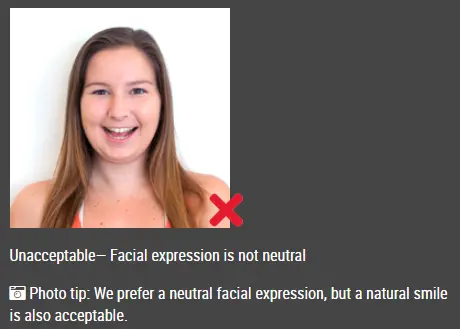
Schritt 5: Haben Sie einen neutralen Gesichtsausdruck

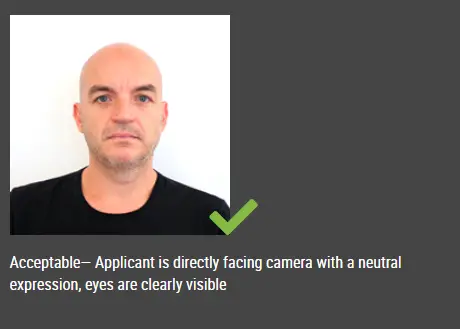
Die Behörden bevorzugen einen neutralen Gesichtsausdruck auf Ihren Passfotos.

Lächeln oder ein geöffneter Mund ist in der Regel nicht zulässig, insbesondere nach den neuen internationalen Passvorschriften.

akzeptables Passfoto

Unzulässiges Passfoto


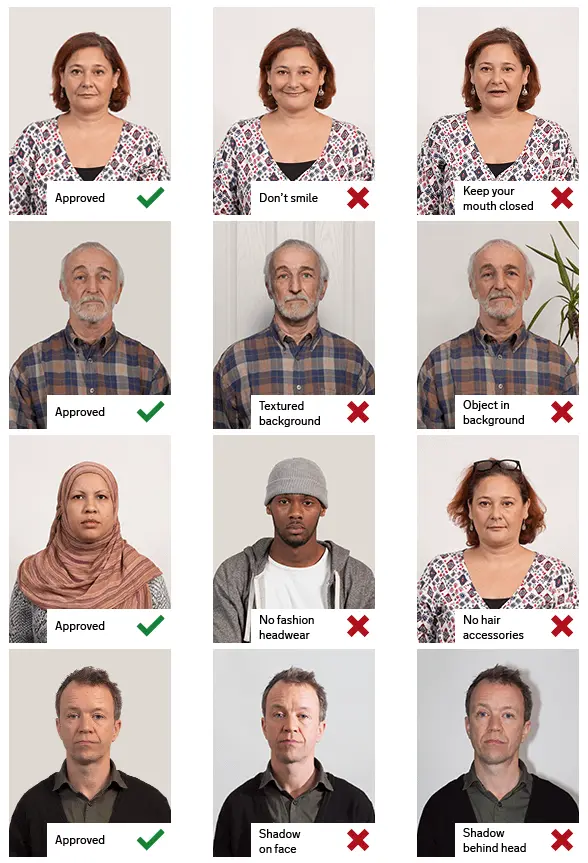
Gute und schlechte Passfotobeispiele

Beispiel für Passfotos

Ausgedruckte Passfotos

Online-Passfotogenerator

Ist dieses Dokument hilfreich?