US Passport Photos Near Me
Last Update: December 28, 2025
To travel internationally, you will need a valid passport. If you wish to apply for a passport, you can submit the application in person at a U.S. Department of State agency or passport acceptance facility, or by mail. You will need to provide proof of citizenship and a photo ID, as well as pay a fee. You should apply well in advance of your intended travel date, as the application process can take several weeks.
A passport photo is as significant as filling out the application form and presenting proof of citizenship and identity. Getting a passport photo near you is convenient and time saving. There might be many places near you that you can take your passport photo, such as the post office, photography studio and drug stores. Our online service is the best choice out of all of these. You can get your passport photos within minutes without leaving your home!
How can I get a United States passport picture at home?
Using a digital camera or smartphone camera, you can take a passport photo at home. Follow the following steps to take your passport photo:
-
Ensure a well-lit area and that the photo is in focus before taking it.
-
Look at the camera straight ahead.
-
Make sure you keep your eyes open and visible.
-
Make sure your hair is not in your face.
-
Take the photo
-
Upload to your photo to www.idphotodiy.com and download both the digital and printable photo
-
Print the photo on a photo quality paper
Important: Don't take a selfie for your passport photo. Have someone take the photo for you.
Where is the best place to take United States passport photos?
When it comes to passport photos, the best place is the one that can take a photo that meets the requirements and pleases you (you are looking your best). You may not have the option of choosing from a variety of shots. Even when you have the choice, you may not get what you want. Therefore, it is wise to snap your passport photo at home. You may take as many shots as you want until you find one you like. Take your photo at home, and upload it to www.idphotodiy.com to generate digital and printable photos that meet the requirement.
Best passport photo
The best passport photo is one that meets the requirements and shows you looking your best. A photo studio may be able to do it. You can also take the best passport photo at home! Take as many shots as you can in a well-lit place and choose the best one! To meet the photo format, use our photo editing service.
USA Digital passport pictures near me
A drug store's photo service can take and print your passport photo. However, they do not offer digital passport photos. To get digital photos, you can go to a photography studio or a photo booth near you. Using your smart photo, you can take your own digital passport photo! You can use your smart photo to take as many shots as you want, then choose the one you like best. Upload your photo to our website, and we will generate a digital and printable version of your photo in seconds!
US Passport photo printing at home
It is possible to print your passport photo at home if you have a colour printer and photo printing paper. We offer passport photos for printing on 4R 4x6" photo paper, which contains six 2x2" US passport photos. Printing exactly on 4x6" photo paper and cutting along the gray borders will provide you with six 2x2" US passport photos.
Requirements for passport photos at nearest photo store
Six-month-old photograph
The photo must be high resolution and not blurry, grainy, or pixelated
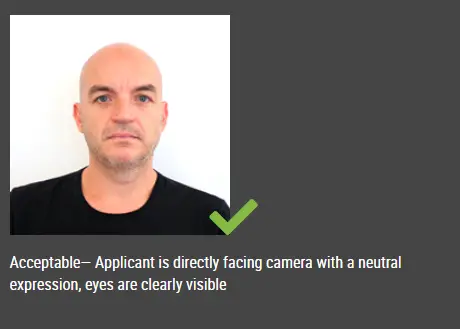
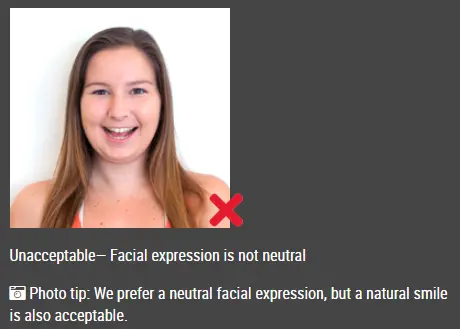
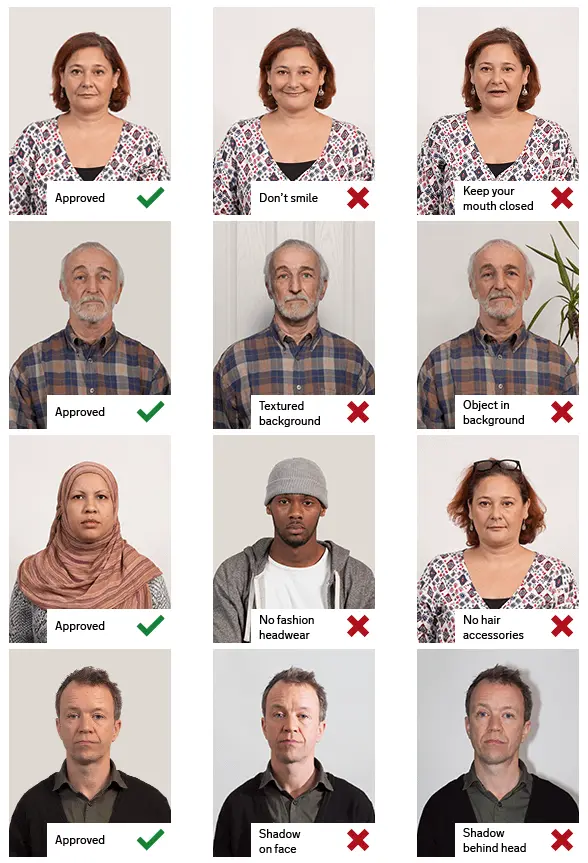
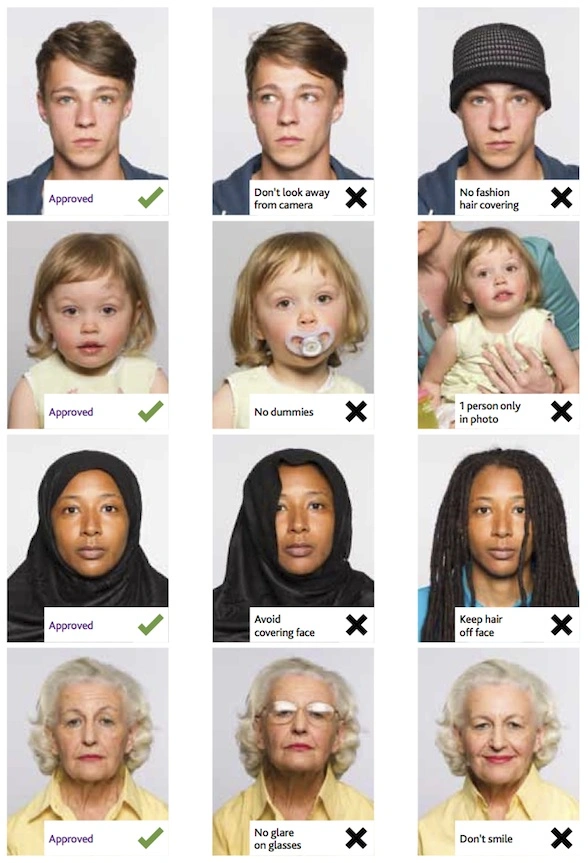
Your facial expression should be neutral or natural, and your eyes must be clearly visible.
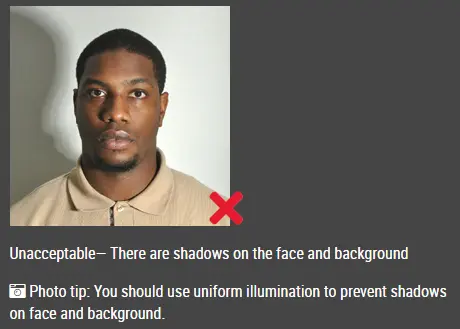
Backgrounds should be white, off-white, or plain and uniform, and shadows should be avoided
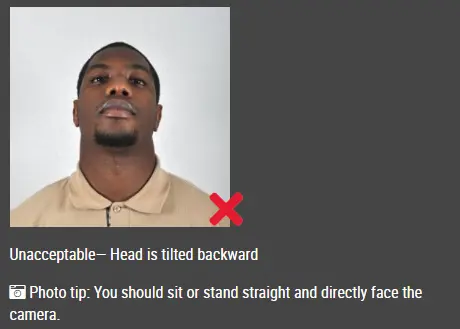
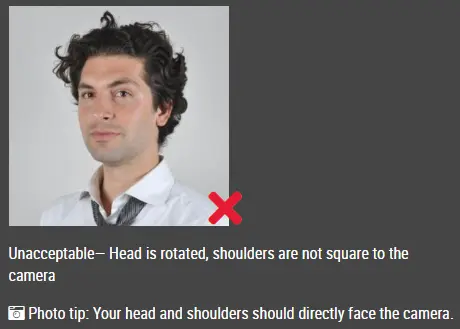
Face the camera straight on so that your entire face can be seen
Ensure the size is
2 x 2 inches (51 x 51 mm)
The height of the head should be 1 -1 3/8 inches (25 - 35 mm) from the bottom of the chin to the top of the head (photos cannot be taken too close up or too far away).
You must know what to wear for a passport photo: wear everyday clothing
Matte or glossy photographs
It is necessary to print in color.
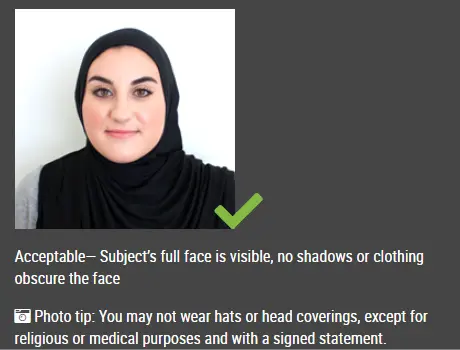
Headphones and devices with hands-free functions, glasses , hats or head coverings should not be worn.
Submit a signed statement that confirms the hat or head covering in your photo is part of recognized, traditional religious clothing that is frequently worn or required in public.
A signed doctor's statement stating that the hat is worn for medical reasons must be submitted if you wear a hat or head covering every day.
Where can I get my passport photo taken?
Passport photos can be taken at the post office, drug stores, photography studios, and photo booths. It can even be taken at home! Using our website, you can download digital photos and printable photos in the right format.
Does UPS take passport photos?
It is convenient to take your passport photo at UPS Store locations. Passport photos can be taken at participating locations.
Does FedEx offer passport photo services?
The FedEx Office provides passport photo service. Although there are thousands of FedEx locations where you can mail packages, there are fewer FedEx Office locations where you can get passport photos. Please contact any of these locations to inquire about this service before you go.
Where can I print passport photo?
-
Print at Home: After you download the printable photo from our website, you may print it at home If you have a good quality printer and photo paper. The passport photo is for printing on 4R 4x6" photo paper. The 4R photo download from our website contains six US passport photos. Just print the photo on 4x6" photo paper and cut the photos along the gray borders, and you'll have six 2x2" US passport photos.
-
In case you don't have a color printer at home, you can order a 4x6" print online:
1) http://photo.walgreens.com/
2) https://www.cvs.com/photo
3) https://photos3.walmart.com/about/prints
4) https://www.costcophotocenter.com/
5) https://www.snapfish.com/
6) https://www.shutterfly.com/
Klicka här för att göra pass-/visumfoton