United States DV lottery Photo Maker

How idPhotoDIY works
Create your passport / visa photos online for printing and online submission

    (Vereisten)
    (Vereisten)
    (Vereisten)
    (Vereisten)
    (Vereisten)
    (Vereisten)
    (Vereisten)
    (Vereisten)


Hoe het werkt

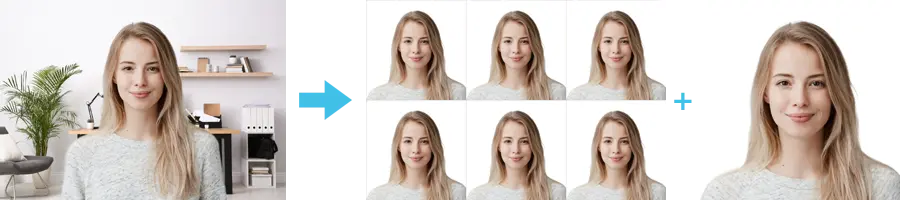
1. Maak een foto

Gebruik een witte muur als achtergrond en maak meerdere foto's met een camera of smartphone

2. Snijd de foto bij

Snijd uw foto bij tot het juiste formaat voor een identiteitsfoto of pasfoto. Meer dan 50 sjablonen beschikbaar!

3. Downloaden en afdrukken

Download uw foto en laat deze afdrukken bij elke fotowinkel of online. Eén digitale foto is ook beschikbaar.

Baby DV lottery photo

Last Update: July 25, 2023

The Baby DV lottery photo is an important requirement for parents who wish to apply for the Diversity Visa Program. This program allows people from countries with low rates of immigration to the United States to apply for a chance to obtain permanent residency.

To apply for the program, parents must submit a recent photo of their child or children who are under the age of 21. The photo must meet certain requirements to be considered valid.

First, the photo must be in color and taken within the last six months. It must be a clear, full-face image of the child with a neutral expression and with both eyes open. The child's head must be centered within the frame and the background must be plain, with no patterns or objects.

The size of the photo must be 600x600 pixels and the file format must be JPEG. The file size must be equal to or less than 240 kB (kilobytes).

It is important to note that photos that do not meet these requirements will not be accepted and could result in the application being rejected.

Therefore, when submitting a Baby DV lottery photo, it is crucial to carefully follow the guidelines to ensure that the photo is valid and the application has the best chance of success.

Tips For Taking photos of babies

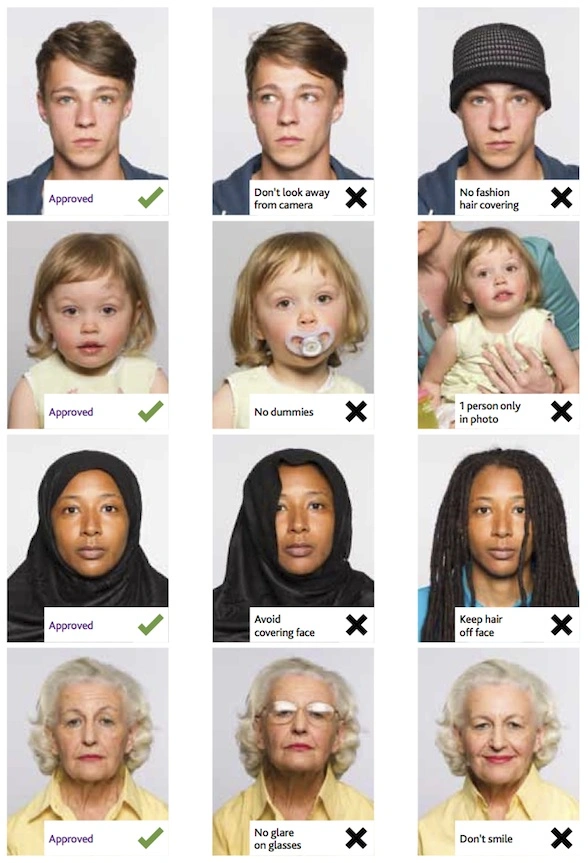
You should not include other people in a photo of your baby or toddler, and your baby should be looking at the camera with his or her eyes open. Below are some tips for taking photos of your baby:


  • Lay your baby on his or her back on a plain white or off-white sheet.By doing this, you will ensure your baby's head is supported and your photo will have a plain background.You should make sure your baby's face is not shadowed, especially if you are taking a picture from above.
  • You can take a picture of your child in the car seat by covering it with a white or off-white sheet.It will also ensure that your baby's head is supported.
  • Use idphotodiy.com to generate your DV lottery photo

Generating a DV Lottery photo that adheres to the strict guidelines can be a daunting task. However, with idphotodiy.com, the process becomes simple and efficient. This user-friendly website ensures compliance with the DV Lottery photo requirements, allowing you to focus on completing your application with confidence. By following the step-by-step guide provided, you can create a professional-quality DV Lottery photo effortlessly.


Klik hier om pasfoto's / visumfoto's te maken
Overige gidsen voor pasfoto's

Hoe maak je in 5 stappen een pasfoto?


Stap 1: Gebruik een digitale camera of smartphone om een foto te maken

Laat iemand anders de foto voor u nemen; een selfie is niet toegestaan voor een pasfotoaanvraag. Gebruik een statief als u er een heeft. Een statief maakt het eenvoudiger om de camera stabiel en waterpas te houden. De afstand tussen de persoon en de camera moet ongeveer 1 meter zijn.


Stap 2: Zoek een plek met goede verlichting

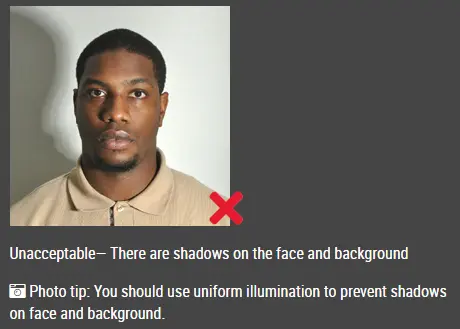
Zorg er bij het maken van de foto voor dat u naar het licht gericht staat, zoals een mooi helder raam of de deur. Dit zorgt voor een gelijkmatige verlichting en voorkomt schaduwen op het gezicht en de achtergrond. Het gezicht moet gelijkmatig verlicht zijn. Er mogen geen schaduwen of lichtreflecties op het gezicht zichtbaar zijn.

Opmerking: U hoeft zich geen zorgen te maken over de achtergrond, want onze online pasfotogenerator verwijdert of verandert de achtergrond automatisch voor u.

onacceptabele pasfoto


Stap 3: Kleed u gepast voor uw pasfoto

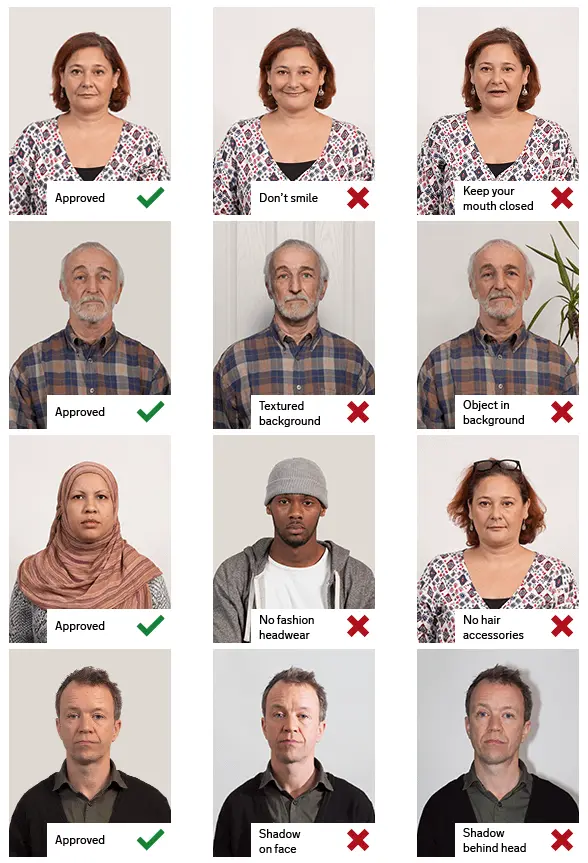
Draag geen uniform. Draag gewone dagelijkse kleding op uw foto.

Draag geen bril. Als u een bril, zonnebril of getinte bril draagt, doe deze dan af voor uw pasfoto.

Uw gezicht moet volledig zichtbaar blijven. Laat uw haar niet over uw gezicht vallen zodat uw ogen bedekt worden. Als u een hele lange pony heeft die uw wenkbrauwen bedekt, moet u deze naar achteren vastzetten met haarspeldjes. Het is het beste als uw oren ook zichtbaar zijn, maar dat zal uw foto niet doen afkeuren.

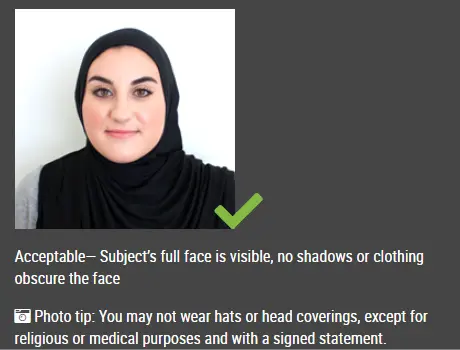
Hoofddeksels zijn niet toegestaan op pasfoto's, tenzij het gaat om religieuze hoofdbedekking, zoals een hoofddoek of keppel, die u dagelijks draagt.

acceptabele pasfoto

Stap 4: Poseer voor de pasfoto

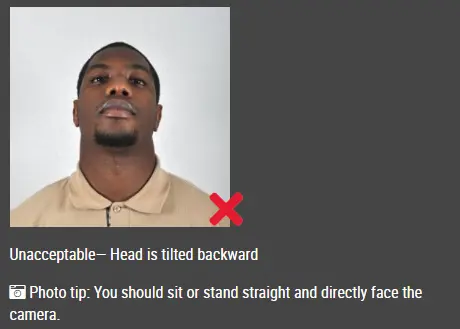
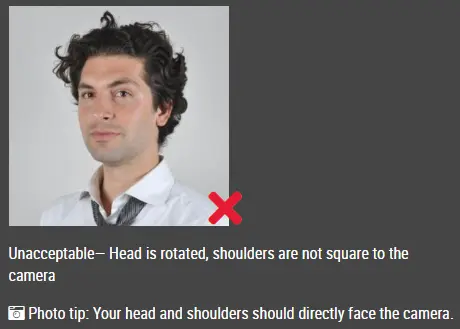
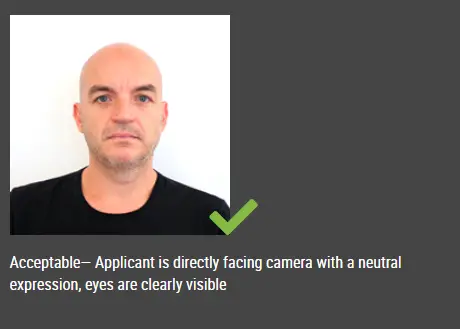
Kijk recht in de camera met uw gezicht recht naar voren. Het hoofd mag niet gekanteld of gedraaid zijn.

Beide oren moeten zichtbaar zijn, of beide randen van het gezicht zichtbaar als het haar de oren bedekt.

De schouders moeten zichtbaar zijn en er moet voldoende ruimte rond het hoofd zijn om de foto bij te snijden.

Plaats de camera op dezelfde hoogte als het hoofd.

onacceptabele pasfoto

onacceptabele pasfoto


Stap 5: Houd een neutrale gezichtsuitdrukking aan

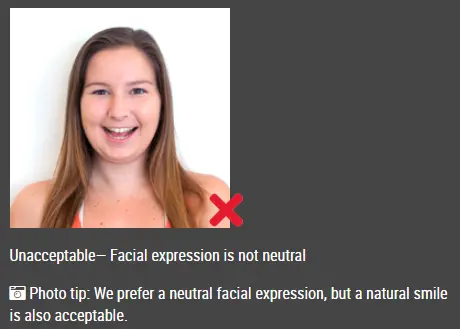
De overheid geeft de voorkeur aan een neutrale gezichtsuitdrukking op uw pasfoto's.

Glimlachen of uw mond open hebben is meestal niet toegestaan, vooral onder de nieuwe internationale paspoortregels.

acceptabele pasfoto

Onacceptabele pasfoto


Goede en slechte pasfotovoorbeelden

Voorbeeld van pasfoto's

Afgedrukte pasfoto's

Online Pasfotogenerator

Is dit document nuttig?