United States Passport Photo Maker

How idPhotoDIY works
Create your passport / visa photos online for printing and online submission

    (Requisiti)
    (Requisiti)
    (Requisiti)
    (Requisiti)
    (Requisiti)
    (Requisiti)
    (Requisiti)
    (Requisiti)


Come funziona

1. Scatta una foto

Usa una parete bianca come sfondo e scatta diverse foto con una fotocamera o uno smartphone

2. Ritaglia la foto

Ritaglia la tua foto nella dimensione corretta per foto identificativa o foto tessera. Oltre 50 modelli disponibili!

3. Scarica e stampa

Scarica la tua foto e stampala in qualsiasi negozio di fotografia o online. È disponibile anche la singola foto digitale.

Walgreens Passport Photo

Last Update: July 18, 2023

Passport photos are available at Walgreens stores. Customers can take their passport photos at selected locations and have them printed on the spot. Also, Walgreens offers a photo upload option and home delivery or store pick-up.

Walgreens passport photo cost

Vsit Walgreens' website and follow the following steps, you can get your passport photo at $0.38!

Step 1: Select a print size of 4x6;

Step 2: Upload the printable passport photo sheet downloaded from our website

Step 3: Pay $0.38 for the order and pick up the print at your nearest Walgreens store. 

Can I take my own passport photo at Walgreens?

Yes, you may go to a Walgreens store near you and have the staff to take the photo for you. Then it takes about an hour before you can pick up your photos. 

Does Walgreens give digital passport photos?

No, Walgreens only take photos and print photos, Walgreens does not provide you with a digital version of your passport photo. If you need a digital photo, you can take a digital photo using your smart photo and have our service generate the correct format for you.

Does Walgreens do 2x2 passport photos?

There are six US passport photo on the 4R photo downloaded from our website. Just order on Walgreens app to print the photo onto 4x6" photo paper and cut the photos along the gray borders when you get the photo, you will get six 2X2 passport photos .

How long do Walgreens passport pictures take?

It takes about one hour before you can pick up your photos.

How much is 2 passport size pictures at Walgreens?

1.You can go to Walgreens store near you and have the staff to take the photo for you, it will cost you $16.99

2. you can take a passport photo with your smart photo and use our service to process it and then print it out for $0.38!

How do I know when my Walgreens photo is ready?

Your order history can be accessed online to check its status. 

How to print your passport photos at Walgreens

There are two ways that you can print your passport photos at Walgreens:

1. Walgreens' app allows you to upload a photo and then print it at the store or have it delivered to your doorstep

2. Use the machine at the store to print your passport photo.

Are Walgreens passport photos free?

You will need a promo code for you get Walgreens passport photos for free. If you use our service to generate a 4X6 photo template and print it at Walgreens, at a cost of $0.38, you can get 6 passport photos.

Walgreens passport photo- business hours

The Walgreens standard business hours is 9am to 9pm.

Walgreens passport photo near me

You may enter your loaction to search for the Walgreens store near you on Walgreens webiste.


Clicca qui per creare foto per passaporto / visto
Altre guide sulle foto tessera

Come scattare una foto per il passaporto in 5 passaggi?


Passo 1: Usa una fotocamera digitale o uno smartphone per scattare una foto

Fate scattare la foto da qualcun altro: i selfie non sono accettati per la domanda di foto passaporto. Se avete un treppiede, usatelo: renderà più facile mantenere la fotocamera stabile e in piano. La distanza della persona dalla fotocamera dovrebbe essere di circa 1 metro.


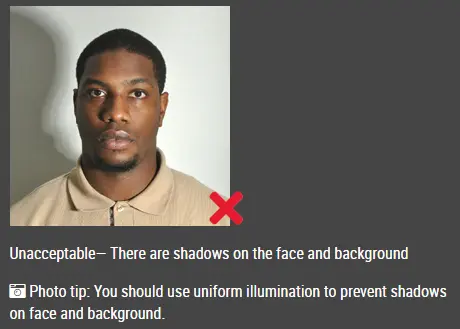
Passo 2: Trova un posto con una buona illuminazione

Quando scattate la foto, dovete rivolgervi verso la luce, ad esempio una finestra luminosa o una porta. Questo garantisce un'illuminazione uniforme, evitando ombre sul viso e sullo sfondo. Il viso deve essere illuminato in modo uniforme. Non ci devono essere ombre né riflessi sul viso.

Nota: Non dovete preoccuparvi dello sfondo: il nostro generatore di foto per passaporto online rimuoverà o cambierà automaticamente lo sfondo per voi.

foto passaporto non accettabile


Passo 3: Vestiti in modo adeguato per la foto del passaporto

Non indossate uniformi. Indossate abiti civili comuni nella foto.

Non indossate occhiali. Se portate occhiali da vista, da sole o lenti colorate, toglieteli per la foto del passaporto.

Il viso deve comunque essere completamente visibile. Non lasciate che i capelli ricadano sul viso coprendo gli occhi. Se avete una frangia molto lunga che copre le sopracciglia, fermatela con delle mollette. È preferibile che si vedano anche le orecchie, ma questo non comporterà il rifiuto della foto.

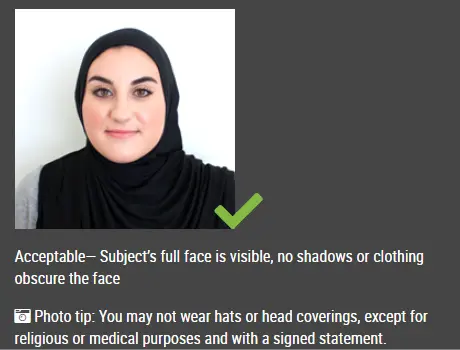
Non è consentito indossare cappelli nelle foto per passaporto, a meno che non si tratti di un copricapo religioso, come un velo o una kippah, indossato ogni giorno.

foto passaporto accettabile

Passo 4: Posa per la foto del passaporto

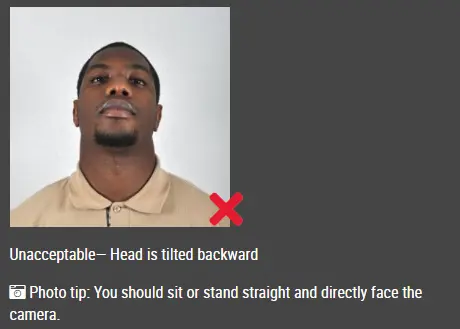
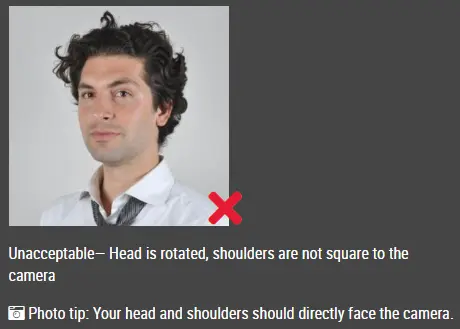
Guardate dritto verso la fotocamera con il viso frontale. La testa non deve essere inclinata né ruotata.

Entrambe le orecchie visibili o entrambi i bordi del viso visibili se i capelli coprono le orecchie.

Le spalle devono essere visibili e ci deve essere spazio sufficiente intorno alla testa per ritagliare la foto.

Posiziona la fotocamera alla stessa altezza della testa.

foto passaporto non accettabile

foto passaporto non accettabile


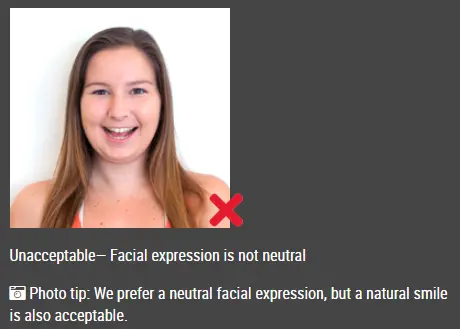
Passo 5: Mantieni un'espressione neutra

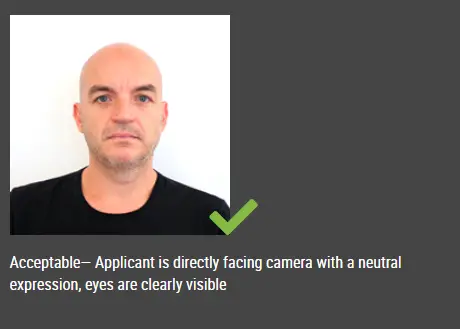
Le autorità preferiscono che abbiate un'espressione neutra nelle foto per il passaporto.

Sorridere o tenere la bocca aperta di solito non è accettabile, soprattutto secondo le nuove norme internazionali sui passaporti.

foto passaporto accettabile

Foto passaporto non accettabile


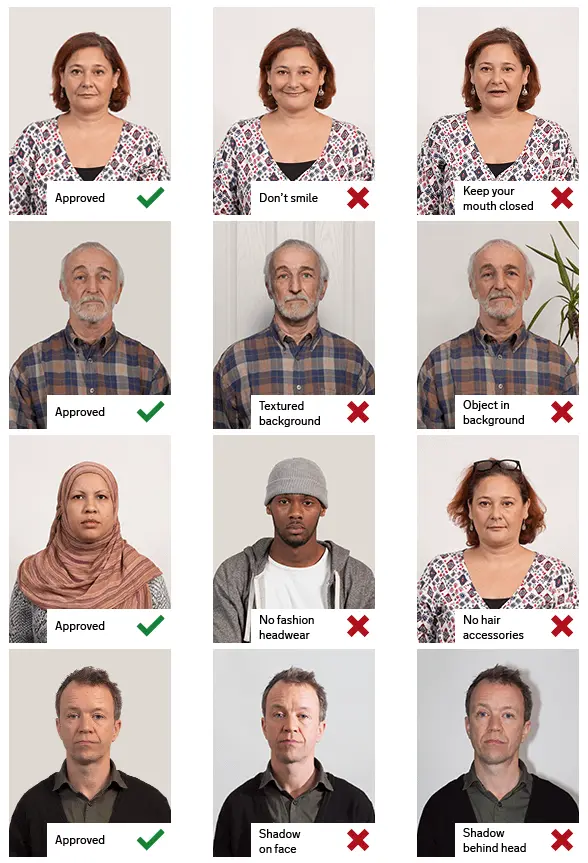
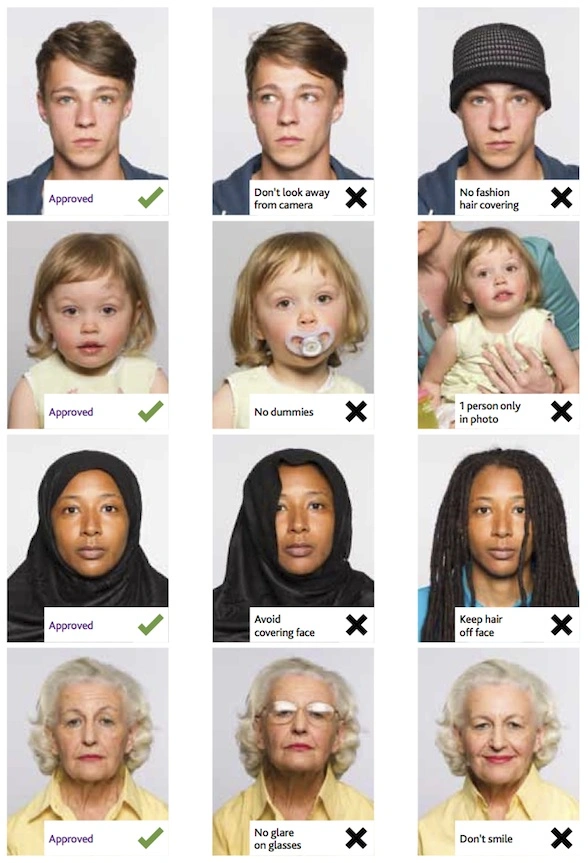
Esempi di foto passaporto giuste e sbagliate

Esempio di foto per passaporto

Foto per passaporto stampate

Generatore di foto per passaporto online

Questo documento è utile?