United States Passport Photo Maker

How idPhotoDIY works
Create your passport / visa photos online for printing and online submission

    (Kröfur)
    (Kröfur)
    (Kröfur)
    (Kröfur)
    (Kröfur)
    (Kröfur)
    (Kröfur)
    (Kröfur)


Hvernig þetta virkar

1. Taktu mynd

Notaðu hvítan vegg sem bakgrunn og taktu nokkrar myndir með myndavél eða snjallsíma

2. Skerðu myndina

Skerðu myndina þína í rétta stærð fyrir skilríkja- eða vegabréfsmynd. Yfir 50 sniðmát í boði!

3. Sæktu og prentaðu

Sæktu myndina þína og prentaðu hana í hvaða myndaverslun sem er eða á netinu. Stök stafræn mynd er einnig í boði.

Walgreens Passport Photo

Last Update: July 18, 2023

Passport photos are available at Walgreens stores. Customers can take their passport photos at selected locations and have them printed on the spot. Also, Walgreens offers a photo upload option and home delivery or store pick-up.

Walgreens passport photo cost

Vsit Walgreens' website and follow the following steps, you can get your passport photo at $0.38!

Step 1: Select a print size of 4x6;

Step 2: Upload the printable passport photo sheet downloaded from our website

Step 3: Pay $0.38 for the order and pick up the print at your nearest Walgreens store. 

Can I take my own passport photo at Walgreens?

Yes, you may go to a Walgreens store near you and have the staff to take the photo for you. Then it takes about an hour before you can pick up your photos. 

Does Walgreens give digital passport photos?

No, Walgreens only take photos and print photos, Walgreens does not provide you with a digital version of your passport photo. If you need a digital photo, you can take a digital photo using your smart photo and have our service generate the correct format for you.

Does Walgreens do 2x2 passport photos?

There are six US passport photo on the 4R photo downloaded from our website. Just order on Walgreens app to print the photo onto 4x6" photo paper and cut the photos along the gray borders when you get the photo, you will get six 2X2 passport photos .

How long do Walgreens passport pictures take?

It takes about one hour before you can pick up your photos.

How much is 2 passport size pictures at Walgreens?

1.You can go to Walgreens store near you and have the staff to take the photo for you, it will cost you $16.99

2. you can take a passport photo with your smart photo and use our service to process it and then print it out for $0.38!

How do I know when my Walgreens photo is ready?

Your order history can be accessed online to check its status. 

How to print your passport photos at Walgreens

There are two ways that you can print your passport photos at Walgreens:

1. Walgreens' app allows you to upload a photo and then print it at the store or have it delivered to your doorstep

2. Use the machine at the store to print your passport photo.

Are Walgreens passport photos free?

You will need a promo code for you get Walgreens passport photos for free. If you use our service to generate a 4X6 photo template and print it at Walgreens, at a cost of $0.38, you can get 6 passport photos.

Walgreens passport photo- business hours

The Walgreens standard business hours is 9am to 9pm.

Walgreens passport photo near me

You may enter your loaction to search for the Walgreens store near you on Walgreens webiste.


Smelltu hér til að útbúa vegabréfs- / vegabréfsáritunarmyndir
Aðrar leiðbeiningar um vegabréfsmyndir

Hvernig á að taka passamynd í 5 skrefum?


Skref 1: Notaðu stafræna myndavél eða snjallsíma til að taka mynd

Fáðu einhvern til að taka myndina fyrir þig, því sjálfsmynd (selfie) er ekki samþykkt fyrir umsókn um passamynd. Ef þú átt þrífót skaltu nota hann. Þrífótur gerir auðveldara að halda myndavélinni stöðugri og í jafnvægi. Fjarlægðin frá manneskjunni að myndavélinni ætti að vera um 1 metri.


Skref 2: Finndu stað með góðri lýsingu

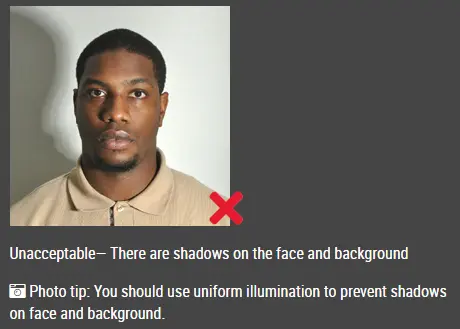
Þegar myndin er tekin ættir þú að snúa að ljósinu, til dæmis björtum glugga eða hurð. Þetta veitir jafna lýsingu og kemur í veg fyrir skugga á andliti og bakgrunni. Andlitið verður að vera jafnt upplýst. Það mega hvorki vera skuggar né glampi á andlitinu.

Athugið: Þú þarft ekki að hafa áhyggjur af bakgrunninum þar sem passamyndagerð okkar á netinu fjarlægir eða breytir bakgrunninum sjálfkrafa fyrir þig.

ósamþykkt passamynd


Skref 3: Klæddu þig rétt fyrir passamyndina

Ekki klæðast einkennisbúningi. Klæðstu venjulegum hversdagsfötum á myndinni.

Ekki nota gleraugu. Ef þú notar gleraugu, sólgleraugu eða lituð gleraugu skaltu taka þau af fyrir passamyndina.

Andlit þitt verður samt að vera fullkomlega sýnilegt. Ekki láta hárið hylja andlitið og hindra sýn í augun. Ef þú ert með mjög sítt topphár sem hylur augabrúnirnar ættir þú að festa það aftur með hárspennum. Best er ef eyrun sjást líka, en það veldur því ekki að myndinni verði hafnað.

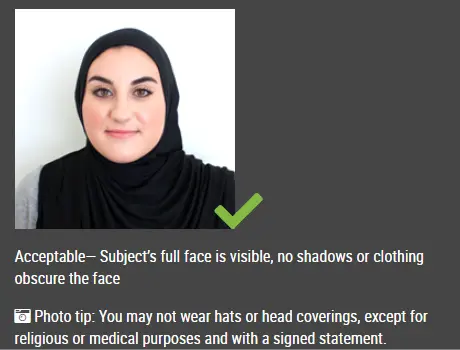
Höfuðföt eru ekki leyfð á passamyndum nema um sé að ræða trúarlegan höfuðbúnað, svo sem höfuðklút eða kollhúfu (yarmulke), sem þú notar á hverjum degi.

samþykkt passamynd

Skref 4: Stilltu þér upp fyrir passamynd

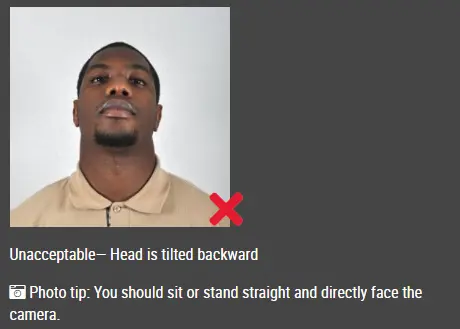
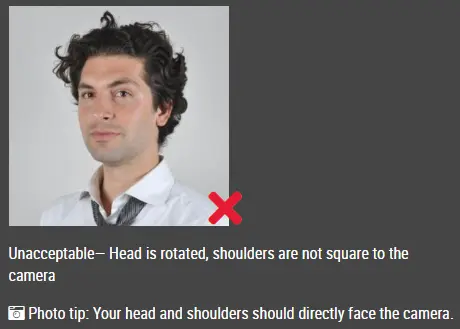
Horfðu beint í myndavélina með andlitið beint fram. Höfuðið ætti hvorki að vera hallað né snúið.

Bæði eyrun sjáist eða báðar brúnir andlitsins séu sýnilegar ef hár hylur eyrun.

Axlir eiga að sjást og nóg pláss á að vera í kringum höfuðið svo hægt sé að skera myndina til.

Staðsettu myndavélina í sömu hæð og höfuðið.

ósamþykkt passamynd

ósamþykkt passamynd


Skref 5: Hafðu hlutlaust svipbrigði

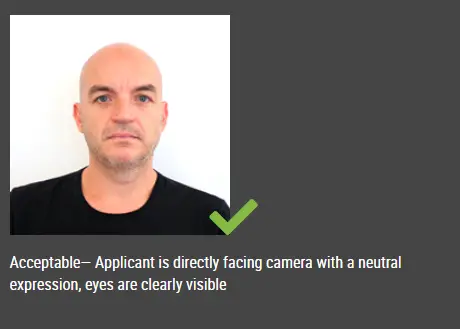
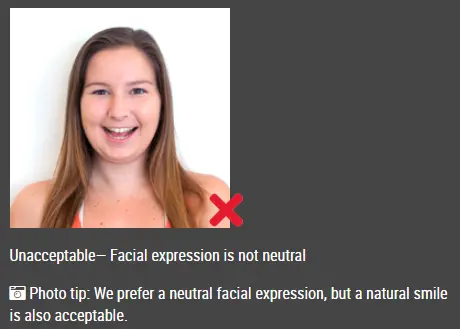
Stjórnvöld vilja helst að þú sért með hlutlaust svipbrigði á passamyndum þínum.

Það er yfirleitt ekki samþykkt að brosa eða hafa munninn opinn, sérstaklega samkvæmt nýjum alþjóðlegum vegabréfsreglum.

samþykkt passamynd

Ósamþykkt passamynd


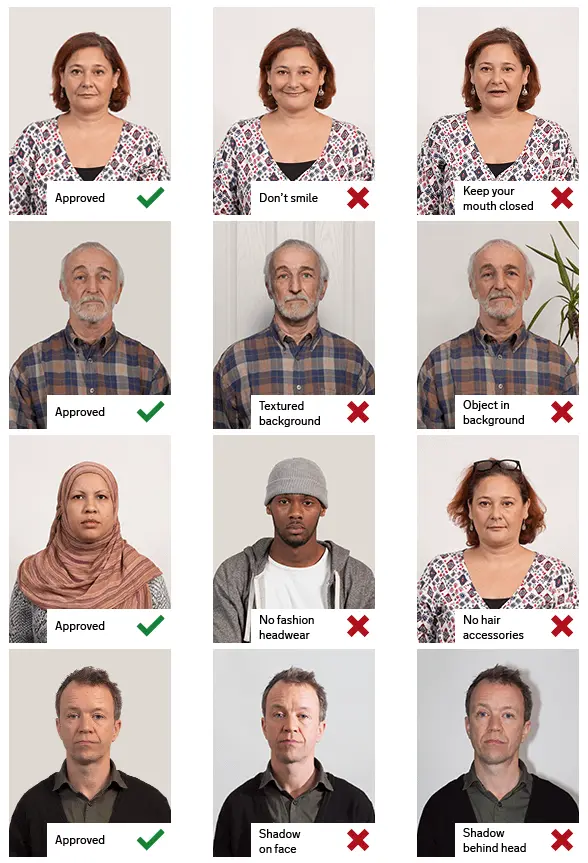
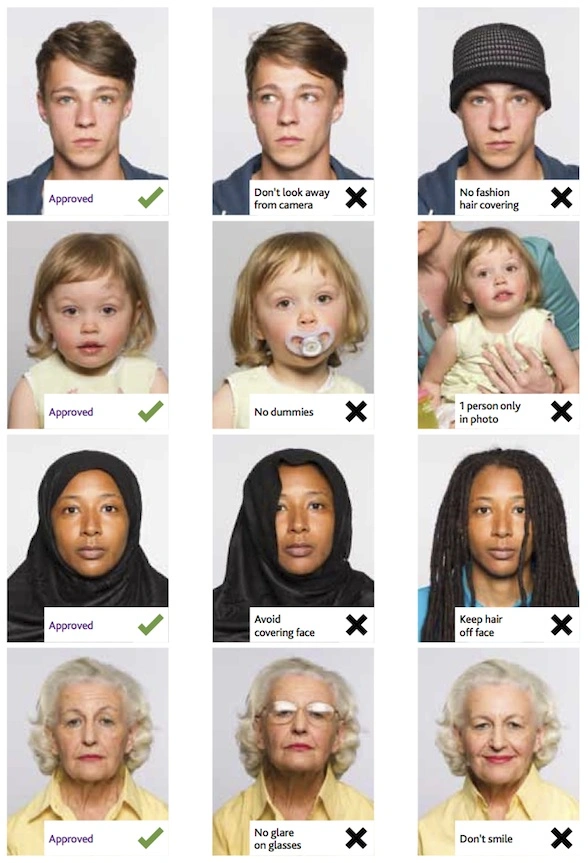
Dæmi um góðar og slæmar passamyndir

Dæmi um passamyndir

Prentaðar passamyndir

Passamyndagerð á netinu

Er þetta skjal gagnlegt?